Dinoustech Private Limited
School Management Software Development: How to Build a School ERP with Parent and Teacher Apps
School management software development helps schools replace paper registers, scattered spreadsheets and separate apps with one connected system for admissions, attendance, fees, timetables, exams, communication and reports. Ready-made school ERPs work for some schools, but many school groups, international schools and education startups need custom software that fits their own processes, curriculum, languages and integrations.
This guide explains what school management software does, the modules it needs, the development process, tech stack, AI features, data protection, cost factors and timelines. For all our education solutions, see education app development.
Key Takeaways
- School management software connects admins, teachers, parents and students in one platform.
- Core modules are admissions, student records, attendance, timetable, fees, exams and report cards, communication and transport.
- Parent and teacher mobile apps drive adoption more than any other feature.
- AI can help with attendance insights, report comments, timetable planning and parent support, with staff in control.
- A focused MVP takes about 3 to 5 months; a multi-campus ERP with apps takes longer.
Table of Contents
- What Is School Management Software?
- Custom vs Off-the-Shelf
- Core Modules
- Apps for Each User
- Development Process
- Tech Stack
- How Dinoustech Uses AI
- Data Protection and Safety
- Cost Factors
- Timeline
- Challenges
- Designing a Parent App Families Actually Use
- Common Integrations
- Why Dinoustech
What Is School Management Software?
School management software (also called a school ERP or school management system) is a platform that runs the daily operations of a school. It stores student and staff data, manages academic work and finances, and keeps parents informed. A good system saves teachers time, reduces errors in fees and results, and gives leaders a clear view of the whole school.
It is different from a learning management system, which focuses on courses and learning content. Many schools use both together. Our guide to custom LMS development covers the learning side.
Custom vs Off-the-Shelf School Software
| Factor | Off-the-shelf ERP | Custom software |
|---|---|---|
| Start time | Fast | A few months |
| Fit to your process | You adapt to the software | Software fits your process |
| Branding | Limited | Full branding on web and apps |
| Integrations | Limited to supported tools | Any system with an API |
| Long-term cost | Per-student fees grow every year | Upfront build plus maintenance |
| Data ownership | Vendor hosted | You own the code and data |
Custom software makes most sense for school chains, international schools, coaching groups and edtech companies selling to schools.
Core Modules
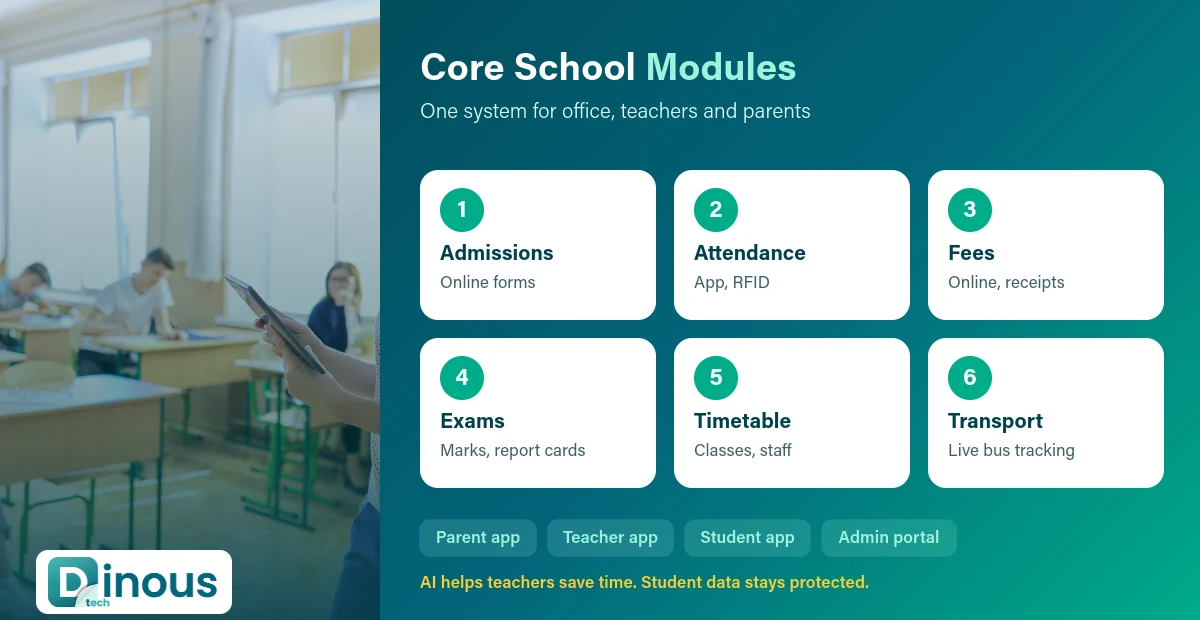
- Admissions: online enquiry, application forms, document upload, entrance test scheduling and admission status.
- Student information: profiles, guardians, medical notes, documents and history.
- Attendance: class-wise or period-wise attendance on mobile, with instant alerts to parents.
- Timetable: class and teacher timetables, substitutions and room planning.
- Fees and finance: fee structures, online payments, receipts, reminders, concessions and reports.
- Exams and report cards: grading schemes, marks entry, report card generation and analytics. For online exams, see online exam proctoring software.
- Homework and assignments: set, submit and grade work.
- Communication: announcements, circulars, chat and notifications.
- Transport: routes, bus tracking and pickup alerts.
- Library, inventory and HR: books, assets, staff records, leave and payroll links. See our post on digital library apps.
- Reports and dashboards: attendance trends, fee collection, results and staff workload.
Apps for Each User
- Admin web portal: full control of all modules, settings and reports.
- Teacher app: attendance, homework, marks entry, timetable and messages.
- Parent app: attendance alerts, fees, results, homework, bus tracking and messages.
- Student app: timetable, assignments, results and learning content.
- Management dashboard: multi-campus view for school groups.
School Management Software Development Process
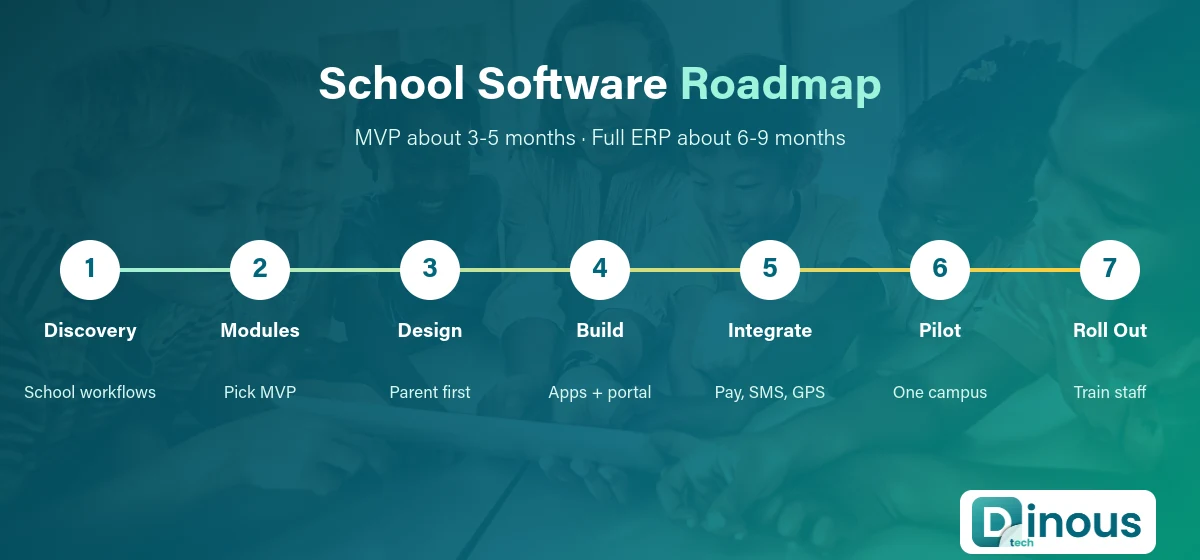
- Discovery: visit or interview admins, teachers and parents; map current processes and pain points.
- Prioritise modules: choose which modules go into the first release.
- Design: simple, fast screens; teachers must take attendance in seconds.
- Build: backend, admin portal and apps in sprints with demos.
- Data migration: import students, staff and fee data from spreadsheets or old systems.
- Training and pilot: start with one campus or grade, then roll out.
- Support: regular updates for new academic years, fee changes and features.
Tech Stack
| Layer | Common choices |
|---|---|
| Parent, teacher and student apps | Flutter or React Native |
| Admin portal | React or Angular |
| Backend | Node.js, Laravel, Java or Python |
| Database | PostgreSQL or MySQL |
| Payments | Stripe, Razorpay, PayPal or local gateways |
| Notifications | Firebase, SMS and WhatsApp business APIs |
| Hosting | AWS, Azure or Google Cloud |
How Dinoustech Uses AI in School Software
AI-assisted development: AI tools help our developers with routine code, tests and documentation, so schools get features faster.
AI features in the platform:
- Early alerts for students with falling attendance or marks, so teachers can step in
- Draft report card comments that teachers review and edit
- Timetable suggestions that respect teacher and room limits
- Smart fee reminders and collection insights
- Learning support through an AI tutor integration
AI support agent: a parent help assistant answers common questions about fees, holidays and timetables in multiple languages, and passes complex issues to the school office.
Data Protection and Safety
Schools hold sensitive data about children. Your software should use role-based access, encryption, audit logs, secure parent verification, consent for photos and data sharing, and data retention rules. Depending on your country, laws such as GDPR, FERPA in the USA or the DPDP Act in India may apply. This is general information, not legal advice; check local requirements with a lawyer.
Cost Factors
- Number of modules in the first release
- Number of apps (parent, teacher, student, driver)
- Single school or multi-campus support
- Custom grading schemes and report card formats
- Integrations: payments, SMS, biometric attendance, accounting, LMS
- Data migration and training
- AI features
See our education app development cost guide and try the app cost calculator for a quick estimate.
Timeline
| Scope | Typical time |
|---|---|
| MVP: students, attendance, fees, communication, parent app | About 3 to 5 months |
| Full ERP: all modules, teacher and student apps, transport | About 6 to 9 months |
| Multi-campus with integrations and AI | About 9 to 12 months |
Plan launches around the academic calendar, ideally before a new term starts.
Challenges
- Teacher adoption: the app must be faster than paper.
- Messy old data that needs cleaning before migration.
- Different fee and grading rules across campuses.
- Peak loads on result days and fee deadlines.
- Keeping parents engaged without sending too many notifications.
Designing a Parent App Families Actually Use
The parent app is often the most-used part of school software and the one families judge the school by. A few design choices make a big difference:
- One home screen: today's attendance, homework, upcoming fees and latest notices in one view.
- Multiple children: easy switching for parents with more than one child in the school.
- Language options: notices and app text in the languages families speak at home.
- Fewer, better notifications: group less urgent updates into a daily summary.
- Quick payments: pay fees in a few taps with saved methods and instant receipts.
- Two-way messages: structured messages to class teachers with office hours, so teachers are not overwhelmed.
- Accessibility: large text options and simple navigation for all parents.
Common Integrations
School software rarely works alone. Plan these integrations early:
| Integration | Why it matters |
|---|---|
| Payment gateway | Online fee collection, receipts and reconciliation |
| SMS, email and WhatsApp business APIs | Reach parents who do not open the app |
| Biometric or RFID attendance | Automatic attendance for students and staff |
| GPS devices on buses | Live bus tracking and pickup alerts |
| Accounting software | Fee and expense data flows into the books |
| LMS or video classes | Learning content linked to timetables and homework |
| Government or board portals | Exporting data in required formats where needed |
Why Choose Dinoustech?
Dinoustech is a software development company in Jaipur, India, with a team that has 7+ years of experience and 450+ projects delivered. We build education platforms including school software, LMS, language learning apps and tutoring apps for clients worldwide.
- Discovery with real users before design
- Cross-platform parent and teacher apps
- Secure handling of student data
- Training, migration and support every academic year
See our portfolio or contact us to plan your school management software.