Dinoustech Private Limited
Online Exam and Proctoring Software Development: How to Build a Secure Assessment Platform with AI Proctoring
Online exam and proctoring software development means building a platform where institutions can create tests, deliver them securely online, monitor candidates with live or AI-assisted proctoring, grade answers and publish results, all with strong privacy and fairness controls. Schools, universities, certification bodies, coaching institutes and employers use these platforms to run assessments at scale without exam halls. This guide explains how online exam software works, the proctoring options, key features, AI capabilities, privacy and accessibility rules, the build process, tech stack, cost factors and timelines.
Key Takeaways
- An online exam platform has three parts: test creation, secure delivery, and grading with results and analytics.
- Proctoring can be live (a human watches), recorded (reviewed later) or AI-assisted (software flags events for human review).
- AI should flag possible issues, not decide that someone cheated. Human review keeps the process fair.
- Privacy, consent, data retention and accessibility must be designed in, especially for webcam, audio and screen monitoring.
- Good question design, randomisation and open-book formats reduce cheating as much as monitoring does.
- Cost depends on question types, proctoring mode, scale, integrations with LMS and student systems, and the number of platforms.
Table of Contents
- What Is Online Exam and Proctoring Software?
- Who Needs It
- How an Online Exam Platform Works
- Types of Proctoring
- Key Features
- Designing Cheat-Resistant Exams
- Step-by-Step Development Process
- Recommended Tech Stack
- How Dinoustech Uses AI
- Privacy, Fairness and Accessibility
- Business Models
- Cost Factors
- Development Timeline
- Challenges and Solutions
- Why Choose Dinoustech
What Is Online Exam and Proctoring Software?
Online exam software lets educators and testing organisations build question banks, assemble tests, schedule them and deliver them to candidates on a computer or mobile device. Proctoring software adds supervision: it checks the candidate's identity and watches for behaviour that may break exam rules, using a mix of webcam, microphone, screen monitoring, browser restrictions and human proctors.
Together, they replace or extend traditional exam halls. Results are graded automatically for objective questions and by examiners for written answers, and detailed analytics show how candidates and questions performed.
Who Needs Online Exam Software?
- Schools and universities: midterms, finals, entrance tests and continuous assessment, often linked to their LMS. See our guide to custom LMS development.
- Certification and licensing bodies: professional exams that need strong identity checks and secure delivery.
- Coaching and test-prep companies: mock tests, practice exams and rank lists at scale.
- Employers and recruiters: skills assessments and pre-employment tests.
- Corporate training teams: compliance and training assessments.
How an Online Exam Platform Works
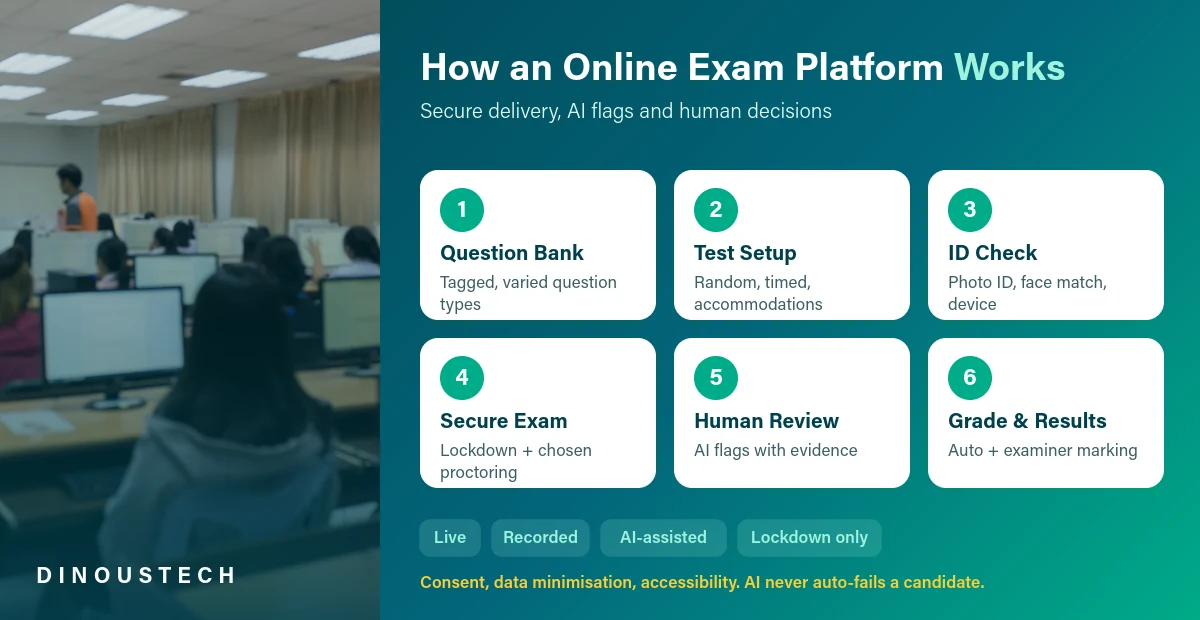
- Question bank: examiners create questions with tags for topic, difficulty and learning outcomes.
- Test setup: tests are assembled with rules for randomisation, timing, sections, attempts and accommodations.
- System and identity check: candidates test their device, camera and connection, then verify identity with a photo ID and a face match.
- Secure exam: the exam runs in a restricted browser or app, with the chosen proctoring mode.
- Review: AI flags possible issues with timestamps and evidence, and trained reviewers decide what action, if any, is needed.
- Grading and results: objective questions are auto-graded, written answers go to examiners, and results and analytics are published.
Types of Proctoring
1. Live Online Proctoring
A trained proctor watches a small group of candidates in real time by video and can intervene. It offers high security but costs more and needs scheduling.
2. Recorded Proctoring
Webcam, audio and screen are recorded during the exam and reviewed afterwards, often with AI highlights to speed up review.
3. AI-Assisted Proctoring
Software monitors in real time and flags events such as another face in view, the candidate leaving the frame, voices, or switching windows. Humans review the flags before any decision.
4. Browser Lockdown Only
A secure browser or app blocks other apps, copy and paste, and screenshots, without camera monitoring. It suits low-stakes quizzes.
5. Hybrid and Test Centre Models
Some programmes mix remote exams with supervised test centres, using the same platform for both.
Key Features of Online Exam and Proctoring Software
Examiner and Admin Features
- Question bank with many question types: multiple choice, multi-select, numeric, short answer, essay, coding, file upload and audio or video response
- Rich editor for maths, chemistry and diagrams
- Randomised question and option order, question pools and parallel test forms
- Scheduling, time windows, time zones and attempts
- Accommodations such as extra time, breaks and screen reader support
- Proctoring settings per exam and a review dashboard for flagged sessions
- Rubric-based marking, double marking and moderation
- Results, rank lists, certificates and item analysis
Candidate Features
- Simple registration, booking and reminders
- Device and connection check before the exam
- Clear instructions, practice tests and countdown timer
- Auto-save of answers and recovery after disconnection
- Flag-for-review and question navigator
- Results, feedback and certificates
Security Features
- ID verification and face matching
- Secure browser or app with lockdown options
- Webcam, audio and screen monitoring, depending on the exam
- Encrypted question delivery and watermarking to deter leaks
- Audit logs for every action
To make tests more engaging for practice, read our post on gamification in eLearning.
Designing Cheat-Resistant Online Exams
Monitoring is only one part of exam integrity. The way tests are designed often matters more, and it is kinder to honest candidates. Good platforms make these practices easy:
- Large question pools: each candidate gets a different set of questions of similar difficulty.
- Randomised order: questions and answer options appear in a different order for each person.
- Parameterised questions: numbers in maths or science questions change per candidate, so answers cannot simply be shared.
- Application-based questions: case studies, scenarios and short explanations test understanding, which is harder to copy than facts.
- Open-book formats: for some subjects, allowing notes and focusing on reasoning removes much of the reason to cheat.
- Sensible time limits: enough time to think, but not enough to research every answer.
- Practice tests: candidates who know the format feel less stressed and make fewer mistakes.
Combining good design with the lightest proctoring level that fits the stakes gives the best balance of security, cost and candidate experience. For the wider feature set of learning platforms, see essential features every education app needs and our guide to online tutoring app development.
Step-by-Step Development Process
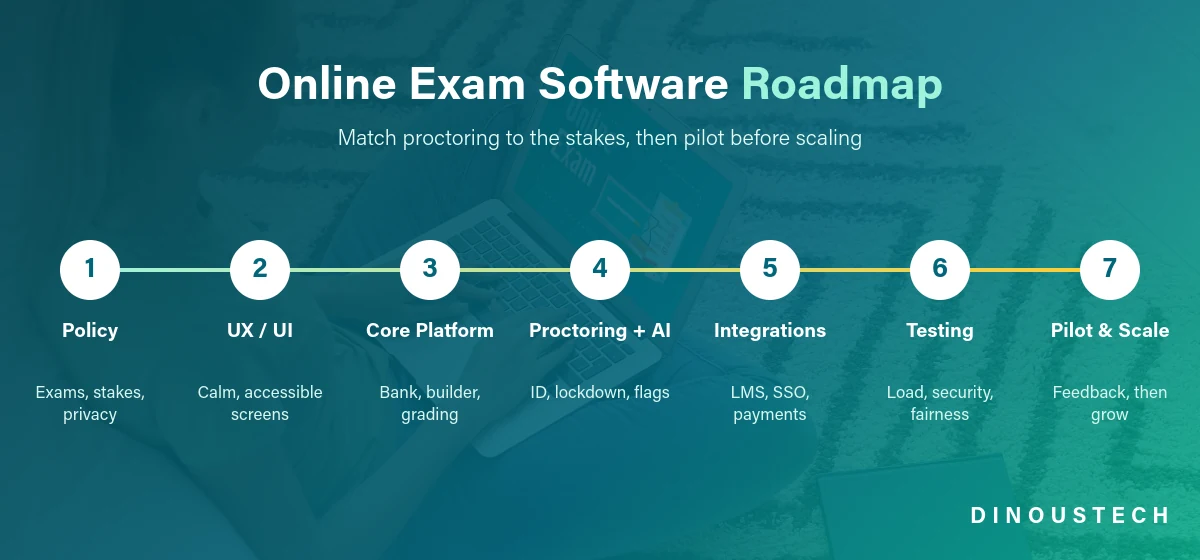
Step 1: Assessment Policy and Requirements
We work with you to define exam types, stakes, proctoring levels, accommodations, privacy rules and integrations.
Step 2: UX and UI Design
We design calm, distraction-free exam screens, accessible layouts and efficient tools for examiners and reviewers.
Step 3: Build the Core Platform
We build the question bank, test builder, delivery engine, grading, results and admin modules.
Step 4: Proctoring and AI
We add identity verification, secure browser or app, recording and AI flagging, with a human review workflow.
Step 5: Integrations
We connect your LMS (for example through LTI), student information system, single sign-on, payments and video services.
Step 6: Load, Security and Fairness Testing
We test peak loads for exam days, security of question delivery, accessibility, and AI flag accuracy across different candidates and conditions.
Step 7: Pilot and Scale
We run a pilot exam, collect candidate and examiner feedback, and scale to more exams and users.
Recommended Tech Stack
| Layer | Options |
|---|---|
| Web app | React or Next.js, with a secure exam mode |
| Desktop lockdown app | Electron or native apps for Windows and macOS |
| Mobile apps | Flutter or React Native for practice tests and low-stakes exams |
| Backend | Node.js, Python (Django or FastAPI) or Java with REST APIs and WebSockets |
| Database | PostgreSQL, Redis for sessions and timers |
| Video and media | WebRTC, media servers, encrypted cloud storage with retention rules |
| AI and vision | Face detection and matching, gaze and object detection models, audio event detection |
| Integrations | LTI 1.3, SAML or OpenID Connect SSO, payment gateways |
| Cloud | AWS, Google Cloud or Azure with autoscaling and CDN |
How Dinoustech Uses AI in Assessment Projects
AI-Assisted Development
Our developers use AI coding assistants for routine work such as API boilerplate, tests and documentation, with every change reviewed by an engineer.
AI Features Inside the Platform
- Proctoring flags: detection of multiple faces, absence, phone-like objects, voices and window switching, with confidence scores for human review.
- Question generation: AI drafts questions and distractors from course material for examiners to edit and approve.
- Assisted marking: suggested scores and feedback for short answers and essays based on rubrics, with examiners making the final decision.
- Item analysis: spotting questions that are too easy, too hard or confusing.
- Integrity signals: unusual answer similarity or timing patterns across candidates.
AI Support Agent
A support assistant can help candidates with device checks, booking and exam-day questions, and help examiners with platform settings, passing urgent issues to the live support team. See also our guide to AI tutor app development.
Privacy, Fairness and Accessibility
- Consent and transparency: tell candidates exactly what is monitored, why, who can see it and how long it is kept.
- Data protection: laws such as GDPR in Europe, FERPA for student records in the US and other national laws apply. Face data can be biometric data under some laws, which needs extra care.
- Data minimisation: collect only what each exam needs and delete recordings on a set schedule.
- Fairness: test AI flags across skin tones, lighting, disabilities and devices, and never auto-fail candidates based on AI alone.
- Accessibility: follow WCAG guidelines and support accommodations such as extra time and assistive technology.
This is general information, not legal advice. Please confirm your obligations with legal and data protection experts in each market.
Business Models
- Per-exam or per-candidate fees: common for certification and recruitment tests.
- Institution subscriptions: annual licences for schools and universities.
- Tiered proctoring: different prices for lockdown, AI-assisted, recorded and live proctoring.
- Test-prep marketplace: paid mock test series for students.
- White-label licensing: branded platforms for coaching institutes and training companies.
Online Exam Software Development Cost Factors
- Question types and editors: basic objective questions or advanced types like coding and maths.
- Proctoring mode: lockdown only, AI-assisted, recorded or live.
- Scale: number of concurrent candidates on peak exam days.
- Platforms: web, desktop lockdown app and mobile apps.
- Integrations: LMS, student systems, SSO and payments.
- AI features: question generation, assisted marking and analytics.
For general budgets, see our post on education app development cost.
Development Timeline
| Scope | What It Includes | Typical Timeline |
|---|---|---|
| MVP | Question bank, test builder, web delivery with lockdown, auto-grading, results | 10-14 weeks |
| Proctored platform | ID checks, recorded and AI-assisted proctoring, review dashboard, LMS integration | 4-6 months |
| Enterprise assessment suite | Live proctoring, desktop app, advanced question types, AI marking, multi-tenant setup | 6-10 months or more |
Challenges and Solutions
- False flags: confidence thresholds, clear evidence clips and human review before any action.
- Exam-day traffic spikes: load testing, autoscaling and staggered start times.
- Poor internet: auto-save, offline buffering and reconnection without losing time.
- Question leaks: large question pools, randomisation and watermarking.
- Candidate anxiety: practice tests, clear rules and friendly support.
Why Choose Dinoustech for Online Exam Software Development
Dinoustech is a software development company based in Jaipur, India, building software for clients in India and around the world. Our education app development team builds LMS platforms, tutoring apps and assessment tools.
- Experience with LMS, quizzes and learning apps
- Video, AI and computer vision integration
- Privacy-first and accessible design
- Developers available for calls in US, UK, EU and Middle East time zones
- Support for high-traffic exam days
See examples of our work in our portfolio.
Build Your Online Exam Platform With Dinoustech
Whether you need secure online exams for a university, a certification programme or a test-prep business, we can help you plan the assessment design, proctoring and integrations, and build it end to end. Contact Dinoustech today for a free consultation.