Dinoustech Private Limited
How Long Does It Take to Build an App? Real Timelines by App Type
How long does it take to build an app? For most business apps, the honest answer is about 3 to 9 months from idea to launch. A simple MVP with a few screens can go live in 6 to 12 weeks. A complex platform with several user roles, payments, real-time features and integrations usually takes 6 to 12 months or more. The exact time depends on scope, the number of platforms, integrations, compliance needs and how quickly decisions are made on your side.
This guide gives realistic timelines by app type and by phase, explains what makes projects slow down, and shows practical ways to launch sooner without cutting quality. For a quick estimate of both cost and time for your own feature list, try our free app cost calculator.
Key Takeaways
- Simple MVP: about 6 to 12 weeks. Medium app: about 3 to 6 months. Complex platform: about 6 to 12 months or more.
- Development is usually only 50 to 60 percent of the schedule; discovery, design, testing and store review take the rest.
- The biggest time drivers are the number of user roles, integrations, real-time features and compliance.
- Slow feedback and changing scope delay more projects than slow coding does.
- Launching a focused MVP first, then adding features in short releases, is the fastest way to reach real users.
Table of Contents
- The Short Answer
- App Development Timeline by App Type
- Timeline by Phase
- What Decides How Long Your App Takes
- Does Team Setup Change the Timeline?
- Example Timelines
- Common Causes of Delay
- How to Build Your App Faster
- How Dinoustech Uses AI to Save Time
- After Launch: Timelines Do Not Stop
- How to Plan Your Own Timeline
- Why Dinoustech
The Short Answer
| App complexity | What it usually includes | Typical time to launch |
|---|---|---|
| Simple / MVP | One user role, 8 to 15 screens, login, basic admin, one or two integrations | 6 to 12 weeks |
| Medium | Two or three user roles, payments, chat or notifications, admin dashboard, several integrations | 3 to 6 months |
| Complex | Multiple apps and panels, real-time tracking or video, marketplace logic, AI features, strict compliance | 6 to 12 months or more |
These ranges assume a dedicated team and quick decisions. They also assume cross-platform development for Android and iOS. Building two separate native apps can add time.
App Development Timeline by App Type
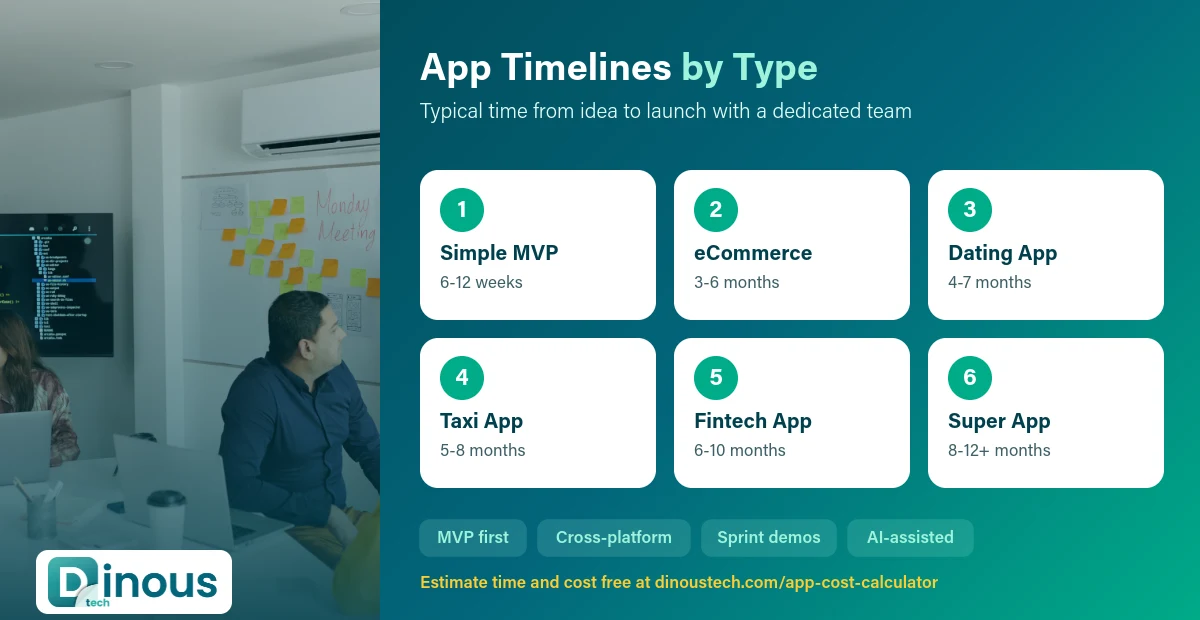
| App type | MVP | Full product | Why it takes this long |
|---|---|---|---|
| Business or booking app | 6 to 10 weeks | 3 to 5 months | Calendars, payments, reminders, admin panel |
| eCommerce app | 8 to 12 weeks | 4 to 6 months | Catalogue, cart, payments, orders, delivery, offers |
| Education / e-learning app | 8 to 12 weeks | 4 to 6 months | Video, quizzes, progress tracking, live classes |
| Dating app | 10 to 14 weeks | 4 to 7 months | Matching, chat, safety and verification, subscriptions |
| Taxi or delivery app | 12 to 16 weeks | 5 to 8 months | Three or more apps, live tracking, dispatch, payouts |
| Healthcare app | 12 to 16 weeks | 6 to 10 months | Telemedicine, records, HIPAA or GDPR work, integrations |
| Fintech app | 12 to 16 weeks | 6 to 10 months | KYC, banking APIs, security reviews, compliance |
| Marketplace or super app | 14 to 20 weeks | 8 to 12+ months | Many user roles, vendor tools, complex payments |
| AI-powered app or agent | 4 to 8 weeks | 2 to 6 months | Data preparation, integrations, testing and evaluation |
Want more detail for a specific product? See our timeline guides for dating apps, fintech apps and MLM software, and our AI agent cost and timeline guide.
Timeline by Phase
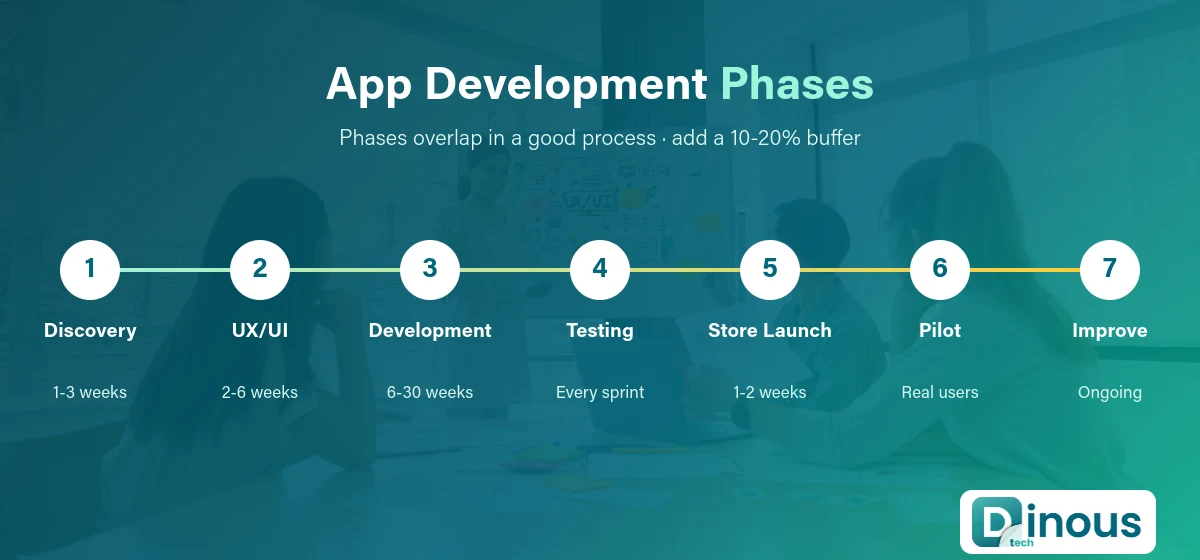
| Phase | What happens | Typical duration |
|---|---|---|
| 1. Discovery | Goals, users, feature list, scope, tech choices, estimate | 1 to 3 weeks |
| 2. UX/UI design | User flows, wireframes, visual design, clickable prototype | 2 to 6 weeks |
| 3. Development | Backend, apps, admin panel, integrations, in two-week sprints | 6 to 30 weeks |
| 4. Testing | Functional, device, performance and security testing | 2 to 6 weeks (overlaps development) |
| 5. Launch | Store listings, review, production setup, monitoring | 1 to 2 weeks |
| 6. Post-launch | Bug fixes, analytics, improvements, new features | Ongoing |
Phases overlap in a good process. Design for the next module can run while developers build the current one, and testers work inside every sprint instead of waiting until the end.
What Decides How Long Your App Takes
1. Number of user roles and panels
Every role (customer, vendor, driver, doctor, admin) adds screens, permissions and test cases. A taxi app with rider, driver and admin panels takes far longer than a single-role app.
2. Features that are hard by nature
Real-time tracking, video calls, chat, offline mode, complex search and recommendation engines take more time than standard forms and lists.
3. Integrations
Payment gateways, banking APIs, ERP or CRM systems, hospital systems and government APIs each need setup, testing and sometimes approvals from the other side.
4. Platforms
One cross-platform codebase with Flutter or React Native is usually faster than two native apps. A web app or web admin adds its own time.
5. Design depth
Custom animations, illustration-heavy designs and complex dashboards take longer than clean, standard UI patterns.
6. Compliance and security
Healthcare, fintech and apps for children need extra security work, audits and documentation. Plan weeks, not days, for this.
7. Data and content
Product catalogues, course content, legacy data migration and AI training data often arrive late and delay launch even when the code is ready.
8. Team size and decision speed
A dedicated team with a single decision-maker on the client side moves much faster than a project where every screen waits for several approvals.
Does Team Setup Change the Timeline?
Yes, quite a lot. The same app can take very different amounts of time depending on who builds it and how the team is organised.
| Team setup | Effect on timeline | Best for |
|---|---|---|
| Freelancer | Often slower for medium or complex apps, because one person covers design, backend, apps and testing | Very small apps and prototypes |
| In-house team (new) | Hiring and onboarding can add 2 to 4 months before real development starts | Companies building a long-term product team |
| Development company | Fastest start, because designers, developers and testers are already working together | Most startups and businesses |
| Dedicated team model | Steady speed for long projects, with the option to add people for busy phases | Products with a long roadmap |
Time zones matter less than many people expect. With a clear sprint plan, shared tools and a few hours of daily overlap, offshore teams in India deliver on schedule for clients in the USA, UK, Europe and Australia. Some teams even use the time difference to their advantage: work done overnight is ready for review the next morning.
Adding more developers does not always make a project faster. Beyond a certain point, extra people need more coordination. A small senior team with clear ownership is usually quicker than a large team with unclear roles.
Example Timelines
Example 1: Salon booking app MVP (about 8 weeks)
Week 1 discovery, weeks 2 to 3 design, weeks 3 to 7 development of customer app and admin panel with bookings, reminders and payments, week 8 testing and launch.
Example 2: eCommerce app with vendor panel (about 5 months)
Two weeks of discovery, four weeks of design, about twelve weeks of development across customer app, vendor panel and admin, three weeks of testing overlapping development, then store release and a soft launch.
Example 3: Telemedicine platform (about 8 months)
Longer discovery for compliance, design for patient and doctor apps, development of video consultations, prescriptions and records, integration with labs and pharmacies, security testing and a pilot with a small group of clinics before full launch.
Common Causes of Delay
- Scope creep: new features added mid-sprint push everything else back.
- Slow feedback: a week of waiting on design approvals becomes a week added to launch.
- Unclear requirements: vague features get rebuilt after the first demo.
- Third-party dependencies: payment gateway approvals, API keys and partner sandboxes often take weeks.
- Late content and data: the app is ready, but product photos, courses or price lists are not.
- App store rejections: missing privacy details, login issues or policy problems can add days or weeks.
- Testing left to the end: bugs found late are slower and costlier to fix.
How to Build Your App Faster
- Start with an MVP. List every feature, then keep only what a first user needs to get value. Everything else goes into release two.
- Write a clear requirements document. User roles, key flows and must-have features, agreed before design starts.
- Use proven building blocks. Ready payment, auth, maps and notification services save weeks compared to custom builds.
- Go cross-platform. One codebase for Android and iOS where it fits.
- Keep one decision-maker. Fast, clear feedback is the cheapest speed boost there is.
- Test every sprint. Catch issues early instead of in a long final testing phase.
- Prepare store accounts and content early. Developer accounts, privacy policy and assets ready before launch week.
How Dinoustech Uses AI to Save Time
AI now shortens many parts of app delivery when it is used carefully and reviewed by experienced developers:
- AI-assisted development: our developers use AI coding tools for boilerplate, test generation, code review and documentation, which frees time for the hard parts of your product.
- Faster discovery: AI helps turn meeting notes into structured requirements and first-draft user stories that the team then refines with you.
- Smarter testing: AI helps generate test cases and spot edge cases early.
- AI features in your app: chat assistants, smart search, recommendations and voice features can now be added in weeks instead of months, using proven AI APIs.
- AI support after launch: an AI support agent can answer common user questions and hand complex issues to your team.
AI speeds up work, but it does not replace planning, design judgement or testing. The biggest gains still come from a clear scope and quick decisions.
After Launch: Timelines Do Not Stop
Launch is the start of the product's life. Plan for bug fixes in the first weeks, regular updates for new Android and iOS versions, security patches and new features based on real user data. Many teams work in monthly or two-week release cycles after launch. Our software maintenance services cover this ongoing work.
How to Plan Your Own Timeline
- List your user roles and the core flow for each.
- Mark features as must-have, nice-to-have or later.
- List every integration and check if each one needs approval or a partner account.
- Choose platforms: Android, iOS, web, or all three.
- Add time for compliance if you work in healthcare, finance or education for minors.
- Add a buffer of 10 to 20 percent for feedback and store review.
- Use our cost calculator to get a first estimate, then confirm it with a development team.
Time and cost go together. If you are comparing budgets, read our guides to app development cost in India and India vs USA vs UK app costs.
Why Dinoustech
Dinoustech has delivered 450+ projects, and our team brings 7+ years of experience in mobile app development, web platforms and custom software. We plan every project in clear phases with sprint demos, so you always know what is done and what comes next.
- Honest timelines in the proposal, with a phase-by-phase plan
- Two-week sprints with working demos you can test
- Cross-platform builds that save time where they fit
- AI-assisted development and testing
- Teams that work with clients in the USA, UK, UAE and Australia
See examples of our work in the portfolio.
Want a real timeline for your app? Share your idea and feature list, and we will send a phase-by-phase plan with time and cost. Talk to Dinoustech today.