Dinoustech Private Limited
Custom LMS Development: How to Build a Learning Management System for Schools, Academies and Businesses
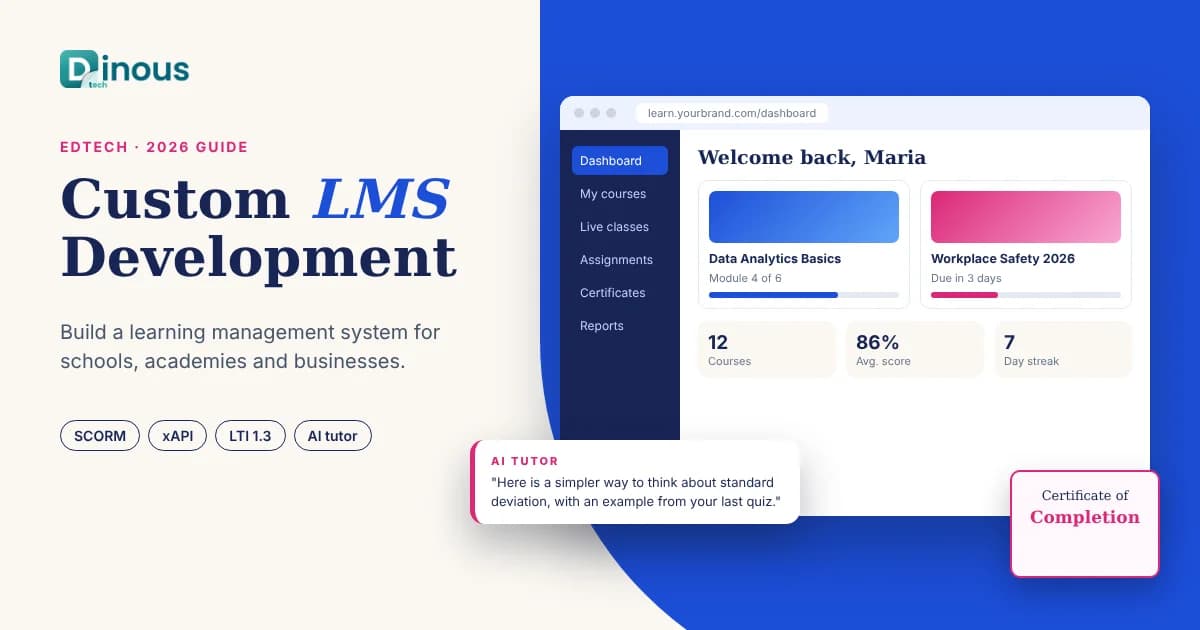
Every school, training academy and growing company eventually hits the same wall: courses live in shared drives, quizzes in one tool, video lessons in another and progress reports in spreadsheets. A learning management system (LMS) brings all of it into one place. Custom LMS development means building that platform around your own learners, content and business model instead of bending your teaching to fit an off-the-shelf tool. This guide explains how to build an LMS in 2026: when custom makes sense, the main LMS types, user roles and features, eLearning standards such as SCORM, xAPI and LTI, the step-by-step process, tech stack, AI, compliance, cost factors and timeline. It is written for schools, universities, edtech founders, coaching businesses and corporate training teams worldwide, from the USA, UK and Europe to the UAE and Australia.
Dinoustech is an education app development company that builds learning apps, course platforms and training systems for clients around the world. The guidance below comes from the questions education and training leaders ask us before they start a project.
Key Takeaways
- A custom LMS makes sense when your learning model, branding, integrations or revenue model do not fit tools like Moodle, Canvas, Teachable or TalentLMS.
- Decide your LMS type first: academic, corporate training, course marketplace or extended enterprise (training customers and partners). Each needs different features.
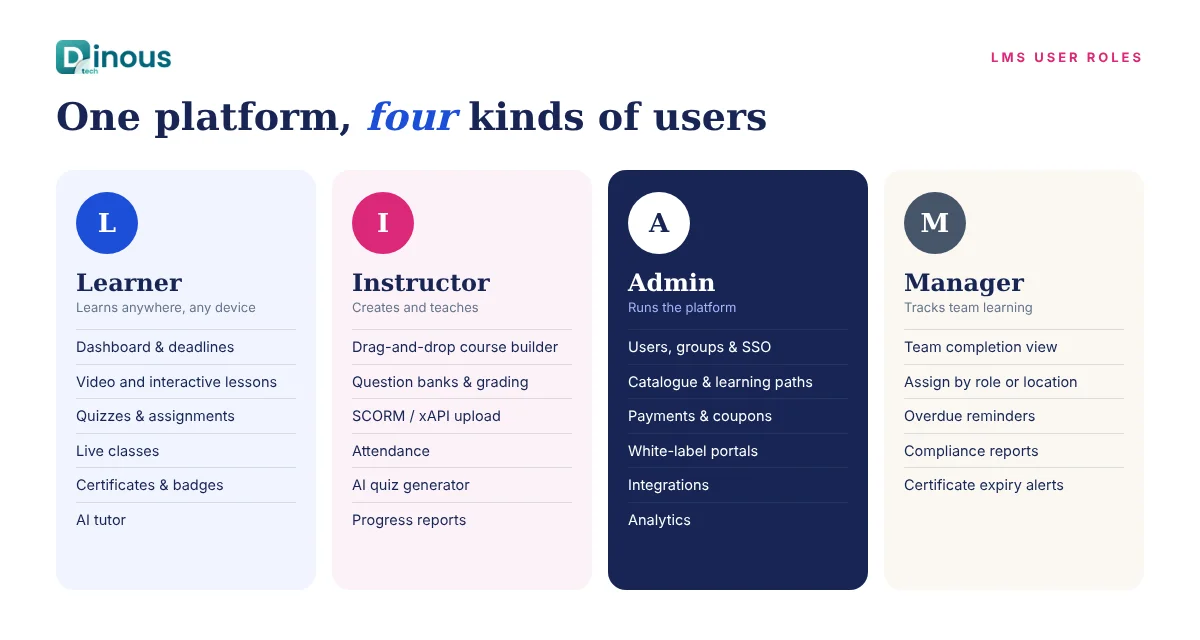
- Design around roles: learners, instructors, admins and, in companies, managers who track their teams.
- Support the standards your content needs: SCORM for existing course packages, xAPI or cmi5 for richer tracking, and LTI to plug in outside tools.
- AI can generate quizzes, recommend next lessons, tutor learners and answer support questions, but teachers should stay in control of content and grading.
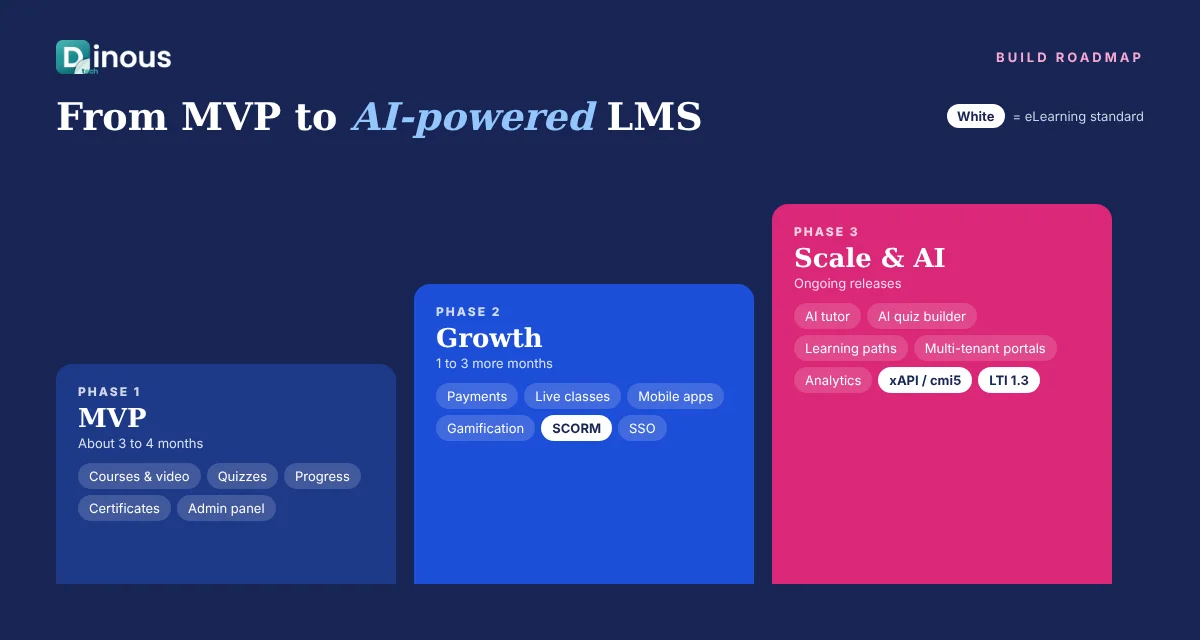
- Start with an MVP (courses, video, quizzes, progress and certificates), then add live classes, gamification, mobile apps and analytics.
In this guide
Table of Contents
- What Is a Learning Management System?
- Custom LMS vs Off-the-Shelf
- Types of LMS Platforms
- Key Features by User Role
- SCORM, xAPI, cmi5 and LTI Explained
- Custom LMS Development Process
- Recommended Tech Stack
- How Dinoustech Uses AI in LMS Platforms
- Monetization Models
- Privacy, Accessibility and Compliance
- Custom LMS Development Cost Factors
- Development Timeline
- Common Challenges
- Why Choose Dinoustech
- Conclusion
What Is a Learning Management System?
A learning management system is software that lets organisations create, deliver, track and report on learning. At its simplest, an LMS hosts courses made of lessons (video, text, documents, interactive content), checks understanding with quizzes and assignments, and records each learner's progress. Instructors use it to teach and grade; administrators use it to enrol people, manage content and run reports.
Modern LMS platforms go much further. They run live virtual classes, issue certificates, assign learning paths by role, send reminders, integrate with HR systems or school information systems, sell courses online and work just as well on a phone as on a laptop. An LMS is different from a simple course app because it is built to manage many learners, many courses and many teachers at the same time, with proper roles and reporting.
Custom LMS vs Off-the-Shelf: When to Build Your Own
Ready-made platforms are a good start for many organisations. Open-source systems such as Moodle are free to license, and SaaS tools are quick to set up. But they come with limits, and many teams outgrow them. A custom LMS is usually the right choice when:
- Your learning model is unique: cohort-based programmes, blended classroom and online learning, apprenticeships or skill assessments that standard tools handle poorly.
- The LMS is your product: if you sell courses or training, the platform is your brand and your competitive advantage, not just a tool.
- Per-user fees are growing: SaaS pricing per active learner can become expensive at scale, while a custom platform is an asset you own.
- You need deep integrations: HR systems, CRMs, payment gateways, student information systems, video tools or your own mobile app.
- Data and hosting matter: you need full control over where learner data is stored and how it is used.
A middle path also works well: start with a lean custom core and connect best-in-class tools for video, live classes or authoring, then replace them over time. If you are still deciding what to build, our step-by-step guide to developing an educational app covers the early planning stage.
Types of LMS Platforms
Academic LMS
Used by schools, colleges and universities to run classes, assignments, grading and parent or student communication. Key needs include timetables, gradebooks, classroom groups and integration with student information systems.
Corporate training LMS
Used by companies for onboarding, compliance training, product knowledge and skills development. Managers assign learning paths, track completion and prove compliance in audits.
Course marketplace or creator platform
Used by edtech startups, coaches and academies to sell courses online, similar to Udemy or Teachable. It needs storefronts, payments, coupons, affiliate links, reviews and instructor payouts.
Extended enterprise LMS
Used to train people outside the company, such as customers, partners, dealers or franchisees. It usually needs multi-tenancy (separate branded portals for each partner), certifications and sometimes paid access.
Key Features by User Role
Learner features
- Personal dashboard with enrolled courses, deadlines and progress
- Video, audio, text, PDF and interactive lessons that work on mobile and offline
- Quizzes, assignments, practice tests and instant feedback
- Certificates and badges on completion
- Discussion forums, comments and peer groups
- Live classes with chat, polls and recordings
- Notes, bookmarks, search and multi-language support
- Gamification such as points, streaks and leaderboards (see our article on gamification in eLearning)
Instructor features
- Course builder with drag-and-drop lessons, modules and drip release
- Question banks, randomised tests and rubric-based grading
- Upload of SCORM, xAPI and cmi5 packages
- Live class scheduling and attendance
- Learner progress reports and messaging
Admin features
- User, group and role management with bulk enrolment and single sign-on
- Course catalogue, categories and learning paths
- Payments, subscriptions, coupons and invoices for paid platforms
- White-label branding and multi-tenant portals
- Reports on completion, scores, engagement and revenue
- Integrations with HR, CRM, video and payment systems
Manager features (corporate)
- Team dashboard with completion and overdue training
- Assigning courses by role, department or location
- Compliance and certification expiry alerts
For a wider list, read our post on the 10 essential features every education app needs.
SCORM, xAPI, cmi5 and LTI Explained
eLearning standards decide whether your LMS can work with content and tools made elsewhere. Supporting the right ones saves your clients from rebuilding their courses.
- SCORM (versions 1.2 and 2004) is the classic packaging standard. Most existing corporate courses made in authoring tools are exported as SCORM files, so corporate LMS platforms usually need it. It tracks completion, scores and time spent inside a browser.
- xAPI (also called Tin Can) records learning activity as simple statements such as "Maria completed Safety Module 2", and stores them in a Learning Record Store (LRS). It can track learning outside the LMS, on mobile, offline or in simulations.
- cmi5 is a set of rules built on xAPI that defines how an LMS launches and tracks content, combining the structure of SCORM with the flexibility of xAPI.
- LTI (Learning Tools Interoperability, current version 1.3 with LTI Advantage) lets you plug outside tools, such as a coding lab or a video platform, into the LMS with single sign-on and grade passback. It is very common in schools and universities.
A good rule: support SCORM if your users have existing course libraries, add xAPI or cmi5 if you want richer tracking, and support LTI if you serve academic institutions.
Custom LMS Development Process
- Discovery. Define your learners, LMS type, roles, content formats, integrations and success metrics. Review the tools you use today and why they fall short.
- Scope and MVP. Prioritise the features you need for launch and plan later phases. Our MVP app development guide explains how to choose them.
- UX and UI design. Design the learner journey, course player, course builder and admin screens. Test with real teachers and learners.
- Architecture. Plan multi-tenancy, video hosting and streaming, content standards support, roles and permissions, and data storage by region.
- Development. Build the web platform, mobile apps and admin panel in short sprints, with a demo every two weeks.
- Content migration. Import existing courses, users and records from old systems or files.
- Testing. Test on different devices and browsers, check SCORM and LTI conformance, test performance with many learners at once, and check accessibility.
- Launch and training. Launch with a pilot group, train instructors and admins, then roll out more widely.
- Support and growth. Monitor usage, fix issues and add features such as live classes, AI tutoring or new integrations in regular releases.
Recommended Tech Stack
| Layer | Common choices |
|---|---|
| Web front end | React or Next.js, Vue.js |
| Mobile apps | Flutter or React Native for iOS and Android |
| Backend | Node.js, Python (Django) or Laravel |
| Database | PostgreSQL or MySQL, Redis for caching, Elasticsearch for search |
| Video | Cloud video hosting with adaptive streaming, DRM for paid content |
| Live classes | WebRTC-based SDKs or integrations with Zoom and similar tools |
| Standards | SCORM runtime, xAPI Learning Record Store, LTI 1.3 provider and consumer |
| Authentication | SSO with SAML or OpenID Connect, Google and Microsoft sign-in |
| Cloud | AWS, Google Cloud or Azure with a CDN for global delivery |
How Dinoustech Uses AI in LMS Platforms
AI is changing how people learn and how teams create courses. At Dinoustech we use AI in three ways.
AI-assisted development
Our developers use AI coding assistants for repetitive work such as boilerplate code, test cases, data migration scripts and documentation. This shortens delivery time, while senior engineers review all code and own architecture, security and data handling.
AI features inside the LMS
- AI course and quiz builder: instructors can turn a document or video transcript into a lesson outline, summaries and quiz questions, then edit and approve them.
- AI tutor: learners can ask questions about a lesson and get explanations grounded in the course content, with hints rather than ready answers for assessments.
- Personalised learning paths: recommendations for the next lesson or revision based on quiz results and activity.
- Grading assistance: first-pass feedback on written answers that teachers review before it is final.
- Translation and captions: automatic subtitles and translated lessons for global audiences.
- Early-warning analytics: alerts when a learner is falling behind so a teacher or manager can step in.
Teachers stay in control: AI content is labelled, reviewed before publishing, and learner data is handled under the platform's privacy rules.
AI support agent for your users
We can add an AI support agent trained on your help articles and policies that answers learner and instructor questions 24/7, such as how to reset a password, where to find a certificate or how to upload a course, and passes complex cases to your team. For a lighter learning format, see our post on building a microlearning app.
Monetization Models
- Course sales: one-time payments per course or bundle.
- Subscriptions: monthly or yearly access to the full library.
- B2B licences: per-seat or per-organisation pricing for companies and schools.
- SaaS platform: offer your LMS to other organisations with white-label portals.
- Certification fees: paid exams and verified certificates.
- Marketplace commission: a share of revenue from instructors who sell on your platform.
Privacy, Accessibility and Compliance
Learning platforms handle personal data, and often children's data, so privacy must be built in from the start. Depending on your audience, rules may include GDPR and UK GDPR in Europe and the UK, FERPA and COPPA for student and children's data in the USA, and local data protection laws in markets such as the UAE and Australia. Plan for consent, parental controls where needed, data access requests, retention rules and secure hosting by region.
Accessibility is just as important. Aim for WCAG 2.2 AA: keyboard navigation, screen reader support, captions for video, good colour contrast and resizable text. Public institutions in many countries require it, and it makes the platform better for everyone.
Note: this section is general information, not legal advice. Please confirm requirements with a qualified lawyer in each market you serve.
Custom LMS Development Cost Factors
The cost of a custom LMS depends on scope far more than on the label. The main factors are:
- LMS type and roles: a simple course platform costs less than a multi-tenant corporate system with managers and approvals.
- Content formats: video streaming with DRM, live classes and interactive content add work.
- Standards support: SCORM, xAPI, cmi5 and LTI each add development and conformance testing.
- Platforms: web only, or web plus native-feel iOS and Android apps with offline learning.
- Integrations: HR, CRM, student information systems, payment gateways and SSO.
- AI features: tutors, quiz generation and analytics add development and ongoing model costs.
- Migration: moving courses, users and history from an existing system.
- Hosting and support: video storage, bandwidth and maintenance are ongoing costs.
For a closer look at budgets, read our article on education app development cost, or book a short discovery call for an estimate based on your scope.
Development Timeline
| Scope | Typical timeline |
|---|---|
| Discovery and UX design | 3 to 5 weeks |
| MVP (courses, video, quizzes, progress, certificates, admin) | 3 to 4 months |
| Add payments, live classes and mobile apps | 1 to 3 more months |
| Corporate or multi-tenant LMS with SCORM, xAPI and integrations | 5 to 8 months |
| AI tutor, recommendations and analytics | 1 to 2 months, often in a later phase |
These are honest ranges for typical projects; your timeline depends on the final feature list, content migration and integrations.
Common Challenges
- Low engagement: a platform full of courses is useless if learners do not finish them. Plan reminders, gamification and mobile access early.
- Content operations: teams often underestimate the time needed to create, update and organise content. Give instructors simple tools.
- Video performance: slow or buffering video kills learning. Use adaptive streaming and a global CDN.
- Legacy content: old SCORM packages can behave differently across players, so test real files early.
- Scaling: exam days and course launches create traffic spikes. Load-test before they happen.
- Adoption: teachers and admins need training and support, not just software.
Why Choose Dinoustech for Custom LMS Development
Dinoustech builds education and training products alongside apps for fintech, healthcare, eCommerce and other industries. With us you get:
- Experience with eLearning apps, tutoring platforms, digital libraries and course marketplaces
- Web, iOS and Android delivery from one team
- Support for video streaming, live classes, payments and eLearning standards
- Practical AI features with teacher-in-the-loop controls
- Clean admin panels and reporting for schools and companies
- Support and maintenance after launch
See examples of our work in our portfolio, read about online tutoring app development and digital library apps for schools, or explore our mobile app development services.
Conclusion
A custom LMS pays off when learning is central to your business. Start with clear roles and a focused MVP, support the standards your content needs, design for mobile and engagement, and add live classes and AI features as your learners grow. If you want to build a learning management system for learners worldwide, contact Dinoustech to discuss your idea, or explore our education app development services.