Dinoustech Private Limited
AI Tutor App Development: How to Build a Personalised Learning App Students Actually Use
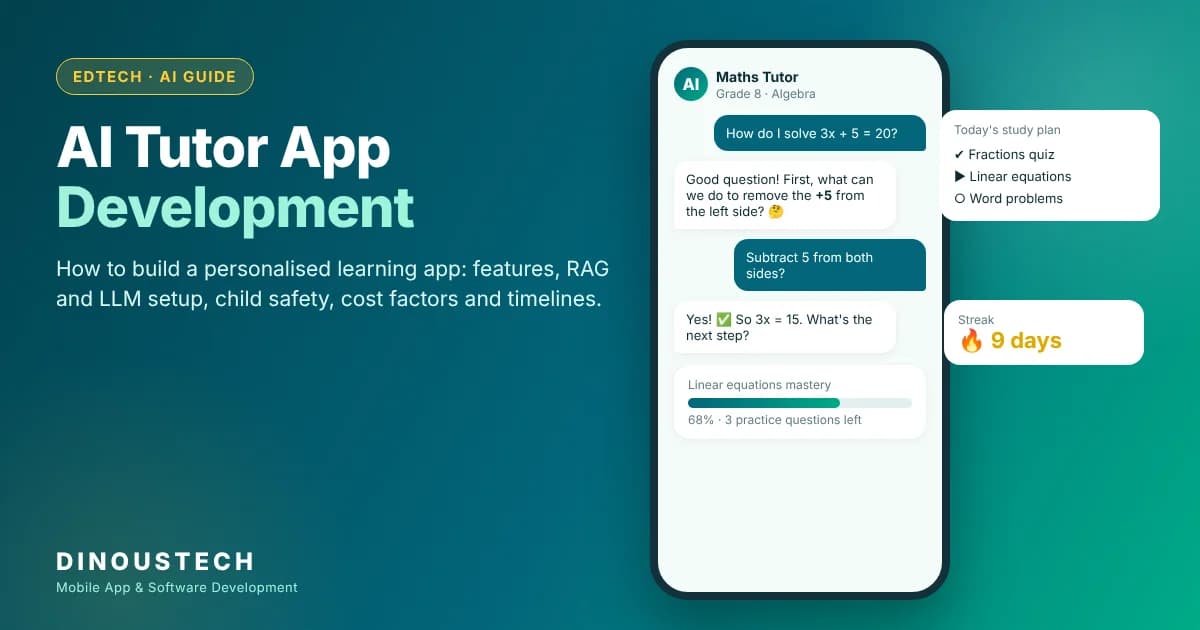
AI tutor app development means building a learning app where an AI model explains concepts, answers questions, sets practice and adapts to each learner's level, much like a patient one-to-one tutor that is available at any hour. The best AI tutor apps do not just hand out answers. They guide students step by step, check understanding with quizzes, track progress, and give teachers and parents a clear view of how each learner is doing. This guide covers what an AI tutor app is, the main types, key features, the build process, tech stack, safety and compliance, cost factors and timelines.
Key Takeaways
- An AI tutor app combines a large language model (LLM) with your own course content, a learner profile and progress tracking, so answers are accurate and personalised.
- The core features are conversational tutoring, step-by-step hints, adaptive practice, progress dashboards and safe content controls.
- Grounding the AI in approved study material (retrieval-augmented generation, or RAG) is the most important step for accuracy.
- Child safety and student data rules, such as COPPA and FERPA in the US and GDPR in Europe, shape the design from day one.
- Cost depends on subjects and content volume, voice and image features, the number of platforms, integrations with schools or LMSs, and AI usage at scale.
- Starting with one subject, one age group and one platform is the fastest way to launch and learn.
Table of Contents
- What Is an AI Tutor App?
- Why AI Tutor Apps Are Growing
- Types of AI Tutor Apps
- How an AI Tutor App Works
- Key Features
- Step-by-Step Development Process
- Recommended Tech Stack
- How Dinoustech Uses AI
- Monetization Models
- Safety, Privacy and Compliance
- Cost Factors
- Development Timeline
- Challenges and Solutions
- Why Choose Dinoustech
What Is an AI Tutor App?
An AI tutor app is an education app that uses artificial intelligence to teach. A student can type, speak or photograph a question, and the AI tutor responds with an explanation at the right level. It can break a problem into steps, ask the student to try the next step, give a hint when they are stuck, and create new practice questions on the same topic.
The difference between an AI tutor and a general chatbot is focus. An AI tutor knows the syllabus, remembers what the learner has already covered, follows teaching rules set by educators, and stays inside safe, age-appropriate boundaries. It also measures learning, so students, parents and teachers can see real progress instead of just chat history.
Why AI Tutor Apps Are Growing
One-to-one tutoring has long been one of the most effective ways to learn, but it is expensive and hard to scale. Modern language models make it possible to offer a tutor-like experience to every learner, at any time, at a much lower cost per student. That is why we see demand from several directions:
- EdTech startups building homework helpers, exam prep apps and language tutors for students worldwide.
- Coaching institutes and tutoring companies adding an AI assistant that supports students between live classes.
- Schools and universities that want a safe AI helper tied to their own courses and learning management system.
- Corporate training teams using AI tutors for onboarding, compliance training and skill development.
- Publishers turning textbooks and question banks into interactive AI-powered study tools.
If you are still planning the wider product, our guide to education app development cost, features and timeline is a useful starting point.
Types of AI Tutor Apps
1. Homework Help and Doubt-Solving Apps
Students snap a photo of a question or type it in, and the AI explains the solution step by step. The best versions encourage the student to attempt each step rather than just showing the final answer.
2. Subject-Specific Tutors
Focused tutors for maths, science, coding or writing go deeper in one subject. They often include worked examples, formula sheets, code runners or writing feedback tools.
3. Exam Preparation Tutors
These apps follow a specific exam syllabus, such as SAT, GRE, IELTS or national school exams. They generate mock tests, explain mistakes and build a revision plan around weak topics.
4. Language Learning Tutors
AI conversation partners let learners practise speaking and writing, with corrections for grammar and pronunciation. Read more in our guide on language learning app development.
5. Course Companion Tutors
Schools, universities and online course platforms add an AI tutor that answers questions only from their own course material. This works well alongside a custom LMS.
6. Hybrid AI and Human Tutoring Platforms
The AI handles routine questions and practice, and hands harder problems to a live human tutor. This model combines the reach of AI with the judgement of experienced teachers. Our article on online tutoring app development explains the live tutoring side.
How an AI Tutor App Works
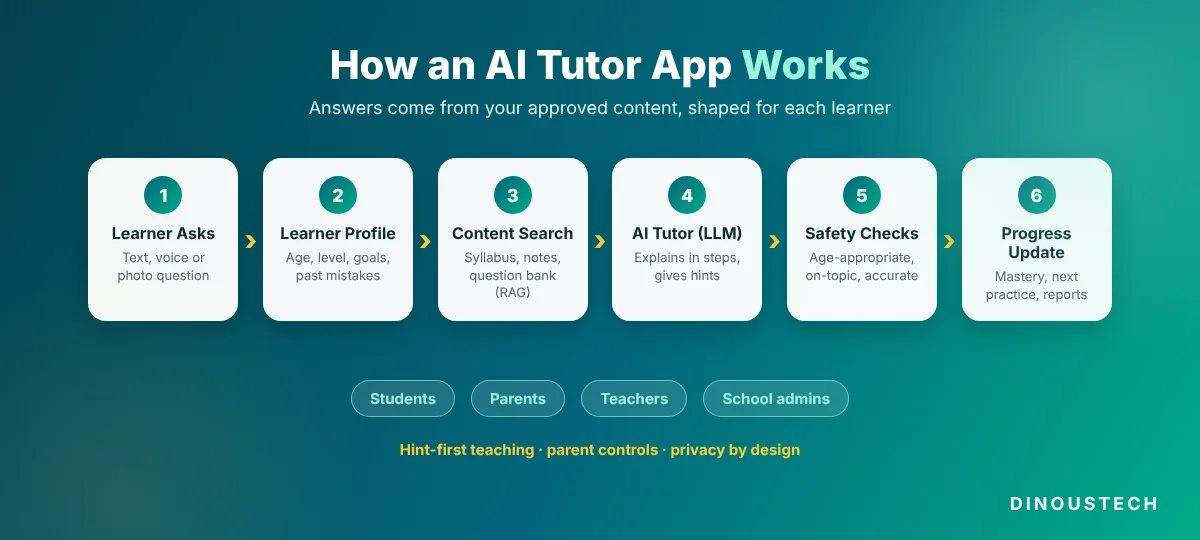
- The learner asks a question by text, voice or photo.
- The app reads the learner profile: age group, subject, level, recent mistakes and learning goals.
- It searches approved content, such as your syllabus, notes and question bank, and pulls the most relevant passages (this is retrieval-augmented generation, or RAG).
- The LLM writes a response using that content and a teaching prompt, for example "explain in simple steps and ask the student to try the next step".
- Safety checks filter unsafe or off-topic content and check the answer against the source material.
- The app updates progress, recording what was covered, how the learner did on practice questions and what to review next.
Key Features of an AI Tutor App
Student Features
- Conversational tutor: chat or voice with an AI that explains at the student's level.
- Step-by-step hints: guided problem solving instead of instant final answers.
- Photo question input: OCR to read printed or handwritten questions and maths equations.
- Adaptive practice: new questions that get easier or harder based on performance.
- Personal study plan: a daily or weekly plan built around goals and weak topics.
- Quizzes and mock tests: auto-generated and auto-graded, with explanations for mistakes.
- Progress dashboard: mastery by topic, streaks and time spent.
- Gamification: badges, streaks and leaderboards to keep motivation high. See our post on gamification in eLearning.
- Multiple languages: explanations in the learner's preferred language.
Parent and Teacher Features
- Progress reports and alerts when a learner is struggling
- Assignment creation and AI-assisted grading support
- Controls for which subjects and features a learner can use
- Conversation review for younger learners
- Class-level analytics for teachers
Admin Features
- Content management for syllabus, notes, question banks and videos
- Prompt and teaching-style settings by subject and age group
- Safety rules, blocked topics and moderation logs
- User, subscription and school account management
- AI usage and cost monitoring
- Quality review tools to rate and improve AI answers
Step-by-Step AI Tutor App Development Process
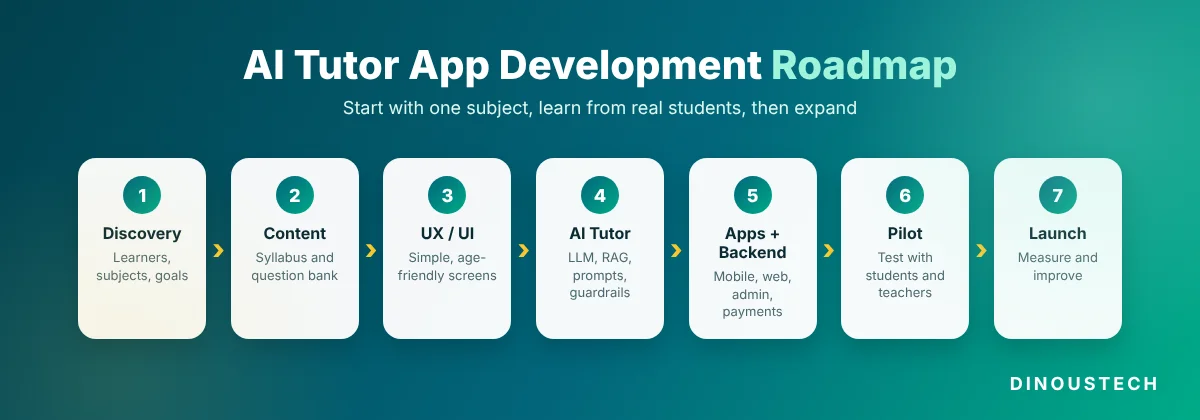
Step 1: Discovery and Learning Goals
Define the learners (age, level, country), the subjects, the curriculum and what success looks like, for example better test scores or more practice completed. These choices decide content, tone and safety rules.
Step 2: Prepare and Structure Content
Gather your syllabus, notes, question banks and worked examples. Tag them by topic and difficulty, and load them into a search index so the AI tutor can use them as its source of truth.
Step 3: UX and UI Design
Design simple, distraction-free screens for the age group: a clean chat view, easy photo upload, clear progress charts and parent or teacher views. Younger learners need larger buttons, simpler language and more visual feedback.
Step 4: Build the AI Tutor Engine
Connect the LLM, build the retrieval layer, write teaching prompts for each subject, and add guardrails for safety and accuracy. This is where the tutor's personality and teaching method are shaped.
Step 5: Build the Apps and Backend
Develop the mobile and web apps, user accounts, progress tracking, quizzes, payments and admin panel. Integrate with LMS platforms or school systems if needed.
Step 6: Test With Real Learners and Teachers
Run pilot sessions with real students and educators. Review AI answers for accuracy and tone, test edge cases, and tune prompts and content based on feedback.
Step 7: Launch and Improve
Launch with one subject or one grade first, then expand. Track learning outcomes, usage and AI cost, and keep improving the content and prompts. Our MVP app development guide explains how to scope a first release.
Recommended Tech Stack for AI Tutor App Development
| Layer | Common Choices | Purpose |
|---|---|---|
| Mobile apps | Flutter, React Native, Swift, Kotlin | iOS and Android learner apps |
| Web app | React, Next.js | Web access for students, teachers and admins |
| Backend | Node.js, Python (FastAPI or Django) | APIs, business logic and AI orchestration |
| AI models | Leading LLM APIs or self-hosted open models | Explanations, hints, question generation and feedback |
| Retrieval (RAG) | Vector databases such as pgvector, Pinecone or Weaviate | Grounding answers in approved content |
| Speech and vision | Speech-to-text, text-to-speech and OCR services | Voice tutoring and photo questions |
| Database | PostgreSQL, MongoDB, Redis | Users, progress, content and caching |
| Video and live classes | WebRTC-based video SDKs | Hybrid human tutoring sessions |
| Cloud and monitoring | AWS, Google Cloud, Azure | Hosting, scaling, logging and AI cost tracking |
How Dinoustech Uses AI in AI Tutor App Projects
AI-Assisted Development
Our team uses AI coding assistants to speed up routine work such as screen scaffolding, API boilerplate and test writing. Developers review every change, so quality stays high while delivery gets faster, and more of the budget goes into the tutoring experience itself.
AI Features We Build Into the App
- Grounded tutoring: RAG pipelines that keep answers tied to your syllabus and content.
- Socratic hints: prompts that guide learners to the answer instead of giving it away.
- Question generation: new practice questions by topic and difficulty, reviewed against your answer keys.
- Writing and answer feedback: rubric-based feedback on essays and long answers to support teachers.
- Learning analytics: AI summaries that tell parents and teachers what a learner has mastered and where they need help.
- Voice tutoring: speech input and natural voice replies for younger learners and language practice.
Explore our generative AI development and AI chatbot development services to learn more.
AI Support Agent for Your Users
Beyond tutoring, we can add an AI support agent that answers questions about accounts, subscriptions and how to use the app, using your help centre content. Anything it cannot solve goes to your support team with the conversation attached.
Monetization Models for AI Tutor Apps
- Freemium: a free daily question limit, with unlimited tutoring in a paid plan.
- Subscriptions: monthly or yearly plans by subject, grade or exam.
- Family plans: one subscription for several children with a parent dashboard.
- School and institution licences: per-student or per-school pricing with admin and teacher tools.
- Course and test packs: paid mock test series or premium courses.
- Live tutor upsell: paid sessions with human tutors when a learner needs more help.
Safety, Privacy and Compliance
This section is general information, not legal advice. Please confirm the rules for each country you serve with a qualified lawyer.
- Children's privacy: in the United States, COPPA applies to online services directed at children under 13 and requires verifiable parental consent before collecting their personal information.
- Student records: apps used by US schools often need to support FERPA requirements for student education records.
- Europe and the UK: GDPR applies to personal data, and the UK's Age Appropriate Design Code sets standards for online services likely to be used by children.
- Content safety: filters for harmful, adult or off-topic content, age-appropriate responses and clear reporting tools.
- Academic integrity: settings that favour hints and explanations over ready-made answers during tests or graded work.
- Data security: encryption, role-based access, data minimisation and clear retention policies.
- Accessibility: readable fonts, screen reader support and captions, following WCAG guidelines.
AI Tutor App Development Cost Factors
The budget depends on scope. These factors make the biggest difference:
- Subjects and content volume: one subject with an existing question bank is much faster than many subjects built from scratch.
- Input types: text only, or also voice, photo questions and handwriting recognition.
- Platforms: Android, iOS, web, or all three.
- User roles: learner only, or also parent, teacher and school admin dashboards.
- Integrations: LMS, school information systems, payment gateways and video SDKs.
- Safety and compliance work: parental consent flows, moderation and data protection features.
- AI usage at scale: model choice, caching and usage limits affect monthly running costs as the user base grows.
- Ongoing improvement: content updates, prompt tuning and new features after launch.
Share your learners, subjects and platforms with us and we will prepare a scoped feature list and a clear estimate.
Development Timeline
| Scope | What It Includes | Typical Timeline |
|---|---|---|
| MVP | One subject, chat tutor with RAG, quizzes, progress tracking, one platform | 8-12 weeks |
| Full app | Several subjects, voice and photo input, parent dashboard, Android and iOS | 4-6 months |
| Platform for schools | Teacher and admin tools, LMS integration, live tutoring, analytics | 6-9 months or more |
Challenges and Solutions
- Wrong or made-up answers: ground every answer in approved content, show sources where useful, and review samples regularly.
- Students copying answers: use hint-first teaching modes and limit full solutions in test mode.
- Keeping learners engaged: short sessions, streaks, rewards and visible progress.
- Rising AI costs: cache common answers, choose the right model for each task and set fair usage limits.
- Trust from parents and schools: transparent privacy policies, parent controls and clear safety settings.
Why Choose Dinoustech for AI Tutor App Development
Dinoustech is a software development company based in Jaipur, India, serving clients worldwide. We have delivered more than 450 projects across mobile apps, web platforms and custom software.
- A dedicated education app development team for learning apps, LMS platforms and tutoring products
- Hands-on AI app development experience with LLMs, RAG and chatbots
- Android, iOS and web delivery from one team
- Safety and privacy considered from the first sprint
- Developers available for calls in US, UK, EU and Middle East time zones
- Post-launch support for content, prompts and new features
See examples of our work in our portfolio.
Build Your AI Tutor App With Dinoustech
Whether you want a homework helper, an exam prep tutor or an AI assistant for your school's courses, we can help you plan, build and launch it. Tell us about your learners and subjects, and we will suggest the right features, tech stack and roadmap. Contact Dinoustech today for a free consultation.