Dinoustech Private Limited
Mobile App Security: A Practical Checklist for Building Secure iOS and Android Apps (OWASP MASVS Guide)
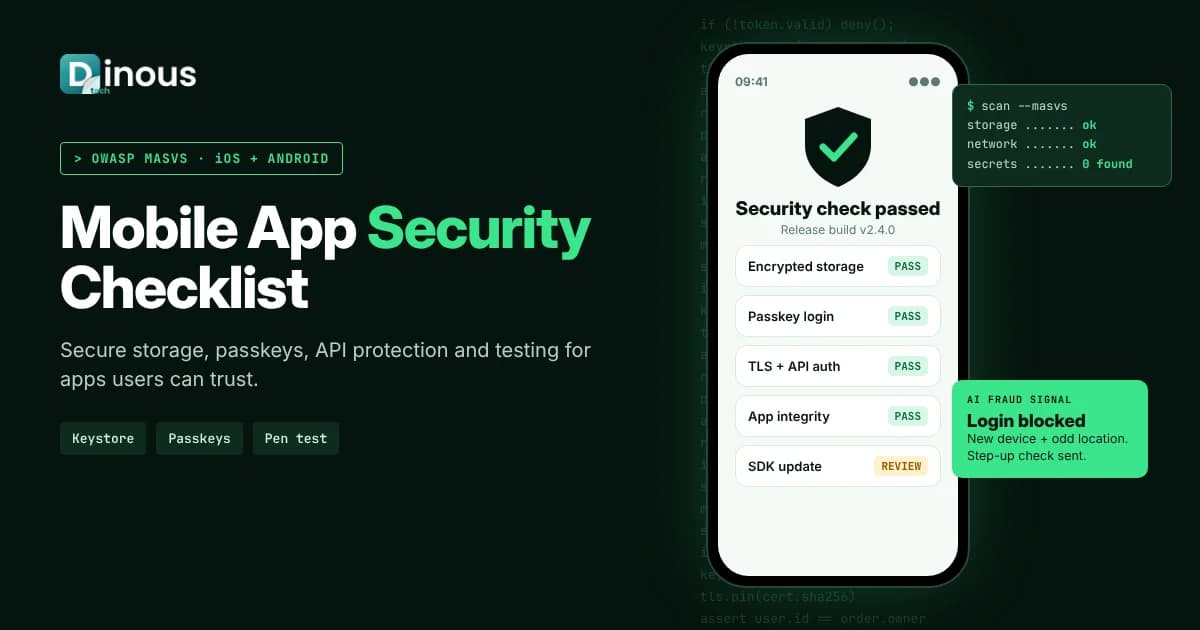
Mobile app security is the set of design choices, coding practices, tests and monitoring that protect an app, its users and its backend from data theft, account takeover, fraud and tampering. Phones store passwords, payment tokens, health records and private messages, and attackers know it. One weak API or a key left inside the app can expose every user. This guide gives business owners, product managers and developers a practical, step-by-step checklist for building secure iOS and Android apps in 2026. It follows the OWASP Mobile Application Security Verification Standard (MASVS) and the OWASP Mobile Top 10, and covers threat modelling, secure storage, authentication, network security, API protection, testing, AI-assisted security and compliance. It is written for teams worldwide, from the USA, UK and Europe to the UAE, Southeast Asia and Australia.
Dinoustech is a mobile app development company that builds fintech, healthcare, dating, e-commerce and on-demand apps where security is part of the product, not an afterthought. The checklist below is the one we use when we plan, build and review apps for clients.
Key Takeaways
- Most serious mobile breaches start on the server side: weak APIs, broken access control and leaked keys, not only on the phone.
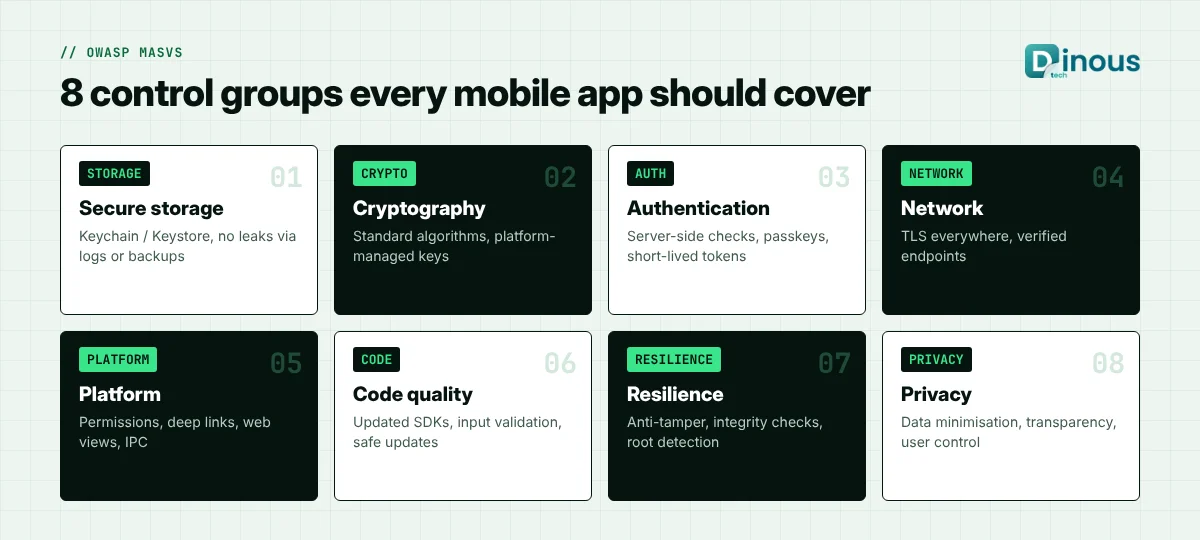
- OWASP MASVS gives a clear structure with eight control groups: storage, cryptography, authentication, network, platform, code, resilience and privacy.
- Never store secrets in the app binary. Keep sensitive data in the iOS Keychain or Android Keystore, and store as little as possible.
- Use modern authentication such as passkeys and biometrics backed by the server, short-lived tokens and checks on every API call.
- Build security into every sprint: threat modelling, code review, automated scans, penetration testing and monitoring after launch.
- AI helps find vulnerabilities and detect fraud faster, but findings still need review by experienced engineers.
In this guide
Table of Contents
- What Is Mobile App Security?
- Why Mobile App Security Matters
- Common Mobile App Security Risks
- The OWASP MASVS Control Groups
- Mobile App Security Checklist
- Securing APIs and the Backend
- Secure Development Process
- Security Testing Methods
- Security Tools and Tech Stack
- How Dinoustech Uses AI
- Compliance by Industry
- Cost Factors
- Where Security Fits in the Timeline
- Common Mistakes
- Why Choose Dinoustech
What Is Mobile App Security?
Mobile app security covers everything that keeps an app and its data safe: how data is stored on the device, how users log in, how the app talks to servers, how the backend checks every request, and how the app resists reverse engineering and tampering. It also includes privacy, meaning the app collects only the data it needs and tells users how it is used.
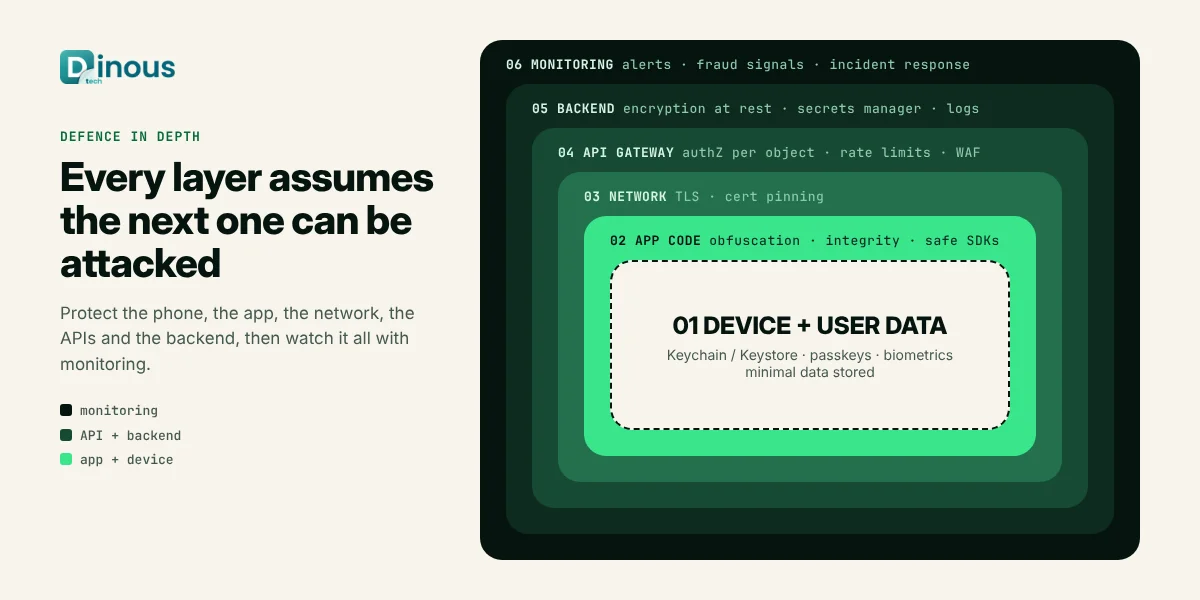
A secure app is not one with a single strong feature such as encryption. It is one where every layer, from the phone to the API to the database, assumes the layer next to it could be attacked.
Why Mobile App Security Matters
- Users trust you with sensitive data: payments, location, health, identity documents and private chats.
- Breaches are expensive: incident response, legal costs, regulator fines, refunds and lost customers often cost far more than doing security right.
- App stores and partners expect it: Apple and Google privacy rules, payment providers, banks and enterprise clients increasingly ask for security evidence before they work with you.
- Fraud targets apps directly: fake accounts, bot sign-ups, promo abuse and account takeover hit revenue even without a classic data breach.
Common Mobile App Security Risks
The OWASP Mobile Top 10 lists the risks that appear most often in real apps. In plain words, they are:
| Risk | What it looks like |
|---|---|
| Improper credential usage | API keys or passwords hard-coded in the app or stored in plain text |
| Inadequate supply chain security | Unsafe third-party SDKs, libraries or build pipelines |
| Insecure authentication and authorisation | Weak login, long-lived tokens, APIs that trust the app instead of checking the user |
| Insufficient input and output validation | Injection, unsafe deep links and web views that load untrusted content |
| Insecure communication | Unencrypted traffic, accepting invalid certificates, leaking data to logs |
| Inadequate privacy controls | Collecting or sharing more personal data than needed |
| Insufficient binary protections | Apps that are easy to decompile, modify and repackage |
| Security misconfiguration | Debug flags in production, exported components, open cloud storage |
| Insecure data storage | Tokens, personal data or files saved where other apps or attackers can read them |
| Insufficient cryptography | Outdated algorithms, home-made encryption or poorly managed keys |
The OWASP MASVS Control Groups
The OWASP MASVS is the industry standard for mobile app security requirements, and the OWASP Mobile Application Security Testing Guide (MASTG) explains how to test each one. Using it gives your team, auditors and clients a shared language. The control groups are:
- MASVS-STORAGE: sensitive data is stored securely on the device and does not leak through logs, backups, screenshots or the clipboard.
- MASVS-CRYPTO: strong, standard cryptography with keys managed by the platform.
- MASVS-AUTH: authentication and authorisation are enforced on the server, and local biometrics are tied to real credentials.
- MASVS-NETWORK: all traffic is encrypted and the app verifies who it is talking to.
- MASVS-PLATFORM: safe use of permissions, inter-app communication, deep links and web views.
- MASVS-CODE: up-to-date dependencies, input validation and safe handling of updates.
- MASVS-RESILIENCE: protection against reverse engineering, tampering, rooted or jailbroken devices and app repackaging, where the risk justifies it.
- MASVS-PRIVACY: data minimisation, transparency and user control over personal data.
Not every app needs every advanced control. A simple content app needs a solid baseline, while banking, health and payment apps need deeper defence and resilience testing. The OWASP testing profiles help you choose the right depth.
Mobile App Security Checklist
Data storage
- Store as little sensitive data on the device as possible.
- Keep tokens and keys in the iOS Keychain or Android Keystore, never in shared preferences, plain files or the app bundle.
- Exclude sensitive files from backups, hide sensitive screens in the app switcher and avoid logging personal data.
- Clear sensitive data on logout and after long inactivity.
Authentication and sessions
- Support passkeys or strong passwords with multi-factor authentication for sensitive actions.
- Use biometric authentication to unlock credentials stored securely, not as a simple yes or no check in the app.
- Use short-lived access tokens with refresh tokens that can be revoked on the server.
- Re-authenticate before high-risk actions such as changing bank details or email.
Network
- Use TLS for every request and block plain HTTP with App Transport Security on iOS and network security config on Android.
- Consider certificate pinning for high-risk apps, with a safe plan for rotating certificates.
- Never send secrets or personal data in URLs, where they end up in logs.
Platform and code
- Request only the permissions you need, at the moment you need them.
- Validate deep links and intents, and lock down exported Android components.
- Restrict web views to trusted domains and disable JavaScript bridges you do not need.
- Keep SDKs and libraries updated and track them with a software bill of materials.
- Remove debug code, test endpoints and verbose logs from release builds.
Resilience
- Use code obfuscation and app integrity checks such as Google Play Integrity API and Apple App Attest for apps that handle money or valuable accounts.
- Detect rooted, jailbroken or emulated devices and react proportionately, for example by limiting high-risk features.
Privacy
- Collect only what the feature needs, explain why, and give users ways to download or delete their data.
- Keep the App Store privacy labels and Google Play data safety form accurate.
Securing APIs and the Backend
The app is only the front door. Attackers often skip it and call your APIs directly, so the backend must never trust the app.
- Check authorisation on every request, for every object. A user must not be able to read another user's order by changing an ID.
- Apply rate limits and bot protection to login, OTP, sign-up and promo endpoints.
- Validate all input on the server, even if the app already validated it.
- Keep secrets in a secrets manager, rotate them, and use separate keys for each environment.
- Encrypt data at rest, restrict database access, and log security events to a central place with alerts.
- Use end-to-end encryption where the product needs it, as explained in our guide to building secure chat apps with end-to-end encryption.
Secure Mobile App Development Process
- Classify data and risk: list what data the app handles and how bad a leak would be. This decides how deep security must go.
- Threat modelling: for each key feature, ask how it could be abused, such as account takeover, payment fraud or data scraping, and design controls.
- Secure design: choose authentication, session, storage and API patterns before writing code.
- Secure coding: follow platform guidelines, use code review checklists and keep secrets out of the repository.
- Automated checks in CI: static analysis, dependency scanning and secret scanning on every pull request.
- Security testing: dynamic testing and a penetration test against the MASVS before major releases.
- Secure release: signed builds, protected signing keys, and release builds without debug features.
- Monitor and respond: crash and security monitoring, fraud alerts, a clear incident response plan and fast patch releases.
If you are starting with an MVP, keep the scope small but do not skip the basics: secure storage, server-side authorisation and TLS are cheap to do on day one and expensive to fix later.
Security Testing Methods
| Method | What it finds | When to use it |
|---|---|---|
| Static analysis (SAST) | Insecure code patterns, hard-coded secrets | Every pull request |
| Dependency and SDK scanning | Known vulnerable libraries | Every build |
| Dynamic analysis (DAST) | Runtime issues in the app and APIs | Before each major release |
| Penetration testing | Real attack paths combining several weaknesses | Before launch and at least yearly for sensitive apps |
| API security testing | Broken access control, injection, rate-limit gaps | With every API change |
| Bug bounty or responsible disclosure | Issues found by outside researchers | After launch, once basics are solid |
Automation makes these checks faster and more regular. Read more on how AI improves software testing and quality assurance.
Security Tools and Tech Stack
| Area | Common choices |
|---|---|
| Secure storage | iOS Keychain, Android Keystore, encrypted databases |
| Authentication | Passkeys (WebAuthn), OAuth 2.0 and OpenID Connect, platform biometrics |
| App integrity | Google Play Integrity API, Apple App Attest, obfuscation tools |
| Testing | OWASP MASTG, MobSF, Frida, Burp Suite or OWASP ZAP |
| CI security | Static analysis, dependency scanning and secret scanning in the build pipeline |
| Backend | API gateway, web application firewall, secrets manager, centralised logging |
These controls work with native apps and with cross-platform frameworks. If you are still choosing a framework, see our guide to choosing a cross-platform app framework and the comparison of Android vs iOS app development.
How Dinoustech Uses AI in Mobile App Security
1. AI-assisted development
Our developers use AI coding assistants to review pull requests for risky patterns, suggest safer code, explain scanner findings and write security test cases. AI also helps keep dependency updates moving. Every suggestion is checked by an engineer, because AI can miss context or suggest insecure code with confidence.
2. AI features inside the app
- Fraud and bot detection: models score sign-ups, logins and payments using device and behaviour signals, and send risky cases for step-up verification.
- Account takeover alerts: unusual login locations, devices or behaviour trigger alerts and re-authentication.
- Content and scam detection: in chat, marketplace and dating apps, AI flags phishing links, scam messages and fake profiles for moderators.
- Safe AI features: when apps include their own AI assistants, we protect them against prompt injection, limit what data they can reach and log their actions.
3. AI support agent for our clients
After launch, clients can use an AI support agent trained on their app documentation and runbooks. It answers questions from their team, explains security settings and drafts clear tickets for our engineers, so incidents and fixes move faster.
Compliance by Industry
- All apps: GDPR in the UK and EU, privacy laws in US states and other countries, and Apple and Google privacy policies.
- Fintech and payments: PCI DSS for card data, plus identity and financial-crime controls covered in our KYC and AML compliance guide.
- Healthcare: HIPAA in the USA and health data rules in other regions, which our healthcare app development team plans for from the start.
- EU products: the Cyber Resilience Act brings security requirements for many products with digital elements, so EU-focused teams should check whether it applies to them.
- Accessibility and security together: security features such as login and verification must still be usable for everyone; see our guide to mobile app accessibility.
This section is general information, not legal advice. Please confirm which rules apply to your app with a legal or compliance adviser.
Mobile App Security Cost Factors
Security cost depends on the risk level of your app more than on its size. The main factors are:
- Type of data handled: payments, health and identity data need deeper controls.
- Number of platforms and the complexity of the backend and APIs.
- Resilience needs such as obfuscation, integrity checks and anti-tampering.
- Third-party penetration tests and audits required by partners or regulators.
- Monitoring, fraud detection and incident response after launch.
- Whether security is built in from the start or added to an existing app, which usually costs more.
For a project-specific estimate, share your app idea with our team.
Where Security Fits in the Timeline
| Stage | Security work |
|---|---|
| Discovery (week 1 to 3) | Data classification, threat model, compliance list |
| Design (week 2 to 5) | Authentication, storage, API and logging design |
| Development (every sprint) | Secure coding, code review, automated scans |
| Pre-launch (2 to 4 weeks) | Dynamic testing, penetration test, fixes and re-test |
| After launch (ongoing) | Monitoring, dependency updates, yearly testing, incident drills |
Common Mistakes to Avoid
- Hiding API keys in the app and assuming nobody will find them.
- Trusting the app to enforce rules that the server should enforce.
- Using biometrics as a simple on-device switch rather than tying them to secure credentials.
- Adding many SDKs without checking what data they collect.
- Running a penetration test once before launch and never again.
- Leaving staging servers, test accounts or debug menus open in production.
Why Choose Dinoustech for Secure Mobile App Development
Dinoustech builds iOS, Android and cross-platform apps with Flutter, React Native and native code for clients worldwide. Security is part of how we plan and build, especially for fintech apps and other apps that handle sensitive data.
- Threat modelling and secure architecture from the first sprint.
- MASVS-based checklists, code reviews and automated scans in every build.
- Secure backend and API design, not only app-side protection.
- Responsible AI for fraud detection and safer AI features.
- Support after launch, including updates, monitoring and our AI support agent.
See examples of what we build in our portfolio.
Conclusion
Mobile app security is not a single feature or a last-minute test. It is a habit that runs through design, coding, testing and operations. Start with a clear view of your data and risks, follow the OWASP MASVS as your checklist, protect the backend as carefully as the app, and keep testing after launch. Done this way, security protects your users, your revenue and your brand without slowing your team down.
Planning a new app or worried about the security of an existing one? Contact Dinoustech for a security-focused app development plan.