Dinoustech Private Limited
MLM Mobile App Development: How to Build a Distributor App for Direct Selling Teams with AI
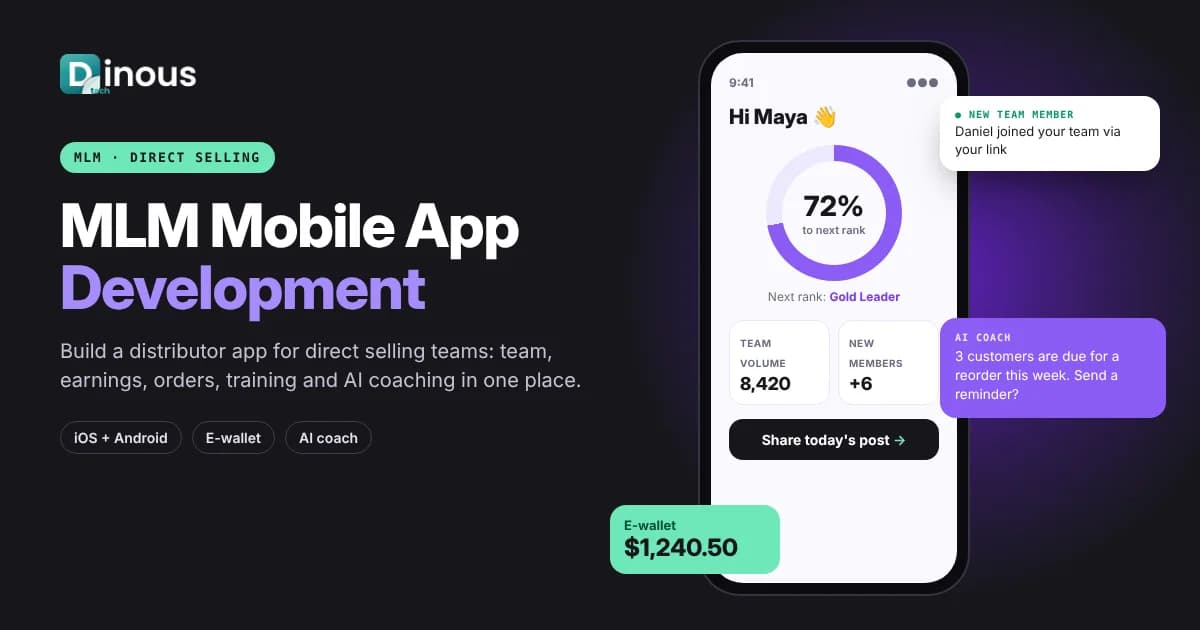
Most network marketing and direct selling distributors run their business from a phone. They share products on messaging apps, follow up with customers between other jobs and check their team's progress late at night. If the company's back office only works well on a desktop browser, distributors lose time and the company loses sales. MLM mobile app development solves this by putting registration, ordering, team tracking, commissions, wallet, training and sharing tools into one app built for distributors. This guide explains how to build an MLM app for direct selling teams in 2026, covering app types, distributor and admin features, architecture, the step-by-step process, tech stack, AI, compliance, cost factors and timeline. It is written for direct selling companies, network marketing brands and MLM software founders worldwide, from the USA, UK and Europe to the UAE, Southeast Asia and Australia.
Dinoustech is an MLM software development company that builds back offices, commission engines and distributor apps for direct selling businesses. The guidance below comes from what our clients ask for when they move their field team to mobile.
Key Takeaways
- An MLM mobile app is the distributor's daily tool: ordering, customers, team, earnings, training and sharing in one place.
- The app should sit on top of your MLM back office and commission engine through secure APIs, never calculate commissions on the phone.
- Design for the field: fast loading, simple screens, offline-friendly lists, many languages and currencies, and one-tap sharing.
- Show a clear, honest picture of earnings and rank progress, and keep income claims and product claims compliant.
- AI can coach new distributors, draft social posts, suggest follow-ups and answer product questions, with human review where it matters.
- Plan for app store rules, data privacy laws and payment regulations in every country where your distributors work.
In this guide
Table of Contents
- What Is an MLM Mobile App?
- Why Direct Selling Teams Need a Mobile App
- Types of MLM Apps
- Distributor App Features
- Admin and Back-Office Features
- How the App Connects to Your MLM Software
- MLM App Development Process
- Recommended Tech Stack
- How Dinoustech Uses AI in MLM Apps
- Compliance and App Store Rules
- MLM App Development Cost Factors
- Development Timeline
- Common Challenges
- Why Choose Dinoustech
- Conclusion
What Is an MLM Mobile App?
An MLM mobile app is an iOS and Android app that gives distributors (also called members, consultants, brand partners or affiliates) access to their direct selling business from their phone. It connects to the company's MLM software, which holds the genealogy, orders, compensation plan rules, commissions and wallets, and presents the parts each distributor needs in a simple, mobile-first way.
It is not a separate system. Think of the MLM back office as the engine and the app as the dashboard and steering wheel the field team uses every day. If you are new to the back-office side, read our guide on how to develop MLM software with distributor management first.
Why Direct Selling Teams Need a Mobile App
- Distributors are mobile-first: many never open a laptop for their business. A responsive website helps, but a native app is faster and can send push notifications.
- Faster duplication: new members can follow the same onboarding checklist, training and scripts as top leaders, right inside the app.
- More reorders: customer lists, reminders and one-tap reorder links help distributors serve existing customers, which keeps a business healthy.
- Clear motivation: rank progress bars, team activity and earnings summaries show what to do next.
- Better brand control: approved images, videos and product claims in a content library reduce off-brand or non-compliant posts.
- Useful data for the company: app activity shows which tools, products and training actually drive results.
Types of MLM Apps
| App type | Who uses it | Main purpose |
|---|---|---|
| Distributor (back-office) app | All distributors | Orders, team, earnings, wallet, training |
| Customer shopping app | Retail and preferred customers | Shop, subscribe, reorder, link to their distributor |
| Leader or field-manager app | Team leaders | Team analytics, coaching, event and promotion tracking |
| Admin or staff app | Company staff | Approvals, support tickets, KYC checks, quick reports |
| Event and training app | Whole community | Live sessions, recordings, event tickets, recognition |
Most companies start with one distributor app that includes a light customer-sharing flow, then add a separate customer app once retail sales grow. For the shopping side, our eCommerce app development team builds storefronts that connect to the same product and order data.
Distributor App Features
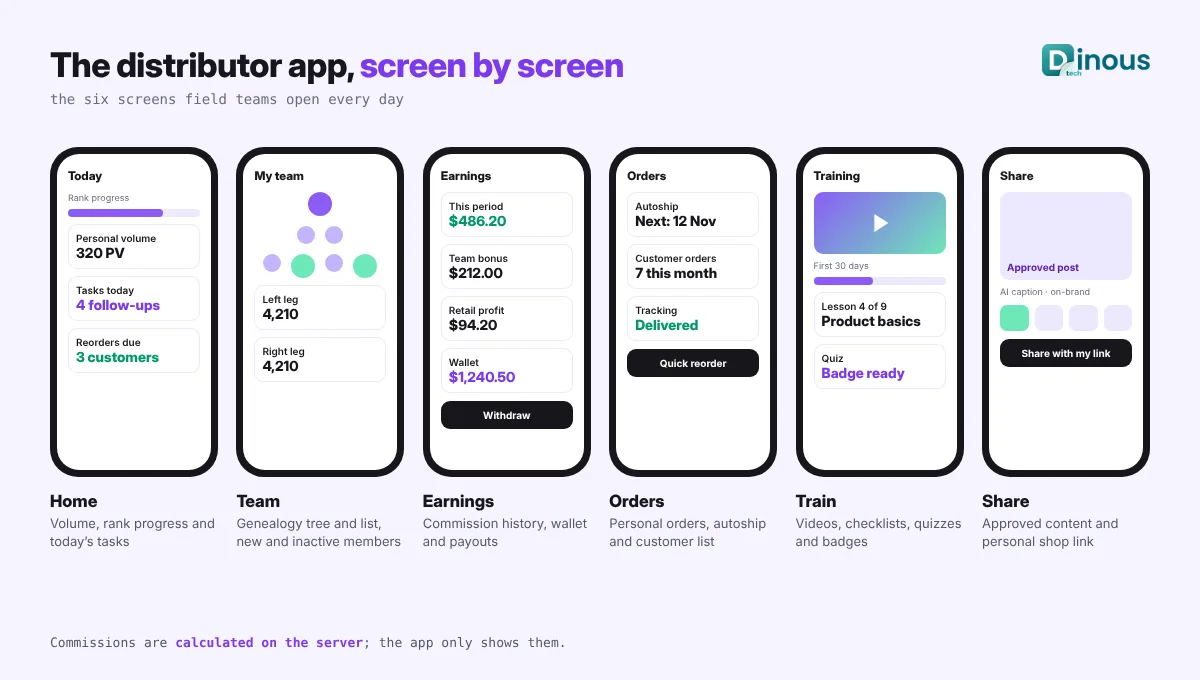
Onboarding and profile
- Sign-up with sponsor or referral link, identity and tax details where required, e-signature on agreements.
- Guided first-30-days checklist with short videos.
- Biometric login and two-step verification for account security.
Home dashboard
- Personal and team volume for the current period, rank progress and what is needed for the next rank.
- Today's tasks: follow-ups, birthdays, reorders due, new team members to welcome.
Team and genealogy
- Mobile-friendly tree views for binary, unilevel or matrix plans, plus searchable list views, because large trees are hard to read on a small screen.
- New member alerts, inactive member flags and leg balance insights. Our article on MLM compensation plans explained covers how each plan shapes these views.
Earnings and wallet
- Commission and bonus history with clear explanations of where each amount came from.
- E-wallet balance, withdrawal requests, payout status and downloadable statements.
- Multi-currency display for international teams.
Orders, customers and sharing
- Personal orders, autoship or subscription management, and order tracking.
- A simple customer list with notes, reorder reminders and purchase history.
- Personal replicated shop links and one-tap sharing of approved posts, images and videos to social and messaging apps.
Training and communication
- Training library with progress tracking, quizzes and certificates.
- Company news, promotions, events and push notifications segmented by country, rank or language.
- In-app support chat and ticket history.
Admin and Back-Office Features
- Content management for news, training, approved marketing assets and push campaigns.
- Rules for which features appear in which country, language or rank.
- Distributor approval, KYC review, compliance flags and account actions.
- App analytics: active users, feature use, training completion and share-to-order conversion.
- Payout approval workflows, fraud checks and audit logs.
- Support desk and role-based access for staff.
For a full list of back-office capabilities, see what features MLM software should have in 2026.
How the App Connects to Your MLM Software
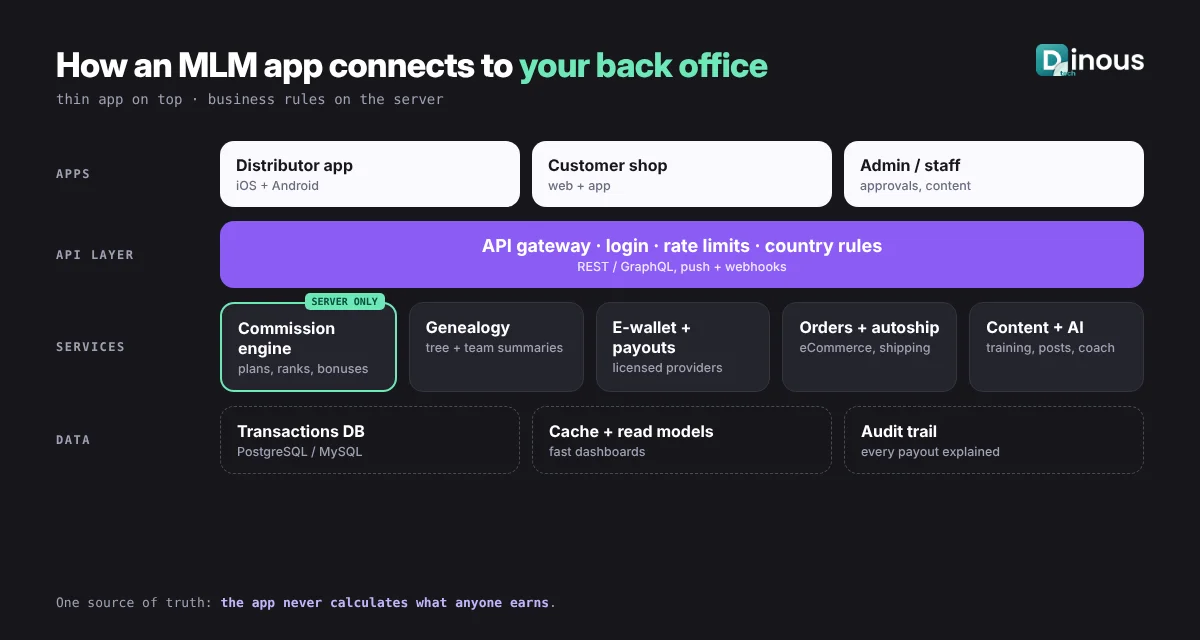
The safest design keeps business logic on the server. The mobile app calls a secure API layer, which talks to the services that matter: the genealogy service, the commission engine, the e-wallet and payout service, the product and order system, the content system and the notification service.
- Commissions are calculated on the server only, then shown in the app. The phone never decides what anyone earns.
- Read models for speed: team summaries and rank progress are pre-calculated so the dashboard opens in a second, even for leaders with thousands of people.
- Caching and offline lists: customer lists, training and approved content can be read without a connection and sync later.
- Webhooks and push: events such as "new team member joined" or "payout sent" trigger real-time notifications.
If your current back office cannot offer clean APIs, a mobile project is a good moment to modernise it. Our MLM software migration guide explains how to move platforms without losing genealogy or commission history.
MLM App Development Process
- Discovery: talk to distributors at different ranks and in different countries. Find the five things they do every day and make those effortless.
- Back-office and API review: check which data and actions your MLM software already exposes, and plan the missing APIs.
- UX and prototype: design key screens (home, team, earnings, share) and test them with real distributors before building.
- MVP build: start with onboarding, dashboard, team, earnings, orders and sharing. Our MVP app development guide explains how to keep the first release focused.
- Testing: test commission displays against the back office for real periods, test large genealogies, slow networks, many languages and older phones.
- Compliance review: review income wording, product claims and app store requirements before submission.
- Launch in waves: release to leaders first, collect feedback, then open to the whole field with training.
- Improve: use analytics and distributor feedback to add features each month.
For the full back-office build sequence, see our step-by-step guide to building successful MLM software.
Recommended Tech Stack
| Layer | Typical choices |
|---|---|
| Mobile app | Flutter or React Native for one codebase on iOS and Android; native Swift or Kotlin for special needs |
| Backend and API | Node.js, Java or Python services behind an API gateway, REST or GraphQL |
| Commission engine | Server-side rules engine with batch and near real-time calculation, full audit trail |
| Database | PostgreSQL or MySQL for transactions, a graph or closure-table model for large genealogies, Redis for caching |
| Payments and payouts | Regional payment gateways and payout providers that support your countries and currencies |
| Notifications and content | Firebase Cloud Messaging and Apple Push Notification service, a headless CMS for training and assets |
| Cloud and security | AWS, Azure or Google Cloud, encryption, WAF, monitoring and regular penetration tests |
Our wider mobile app development practice uses the same stack choices for high-traffic consumer apps.
How Dinoustech Uses AI in MLM Apps
AI-assisted development
Our developers use AI coding assistants to speed up screen building, API clients, test cases and documentation. This is especially useful for commission display testing, where AI helps generate many edge-case scenarios that our team then checks against the real engine. Every change is reviewed by an engineer.
AI features inside your app
- AI coach for new distributors: answers "what should I do next?" using the member's checklist, training progress and team data.
- Post and message drafts: creates social captions and follow-up messages from approved product information, in the distributor's language, with compliance rules built in so it avoids income or medical claims.
- Smart follow-up suggestions: highlights customers who are due for a reorder and team members who may need encouragement.
- Product assistant: answers product questions from the company's approved knowledge base.
- Fraud and anomaly signals: flags unusual sign-up or payout patterns for staff to review. See how AI can automate MLM business management.
AI support agent for our clients
We can give your staff an AI support assistant trained on your app and back-office documentation, so they can quickly answer questions such as "Why is this bonus pending?" or "How do I target a push message to one country?" Our team handles anything that needs a human.
Compliance and App Store Rules
Direct selling is regulated differently in each country, and a mobile app puts your messaging in every distributor's hand, so compliance must be part of the product.
- Income and earnings claims: regulators such as the US Federal Trade Commission warn against misleading income claims. Show earnings factually, link to your income disclosure where you publish one, and keep AI-generated text free of earning promises.
- Product claims: health, beauty and wellness claims are strictly controlled in many markets. Use an approved content library.
- Data privacy: GDPR in Europe and the UK, US state privacy laws and local laws in the Middle East and Asia affect how you collect and store distributor and customer data.
- Payments and wallets: payouts, wallet balances and transfers can fall under payment, tax and anti-money-laundering rules. Use licensed providers.
- App store policies: Apple and Google have rules on in-app purchases, user-generated content, account deletion and business models. Review the latest guidelines before you submit.
This is general guidance, not legal advice. Check every market with a qualified adviser.
MLM App Development Cost Factors
- Back-office readiness: an existing, well-documented API costs far less to build on than a system that needs new APIs.
- Feature scope: a focused distributor MVP versus a full suite with customer app, events and AI.
- Compensation plan complexity: more plan types, bonuses and ranks mean more screens and more testing.
- Countries, languages and currencies: each adds translation, payment and compliance work.
- Genealogy size and performance: very large teams need extra engineering for fast views.
- Integrations: payment gateways, payout providers, KYC services, shipping, CRM and messaging tools.
- Maintenance: OS updates, app store changes, new features and support after launch.
Our article on the cost of MLM software development explains the back-office side of the budget. For an estimate for your app, contact our team.
Development Timeline
| Phase | Typical duration |
|---|---|
| Discovery and API review | 2 to 3 weeks |
| UX design and prototype testing | 3 to 4 weeks |
| MVP development (app + APIs) | 8 to 12 weeks |
| Testing and compliance review | 3 to 4 weeks |
| App store review and leader beta | 2 to 3 weeks |
| Full launch and monthly improvements | Ongoing |
A focused distributor app on top of a ready back office usually takes about four to six months to reach a full launch. If the back office also needs new APIs or a migration, plan more time. Our guide on how long it takes to develop MLM software gives more detail.
Common Challenges
- Numbers that do not match: if the app shows a different total from the back office, trust is lost. Use one source of truth and test every period.
- Slow team views: large genealogies need pre-calculated summaries and paging.
- Low adoption: launch with leaders as champions and include training inside the app.
- Non-compliant sharing: approved content libraries and AI guardrails reduce risky posts.
- Different rules per country: feature flags and country settings keep one app working everywhere.
- Choosing the wrong partner: see our list of common mistakes when choosing an MLM software company.
Why Choose Dinoustech for MLM App Development
- One team for the MLM back office, commission engine, APIs and mobile apps.
- Support for binary, unilevel, matrix and hybrid plans, with clear earnings explanations in the app.
- Mobile-first UX designed with real distributors, for fast daily use.
- Practical AI tools with compliance guardrails.
- Experience with clients in many countries. See examples in our portfolio.
Conclusion
An MLM mobile app is now the main way many distributors run their business. Build it on a solid back office with clean APIs, keep commission logic on the server, design every screen for quick daily use, and treat compliance and data privacy as product features. Add AI where it saves distributors time, with guardrails that protect your brand.
Ready to give your direct selling team a better app? Talk to Dinoustech about your plan, your countries and your current software, and we will map out the right first release.