Dinoustech Private Limited
MVP App Development: How to Build and Launch a Minimum Viable Product App in 2026
Most new apps do not fail because the code is bad. They fail because the team spent a year building features nobody asked for. MVP app development solves that problem. A minimum viable product (MVP) is the smallest version of your app that real users can download, use and pay for, so you learn what works before you invest in the full product. This guide explains how to plan, build and launch an MVP app in 2026: what an MVP is (and is not), how to choose the features, the step-by-step process, the tech stack, how AI speeds things up, cost factors, a realistic timeline and the mistakes that waste the most money. It is written for founders, product owners and business teams worldwide, from the USA, UK and Europe to the UAE and Australia.
Dinoustech is a mobile app development company that helps startups and established businesses turn ideas into launch-ready apps. The advice below comes from the questions founders ask us most often before they write their first line of code.
Key Takeaways
- An MVP is a real, working app with only the features needed to solve one core problem for one clear audience.
- The goal of an MVP is learning: proving that users want the product and will keep using it, before you build everything.
- Feature choice is the hardest part. Use a simple method such as MoSCoW and cut anything that does not test your main idea.
- Cross-platform frameworks like Flutter and React Native let one team ship to iOS and Android at the same time.
- Plan analytics, crash reporting and feedback loops from day one, because launch day is the start of the work, not the end.
- AI shortens MVP timelines through AI-assisted coding and testing, and it can add smart features without a large data team.
Table of Contents
- What Is MVP App Development?
- MVP vs Prototype vs Full Product
- Why Build an MVP First
- Types of MVP
- How to Choose MVP Features
- MVP App Development Process, Step by Step
- Recommended Tech Stack for an MVP
- How Dinoustech Uses AI in MVP Development
- Launch, Measure and Iterate
- Monetization Options to Test Early
- Security, Privacy and Store Rules
- MVP Cost Factors
- MVP Development Timeline
- Common MVP Mistakes and How to Avoid Them
- Why Choose Dinoustech
- FAQs
What Is MVP App Development?
MVP app development is the process of building the first usable version of an app with the minimum set of features that delivers real value to early users. "Minimum" means small in scope. "Viable" means it still works well, looks trustworthy and solves the problem properly. An MVP is not a broken beta or a demo that crashes. It is a focused product that does one job very well.
Think of a food delivery idea. The full vision might include live tracking, loyalty points, group orders, subscriptions, restaurant analytics and chat. The MVP might only let users browse a few local restaurants, place an order, pay and get a notification when the food is on its way. If people order again and again, you have proof. If they do not, you have saved months of work and can change direction quickly.
MVP vs Prototype vs Full Product
These three terms are often mixed up. The table below shows how they differ.
| Stage | What it is | Who uses it | Main question it answers |
|---|---|---|---|
| Prototype | Clickable design or simple mock-up, usually without a real backend | Founders, investors, test users in interviews | Does the idea make sense and is the flow easy to understand? |
| MVP | Working app with real data, accounts and payments for one core use case | Early adopters in the real market | Will people actually use it, come back and pay? |
| Full product | Complete feature set, scaling, integrations and growth tools | Your full target market | How do we grow, retain and earn more per user? |
A good path is prototype first (a few weeks of design), then MVP, then a staged roadmap toward the full product. Our guide to the mobile app development roadmap for new businesses explains how those stages fit together.
Why Build an MVP First
- Lower risk: you spend a fraction of the full budget to test the riskiest assumption in your business.
- Faster time to market: a focused scope can reach users in months instead of a year, before competitors move.
- Real user data: analytics and feedback from real people beat opinions in a meeting room.
- Easier fundraising: investors respond better to a live product with early traction than to slides.
- Better product decisions: you build the next features based on what users do, not what you guessed.
Types of MVP
Not every MVP needs to be a full mobile app. Choose the type that tests your idea at the lowest cost.
- Single-feature MVP: an app that does only the one thing your product is about, for example booking a slot or sending money to a friend.
- Concierge MVP: the app takes the request, but your team completes parts of the service by hand in the background. It tests demand before you automate.
- Landing page MVP: a web page that explains the product and collects sign-ups or pre-orders, used before any app is built.
- Web app MVP: a responsive web version that works on phones, useful when app store approval or native features are not needed yet.
- No-code or low-code MVP: quick to build for simple workflows, but often hard to scale or customise later.
- Custom-coded MVP: the right choice when you need payments, real-time features, device hardware, strong security or a base you can grow on.
How to Choose MVP Features
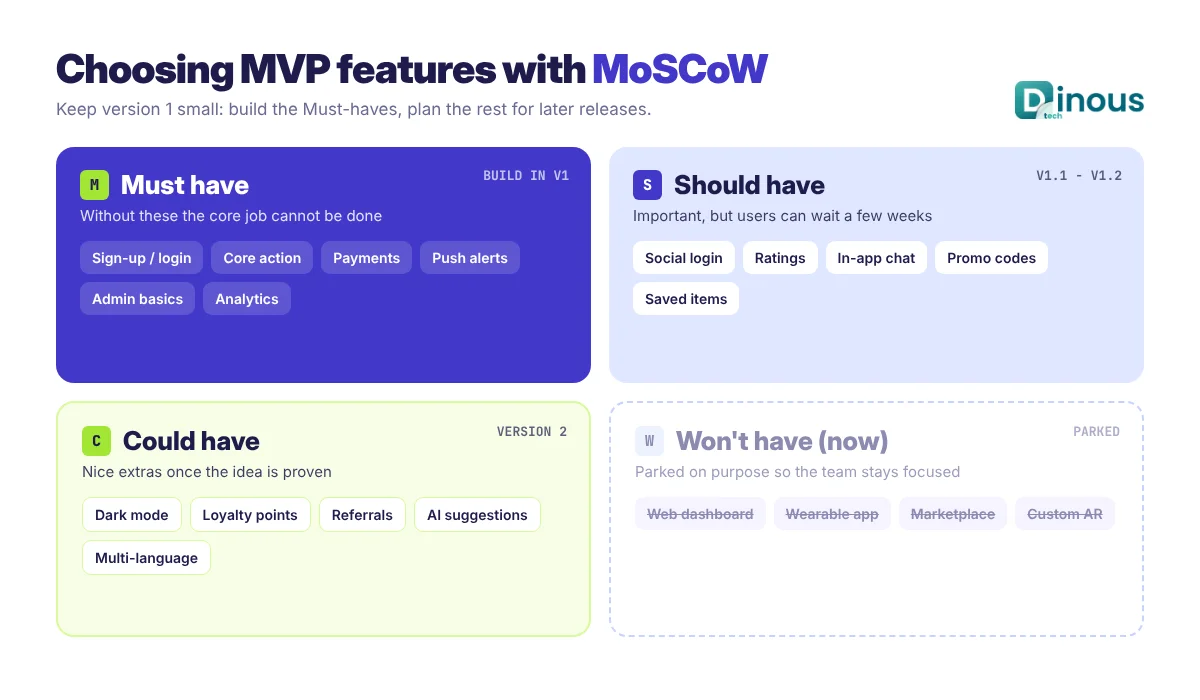
Feature selection decides whether your MVP is lean or bloated. Start by writing one sentence: "Our app helps [user] do [job] better than [current option]." Every feature must support that sentence. Then sort your feature list with the MoSCoW method:
- Must have: without it, the core job cannot be done (sign-up, the main action, payment if you charge).
- Should have: important, but users can live without it for the first release.
- Could have: nice extras that wait for version two.
- Won't have (now): ideas you park on purpose so the team stays focused.
A typical MVP feature set looks like this:
User app
- Sign-up and login (email, phone or social login)
- Simple onboarding that explains the value in three screens or fewer
- The core action of the product (search, book, order, track, learn or pay)
- Payments or subscriptions, if you plan to charge
- Push notifications for key events
- Basic profile and settings, plus an in-app feedback or support option
Admin panel
- User management and content or catalogue management
- Orders, bookings or transactions view
- Basic reports and an analytics dashboard
- Push notification and promo tools
For ideas on what users expect from a modern app once you move past the MVP, see what features make a mobile app successful in 2026.
MVP App Development Process, Step by Step
1. Define the problem and the audience
Write down who the first users are, what problem they have today and how they solve it now. Talk to at least a handful of real potential users. Their words will shape your onboarding, your feature list and your marketing.
2. Study the market and competitors
Look at the apps your users already use. Read their app store reviews, especially the one-star and three-star ones. Those complaints are often your best feature ideas and your clearest positioning.
3. Set success metrics
Decide before launch what success looks like: for example sign-up to first action rate, day-7 and day-30 retention, number of paying users or weekly active users. Without clear metrics, every result looks good or bad depending on who is reading it.
4. Prioritise features and plan the scope
Use MoSCoW, map the user journey from install to the core action and cut anything that does not serve that journey. Agree on a fixed scope for version one and a written list of what comes later.
5. Design wireframes and a clickable prototype
UI/UX designers create wireframes, then a clickable prototype. Test it with five to ten target users. Fixing a confusing screen in design takes hours; fixing it after development takes weeks.
6. Choose the platform and tech stack
Decide between iOS, Android or both, and between native and cross-platform development. Most MVPs launch on both platforms with one cross-platform codebase. Our comparison of Android vs iOS app development helps if you must pick one first.
7. Build in short sprints
Development runs in one- or two-week sprints with a demo at the end of each. You see progress early, test real builds on your own phone and can adjust priorities before it is too late.
8. Test quality and security
QA covers functional testing, device testing on popular phones and screen sizes, performance checks and basic security tests. Automated tests on the core flows protect you from breaking them in later releases.
9. Beta test with real users
Release to a small group of early users through TestFlight on iOS and closed testing on Google Play. Fix the issues they find, polish the onboarding and confirm that analytics events fire correctly.
10. Launch, measure and improve
Publish to the App Store and Google Play, run your first marketing push and watch the metrics you defined in step 3. Plan the next sprint from the data. Our article from idea to App Store covers the publishing side in more detail.
Recommended Tech Stack for an MVP
An MVP stack should be fast to build with, well supported and able to grow when the product works. A common, proven setup:
| Layer | Common choices | Why it suits an MVP |
|---|---|---|
| Mobile app | Flutter or React Native (cross-platform); Swift or Kotlin when native is required | One codebase for iOS and Android cuts time and cost |
| Backend | Node.js, Python (Django or FastAPI) or Laravel | Fast development, large developer pool, easy to scale later |
| Database | PostgreSQL, MySQL or MongoDB | Reliable, well documented, works with every major cloud |
| Backend services | Firebase or Supabase for auth, storage and push | Saves weeks on standard features |
| Cloud hosting | AWS, Google Cloud or Azure | Pay for what you use, scale when traffic grows |
| Payments | Stripe, PayPal, Apple In-App Purchase, Google Play Billing | Trusted checkout and subscription handling |
| Analytics and crashes | Firebase Analytics, Mixpanel or Amplitude; Crashlytics or Sentry | Shows what users do and where the app breaks |
If you are unsure which cross-platform tool fits, read our guide to choosing the right cross-platform app framework or our Flutter app development guide.
How Dinoustech Uses AI in MVP Development
AI changes MVP development in three practical ways. We use it to build faster, to add smart features to your app and to support you after launch.
AI-assisted development
Our developers use AI coding assistants to write boilerplate code, generate API clients, suggest unit tests and review pull requests. Designers use AI tools to explore layout ideas and generate placeholder content for prototypes. Every output is reviewed by an experienced engineer, but the time saved on routine work goes straight into the features that make your product different. AI also helps our QA team create test cases and spot regressions, as we explain in how AI improves software testing and quality assurance.
AI features inside your MVP
Modern AI APIs let an MVP offer smart features without a large data science team. Examples include personalised recommendations, smart search that understands natural language, an in-app AI assistant that answers user questions, automatic content tagging, image or document recognition, and simple churn or fraud signals. The key is to add AI only where it supports the core job of the app. Our article on AI features every mobile app should have lists more ideas.
AI support agent for clients
For client projects we can provide an AI support agent trained on your app's help content and FAQs. It answers routine user questions inside the app or on your website at any hour and passes harder cases to your team. For a young product with a small team, this keeps response times low without hiring a full support desk.
Launch, Measure and Iterate
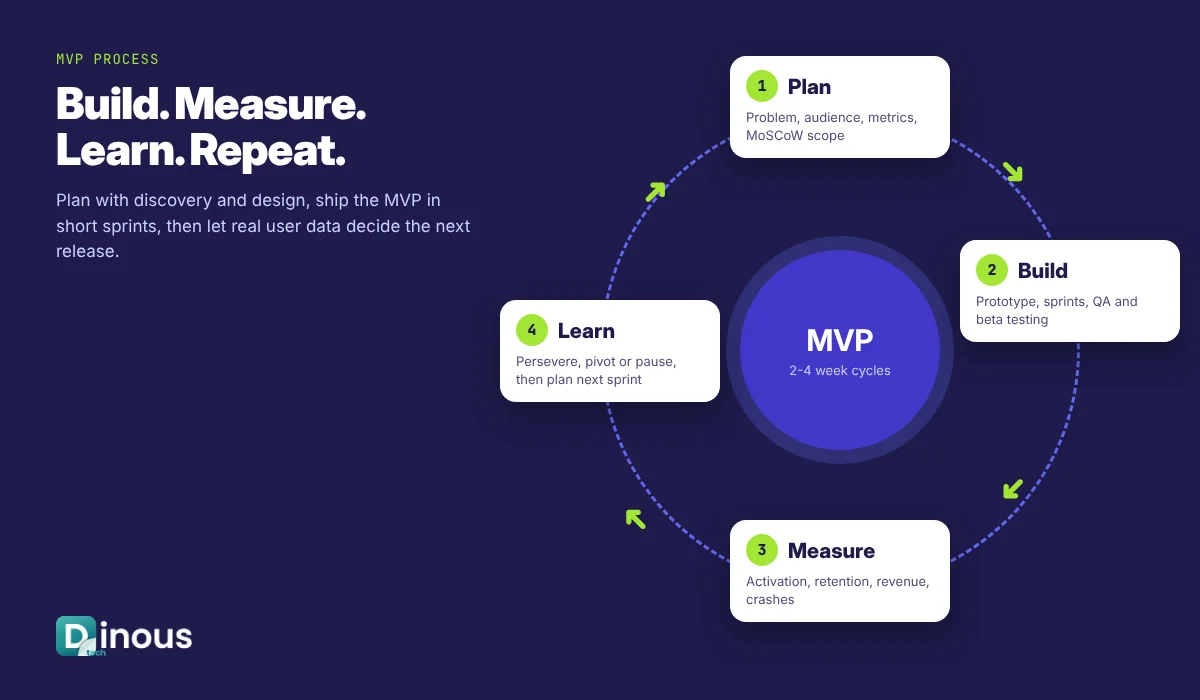
An MVP is only useful if you learn from it. After launch, track a short list of numbers every week: installs, activation (users who complete the core action), retention at day 1, day 7 and day 30, conversion to paid, and crash-free sessions. Combine the numbers with qualitative feedback from in-app surveys, support chats and short user calls.
Then make one of three decisions: persevere (the data is good, keep improving), pivot (users love one part, so refocus on it) or pause (the core idea is not working, so stop before spending more). Each cycle of build, measure and learn should be short, ideally two to four weeks.
Monetization Options to Test Early
- Subscriptions: monthly or yearly plans, often with a free trial. Best for apps used regularly.
- Freemium: a free core with paid premium features. Lets you grow a user base and test what people will pay for.
- Transaction or commission fees: common for marketplaces, booking and delivery apps.
- One-time purchase: simple, but harder to sustain without new users.
- In-app purchases: credits, add-ons or digital goods.
- Advertising: usually only works at large scale; rarely the best first model for an MVP.
Testing a price early, even a small one, tells you far more about real demand than free downloads do.
Security, Privacy and Store Rules
Small scope is no excuse for weak security. Even an MVP needs encrypted connections (HTTPS/TLS), secure password and token handling, role-based access in the admin panel and regular backups. If you collect personal data, follow the privacy laws of your markets, such as GDPR in the EU and UK or CCPA in California, and publish a clear privacy policy. Health, finance and children's apps have extra rules. Features like biometric authentication add trust at low cost.
Both app stores also have review guidelines. Apple and Google regularly update minimum SDK versions, privacy label requirements and testing rules for new developer accounts, so check their current developer documentation before you plan your launch date. This section is general guidance, not legal advice.
MVP Cost Factors
There is no single price for an MVP, because scope drives cost. These factors have the biggest effect:
- Number of features and screens: each extra flow adds design, development and testing time.
- Platforms: one cross-platform codebase usually costs less than two native apps.
- Design depth: a clean standard UI costs less than custom animations and illustrations.
- Backend complexity: real-time features, matching logic or heavy data processing take longer.
- Third-party integrations: payments, maps, chat, video or AI APIs add setup and ongoing fees.
- Compliance needs: health, finance or children's data require extra security work.
- Team location and model: a fixed-scope project and a dedicated team are priced differently.
- Post-launch support: hosting, monitoring, bug fixes and updates are ongoing costs.
The best way to get a reliable number is a short discovery phase that fixes the scope. Contact Dinoustech with your idea and we will share a scoped estimate.
MVP Development Timeline
Timelines depend on scope, but these ranges are realistic for a well-planned MVP:
| Phase | Typical duration |
|---|---|
| Discovery and scope definition | 1 to 2 weeks |
| UI/UX design and clickable prototype | 2 to 3 weeks |
| Development (app, backend, admin panel) | 6 to 10 weeks |
| QA, beta testing and fixes | 2 to 3 weeks |
| Store submission and launch | About 1 week |
| Total | About 3 to 4 months (simpler apps can be faster, complex ones longer) |
Common MVP Mistakes and How to Avoid Them
- Building too much: if your MVP has every feature, it is not an MVP. Protect the scope.
- Skipping user research: a few interviews before design can save months of rework.
- No analytics: without tracking you cannot tell why users leave. Add it before launch, not after.
- Poor quality: "minimum" does not mean buggy. Crashes and slow screens kill early retention.
- Choosing a stack that cannot grow: a quick no-code build may need a full rewrite once you have traction.
- No launch plan: an app nobody hears about teaches you nothing. Plan your first users before release.
- Ignoring feedback: the point of an MVP is to listen and change. Schedule time for it in every sprint.
Why Choose Dinoustech for MVP App Development
- Product thinking first: we help you cut scope to what matters and define the metrics before we code.
- Full team in one place: business analysts, UI/UX designers, mobile and backend developers and QA engineers.
- Cross-platform expertise: Flutter and React Native apps for iOS and Android from one codebase.
- AI-ready builds: AI-assisted development for speed, and AI features where they add real value.
- Built to scale: clean architecture so your MVP grows into the full product instead of being thrown away.
- Support after launch: monitoring, updates and new features as your users grow, worldwide.
You can see apps we have built in our portfolio, and learn more about our mobile app development services.
Conclusion
MVP app development is the smartest way to turn an app idea into a real business with less risk. Focus on one problem, build only what proves your idea, launch quickly, measure honestly and improve in short cycles. With the right partner and a disciplined scope, you can have a working app in the hands of real users in a few months and make every next investment based on data. Ready to build your MVP? Talk to Dinoustech today and get a free consultation on your idea.