Dinoustech Private Limited
EHR Integration for Healthcare Apps: How to Connect Your App with Epic, Oracle Health and Other EHRs Using FHIR
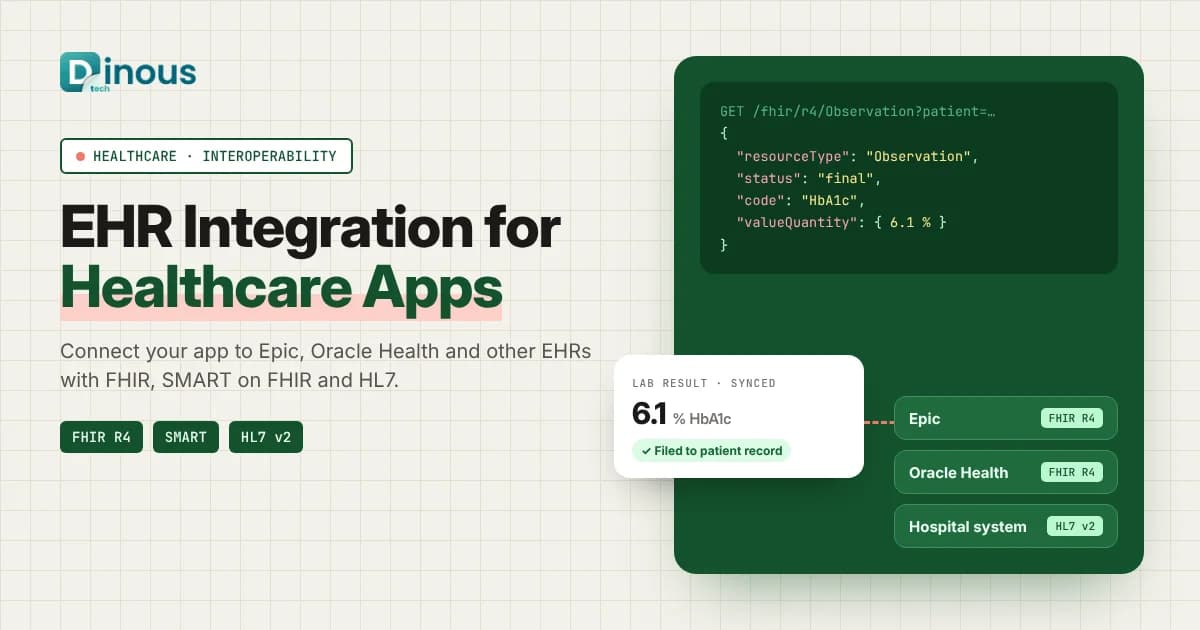
A healthcare app that cannot talk to the hospital's records system often ends up as one more login for busy doctors and one more place for patients to type the same details again. EHR integration for healthcare apps fixes that. It connects your patient app, telehealth product, remote monitoring platform or clinic tool to the electronic health record (EHR) that providers already use, so that appointments, allergies, medications, lab results and visit notes flow to the right place without manual copying. This guide explains how EHR integration works in 2026, covering FHIR APIs, SMART on FHIR, HL7 v2, connecting to Epic and Oracle Health (formerly Cerner), the step-by-step process, tech stack, AI, compliance, cost factors and timeline. It is written for health-tech founders, hospital IT teams and digital health product owners worldwide, from the USA, UK and Europe to the UAE and Australia.
Dinoustech is a healthcare app development company that builds patient apps, doctor platforms and hospital software for clients around the world. The answers below come from the questions product teams ask us before they connect an app to a clinical system.
Key Takeaways
- EHR integration lets your app read and, where allowed, write clinical data in the provider's record system, so doctors work in one place and patients do not repeat their history.
- HL7 FHIR (mostly version R4) is the main modern standard. SMART on FHIR adds secure login and app launch from inside the EHR or from a patient portal.
- Older interfaces such as HL7 v2 messages are still common inside hospitals, so many projects need both FHIR and HL7 v2.
- Epic and Oracle Health each have their own developer programmes, sandboxes and approval steps. Plan time for these, not just for coding.
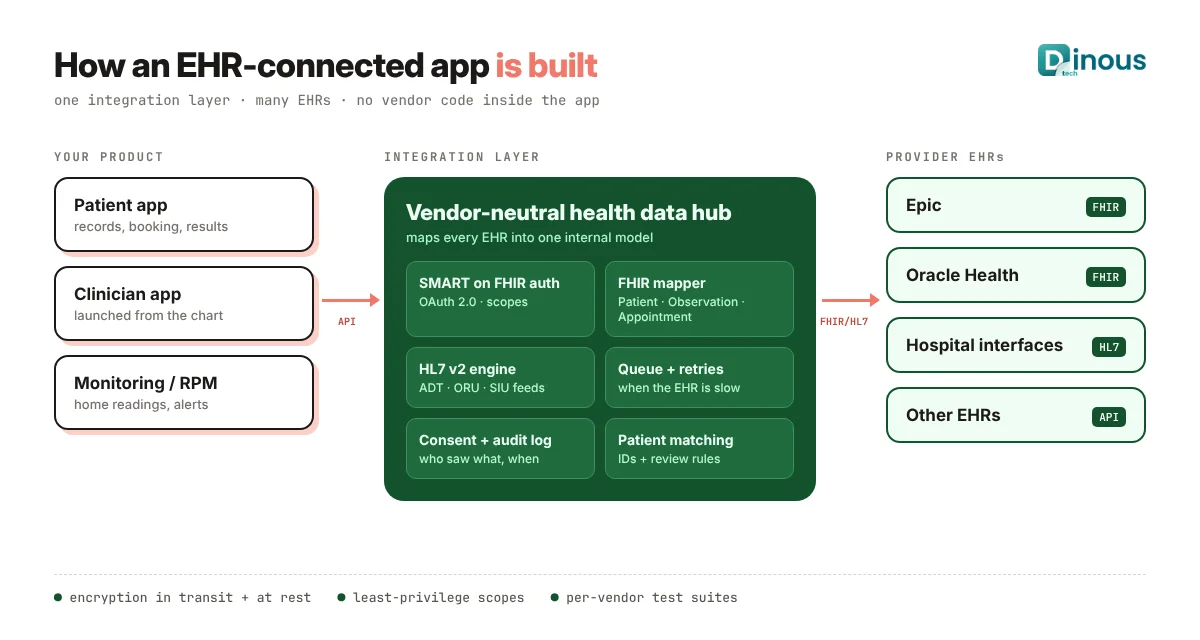
- Build one integration layer inside your product so that adding a second or third EHR does not mean rewriting the app.
- Security, consent and audit logs are part of the design from day one, under HIPAA in the US, GDPR in Europe and local health data laws elsewhere.
In this guide
Table of Contents
- What Is EHR Integration?
- Why Healthcare Apps Need It
- FHIR, SMART on FHIR and HL7 v2
- Ways to Connect to an EHR
- Connecting to Epic and Oracle Health
- Common Use Cases
- EHR Integration Process Step by Step
- Recommended Tech Stack
- How Dinoustech Uses AI in EHR-Connected Apps
- Security, Privacy and Compliance
- EHR Integration Cost Factors
- Timeline
- Common Challenges
- Why Choose Dinoustech
- Conclusion
What Is EHR Integration?
An electronic health record (EHR) is the main digital record a hospital or clinic keeps for each patient: demographics, problems, medications, allergies, lab results, vital signs, immunisations, visit notes and more. EHR integration is the technical connection that lets another piece of software exchange this data with the EHR in a safe, controlled way.
The connection can go in one direction or both. A read-only integration might show a patient their lab results inside your app. A two-way integration might also send home blood pressure readings, a completed intake form or a booked appointment back into the provider's record, where the care team can see it without opening a second system.
You will also hear the term EMR (electronic medical record). In everyday use the two words are often swapped. EMR usually means the record inside one practice, while EHR suggests a record designed to be shared across providers. For integration work, the methods are the same.
Why Healthcare Apps Need EHR Integration
Many promising digital health products struggle to grow inside hospitals for one simple reason: they sit outside the clinical workflow. When a doctor has to log in somewhere else, copy numbers by hand or read a PDF report, adoption drops quickly. Integration matters because it:
- Saves clinician time: data appears inside the EHR screen they already use, and they can launch your app from the patient's chart.
- Reduces errors: no re-typing of medication lists, allergies or results.
- Improves the patient experience: patients can see records, book visits and share data from one app.
- Helps you sell to providers: hospital buyers often ask "Does it integrate with our EHR?" early in the conversation.
- Supports regulation and reimbursement: many programmes expect data to be documented in the official record.
If you are still deciding what kind of product to build, our step-by-step guide to developing a healthcare app and the article on what makes a healthcare app truly useful for patients are good starting points.
FHIR, SMART on FHIR and HL7 v2 Explained
HL7 FHIR
FHIR (Fast Healthcare Interoperability Resources), published by HL7, is the modern standard for exchanging health data over web APIs. Data is organised into "resources" such as Patient, Practitioner, Appointment, Observation (for vitals and lab values), MedicationRequest, AllergyIntolerance, Condition, Encounter and DocumentReference. Your app calls REST endpoints and receives JSON, much like any other modern API. Most current work uses FHIR R4, and many countries publish their own FHIR profiles, such as US Core in the USA and UK Core in England, that define exactly which fields must be present.
SMART on FHIR
SMART on FHIR is a framework on top of FHIR that handles login and authorisation using OAuth 2.0 and OpenID Connect. It lets an app be launched from inside the EHR with the current patient already selected (an "EHR launch"), or lets a patient sign in with their portal account from a standalone app (a "standalone launch"). The app asks for specific scopes, such as permission to read observations, and the EHR decides what to grant.
HL7 v2 and other formats
Inside many hospitals, systems still exchange pipe-delimited HL7 v2 messages, for example ADT messages for admissions and transfers, ORU messages for results and SIU messages for scheduling. These usually travel through an interface engine. Some projects also deal with CDA documents, DICOM for imaging, or bulk FHIR exports for population data. A good integration plan lists exactly which of these your product needs.
Ways to Connect Your App to an EHR
There is no single way to integrate. The right route depends on who your customers are, which EHRs they run and what data you need.
| Method | Best for | Things to watch |
|---|---|---|
| Direct FHIR API (SMART on FHIR) | Patient apps, clinician apps launched from the chart, read and limited write | Each vendor's approval process, supported resources and write permissions differ |
| HL7 v2 through an interface engine | Real-time feeds inside one hospital: admissions, results, orders | Needs the hospital's IT team, custom mapping per site |
| Integration platform or aggregator | Startups that need many EHRs quickly through one API | Ongoing fees, less control, check coverage for your target markets |
| Health information exchange or national network | Records shared across many providers in a region or country | Membership rules, purpose-of-use limits, country-specific setup |
| Patient-mediated access | Consumer apps where patients pull their own records | Data is read-only and depends on what each portal exposes |
Many mature products combine two or more of these. For example, a remote monitoring platform might use SMART on FHIR to launch from the chart, and HL7 v2 messages to file readings as results. Our guide on remote patient monitoring app development shows how that fits into an RPM product.
Connecting to Epic and Oracle Health
Epic and Oracle Health (the EHR business formerly known as Cerner) are among the most widely used EHRs in large health systems, so many teams start there. Both support FHIR R4 and the SMART on FHIR launch framework, and both give developers a sandbox with test patients.
- Epic: developers can start with Epic's public FHIR documentation and sandbox, register an app, and test against sample data. Moving to production at a real hospital involves Epic's vendor programme and the customer organisation, which must approve and switch on your app. Programme names, listing options and fees have changed over the years, so always check Epic's own developer site for current terms.
- Oracle Health: developers register through Oracle Health's developer console, test against its FHIR sandbox, and then work with each client site to enable the app in production.
Two practical lessons apply to both. First, the same FHIR resource can behave differently between vendors (search parameters, paging, extensions, which fields are filled), so test against each one. Second, the hospital is your real gatekeeper: its IT and security teams decide which scopes your app gets, so start those conversations early. Other EHRs, such as athenahealth, eClinicalWorks, NextGen and regional systems used in the UK, Europe, the Middle East and Australia, have their own programmes and should be checked one by one.
Common EHR Integration Use Cases
- Patient apps and portals: show visit summaries, lab results, medications and immunisations; let patients update details before a visit.
- Appointment booking: read real availability and write booked slots, which is a big step up from a separate calendar. See our doctor appointment app development cost guide.
- Telehealth and online consultation: open the patient's history during the call and send the visit note back to the record. Our guide to building an AI doctor consultation app covers the consultation side.
- Remote monitoring and wearables: file home readings as observations and raise alerts in the clinician's workflow.
- Clinical decision support: apps that show risk scores or care-gap reminders inside the chart.
- Hospital and clinic tools: bed management, discharge planning, referral and lab apps that need live patient data. Our article on creating a healthcare app like MyChart covers a patient-portal style product.
EHR Integration Process Step by Step
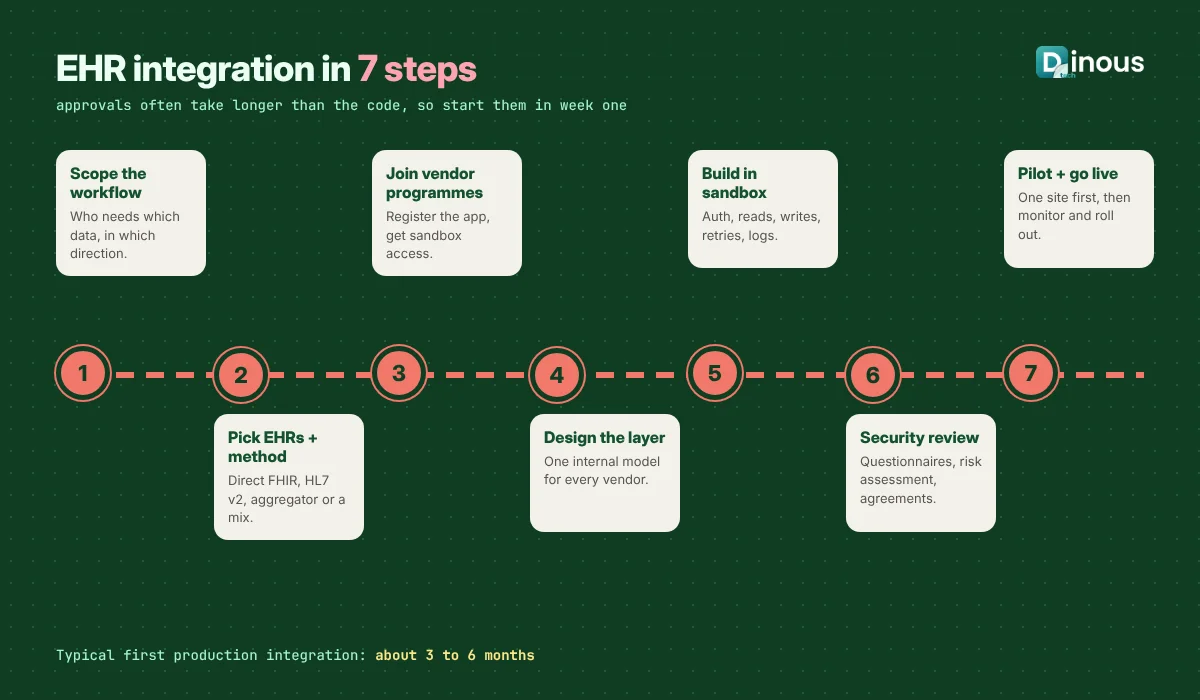
- Define the clinical workflow and data: write down who uses the integration, at which moment, and exactly which data moves in which direction. "Show the last 12 months of HbA1c results to the patient" is a usable requirement; "integrate with the EHR" is not.
- Choose target EHRs and method: list your first customers' EHRs and decide between direct FHIR, HL7 v2, an aggregator or a mix.
- Join developer programmes and sandboxes: register your app, study supported resources and scopes, and note approval steps and any fees.
- Design the integration layer: map each EHR's data into one internal model, so the rest of your app never needs to know which vendor sent it.
- Build and test in the sandbox: implement login, data reads and writes, error handling, retries and logging. Test with edge cases such as missing fields and duplicate patients.
- Security and customer review: complete the hospital's security questionnaire, risk assessment and any vendor review, and sign the required agreements, such as a business associate agreement in the US.
- Pilot, go live and monitor: start with one site or department, watch error rates and data quality, then roll out. Keep monitoring because EHR upgrades can change behaviour.
Recommended Tech Stack
| Layer | Typical choices |
|---|---|
| Patient and clinician apps | Flutter or React Native for mobile, React or Next.js for web, launched as SMART apps where needed |
| Backend | Node.js, Java or .NET services with a clean integration module |
| FHIR tooling | Open-source FHIR client libraries, an internal FHIR server or managed cloud healthcare API for storage and mapping |
| HL7 v2 | An interface engine (open-source or commercial) for receiving, transforming and routing messages |
| Identity and access | OAuth 2.0 and OpenID Connect, SMART scopes, role-based access, multi-factor login for staff |
| Data and messaging | PostgreSQL, a queue for retries (such as RabbitMQ or a cloud queue), encrypted object storage for documents |
| Cloud and monitoring | AWS, Azure or Google Cloud regions that match data residency needs, with audit logs and alerting |
The same thinking applies across our mobile app development work: keep the app simple and put the complexity in a well-tested backend.
How Dinoustech Uses AI in EHR-Connected Apps
AI becomes far more useful once it can see structured clinical data, and it also needs firm limits because that data is sensitive. We use it in three ways.
AI-assisted development
Our engineers use AI coding assistants to speed up repetitive work such as generating FHIR data mappers, writing test cases for unusual records, and documenting interfaces. Every line is reviewed by a developer, and no real patient data is ever pasted into AI tools during development; we use synthetic test data instead.
AI features inside your app
- Record summaries: a short, readable summary of a patient's recent history before a consultation, with links back to the source entries.
- Plain-language explanations: helping patients understand what a lab value or term means, with a clear note to speak to their clinician.
- Smart intake: pre-filling forms from existing records so patients only confirm or correct details.
- Coding and documentation help: drafting visit notes or suggesting codes for a clinician to review and approve.
In all of these, clinicians make the medical decisions. AI output is shown as a draft or suggestion, and we log what the AI saw and produced. Our article on AI healthcare software development goes deeper into AI features.
AI support agent for our clients
Clients can use an AI support assistant trained on their project documentation to answer questions such as "Which FHIR resources does the booking flow write?" or "What does this integration error mean?" at any hour. Our team stays on hand for anything the assistant cannot answer.
Security, Privacy and Compliance
Integration expands the amount of health data your system touches, so security must be designed in, not added later.
- USA: HIPAA applies when you handle protected health information for covered entities or their business associates. US federal rules also push certified EHRs to offer standard APIs and discourage information blocking. Our HIPAA-compliant app development guide explains the safeguards.
- UK and Europe: UK GDPR and the EU GDPR treat health data as special category data. NHS organisations also have their own security and clinical safety standards for suppliers.
- Middle East and Australia: countries such as the UAE and Australia have their own health data and privacy laws, and some require health data to stay in the country.
Practical safeguards include requesting the minimum scopes you need, encryption in transit and at rest, short-lived tokens, strict role-based access, full audit logs of who viewed or changed what, clear patient consent screens, and a tested incident response plan. This is general guidance, not legal advice; confirm requirements with a qualified adviser for each market.
EHR Integration Cost Factors
Every integration is different, so we estimate cost from scope rather than quoting a fixed number. The main factors are:
- Number of EHRs and sites: each new vendor and each hospital adds testing, setup and support.
- Read-only or two-way: writing data back needs more validation, permissions and clinical review.
- Data types: demographics and appointments are simpler than orders, results, notes or imaging.
- Standards mix: FHIR only, or FHIR plus HL7 v2, documents and bulk data.
- Vendor and platform fees: some developer programmes, marketplaces and aggregators charge yearly or per-connection fees.
- Security and compliance work: risk assessments, penetration tests, questionnaires and certifications.
- Ongoing maintenance: EHR upgrades, new API versions and monitoring after go-live.
To see how these factors play out in a full healthcare product, read our benefits of custom healthcare app development article, or contact us for an estimate based on your workflow.
EHR Integration Timeline
| Phase | Typical duration |
|---|---|
| Workflow and data scoping | 2 to 3 weeks |
| Developer programme registration and sandbox access | 1 to 4 weeks, can run in parallel |
| Integration layer design and build (first EHR) | 6 to 10 weeks |
| Testing, security review and agreements | 3 to 8 weeks |
| Pilot at first site | 4 to 8 weeks |
| Each additional EHR | Often shorter, depending on vendor and data |
Vendor and hospital approvals are often slower than the coding itself, so the honest range for a first production integration is roughly three to six months, and sometimes longer for large health systems.
Common EHR Integration Challenges
- Different implementations of the same standard: solved with a vendor-neutral data model and per-vendor test suites.
- Patient matching: names, dates of birth and identifiers do not always line up; use reliable identifiers and clear rules for uncertain matches.
- Limited write access: some data can only be read through public APIs; agree with the hospital which writes are allowed and how they are reviewed.
- Slow approvals: start vendor and security processes in week one, not after the build.
- Data quality: missing units, free-text results and old codes need careful handling and display.
- Upgrades and outages: retries, queues and monitoring keep your app working when the EHR is slow or offline.
Why Choose Dinoustech for EHR Integration
- End-to-end healthcare app development: patient apps, doctor apps, admin panels and the integration layer in one team.
- A vendor-neutral integration design, so you can add new EHRs and markets without rebuilding.
- Security and privacy built into the architecture, with audit logs and least-privilege access.
- Practical AI features that save clinicians time while keeping them in control.
- Experience working with clients in many countries. You can see examples of our work in our portfolio.
Conclusion
EHR integration is what turns a healthcare app from a separate tool into part of everyday care. Start with one clear workflow, choose the right mix of FHIR, SMART on FHIR and HL7 v2, build a clean integration layer, and plan early for vendor programmes, hospital approvals and security reviews. Done well, it saves clinicians time, gives patients a better experience and makes your product much easier to sell to providers.
Planning an app that needs to connect to Epic, Oracle Health or another EHR? Talk to Dinoustech and we will help you map the workflow, pick the integration route and build it.