Dinoustech Private Limited
How to Add AI Features to an Existing App: A Step-by-Step Guide Without Rebuilding
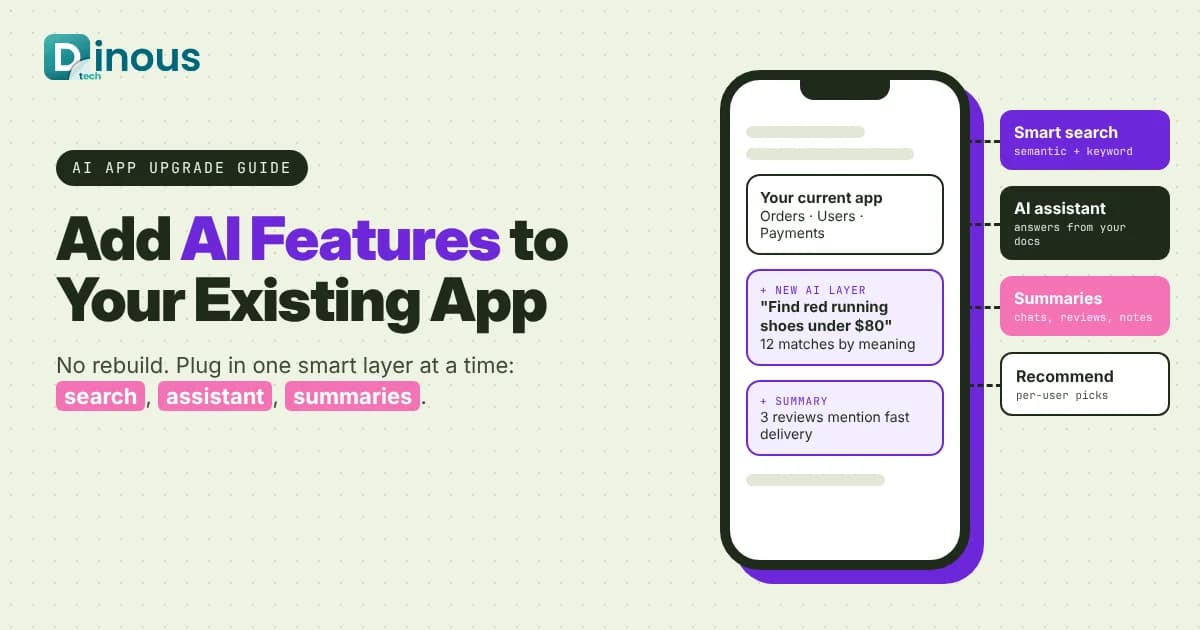
If you already have a working product, you do not need to start again to make it smarter. You can add AI features to an existing app by putting a small, separate AI layer next to the code you already have: your app keeps doing what it does well, and the new layer handles things like smart search, chat support, summaries, recommendations or document reading. This guide is for founders, product owners and CTOs in the USA, UK, Europe, the UAE and Australia who have a live web or mobile app and want to know exactly how to add AI to it, which features are worth it, what changes in the architecture, how long it takes, what drives the cost and what can go wrong.
Dinoustech is an AI app development company that upgrades existing apps as often as it builds new ones. The steps below are the same ones we use when a client asks us to "add AI" to a product that real users already depend on.
Key Takeaways
- You rarely need a rewrite. Most AI features can be added as a separate service that your app calls through an API.
- Start with one feature that solves a clear user problem, ship it to a small group, measure it, then add the next one.
- Keep AI calls on your backend, never directly from the mobile app, so API keys, costs and user data stay under your control.
- Your own data (help articles, product catalogue, past tickets, documents) is what makes AI useful. Clean, connected data matters more than the model you pick.
- Budget for two kinds of cost: the one-time integration work and the monthly AI usage, which grows with your user numbers.
- Privacy, transparency and human fallbacks are part of the feature, not an afterthought.
Quick navigation
What this guide covers
Why Add AI Features to an Existing App Instead of Rebuilding?
A live app already has the hardest things to get: users, data, payments, logins, reviews and a working backend. Throwing that away to build an "AI-first" version is expensive and risky. Adding AI on top of what exists is usually faster and safer, for four reasons.
- Lower risk. The new feature runs beside your current code. If it misbehaves, you switch it off with a feature flag and the rest of the app keeps working.
- Faster value. A focused feature such as smart search or an AI help assistant can reach users in weeks, not the months a rebuild takes.
- Your data is already there. Years of orders, tickets, content and behaviour data are exactly what an AI feature needs to give relevant answers.
- Users stay where they are. No migration, no new app to download, no change to their account.
A rebuild only makes sense when the current app is so old or so tangled that it cannot safely call an external service, or when the business model itself is changing. In most cases we review, a careful integration is the better choice. If you are still unsure which path fits, our guide on common challenges in AI app development covers the warning signs.
AI Features You Can Add to an Existing App
The best AI features remove a step users already find slow or annoying. Here are the ones businesses ask us for most often, with what each one needs from your side.
| AI feature | What it does for users | What it needs from you | Typical effort |
|---|---|---|---|
| Smart (semantic) search | Finds products, articles or records by meaning, not exact words | Your catalogue or content, kept in sync | Low to medium |
| AI help assistant / chatbot | Answers questions from your help docs and hands off to a human when needed | FAQs, policies, past tickets | Medium |
| Summaries | Turns long chats, reports, reviews or notes into short summaries | Access to the text inside the app | Low |
| Personal recommendations | Suggests products, content or next actions per user | Behaviour and purchase history | Medium to high |
| Document and image reading | Pulls data from invoices, IDs, forms or photos | Sample documents and clear rules | Medium |
| Writing help | Drafts listings, replies, emails or descriptions inside your app | Tone and brand guidelines | Low |
| Voice input and voice agents | Lets users speak instead of type, or book by voice | Clear flows and a booking or CRM API | Medium to high |
| AI agent actions | Completes tasks: books, updates orders, files tickets | Safe APIs with permissions and limits | High |
| Predictions and alerts | Flags churn risk, fraud or stock shortages early | Clean historical data | High |
For more ideas by industry, see AI features every mobile app should have and generative AI use cases in mobile app development.
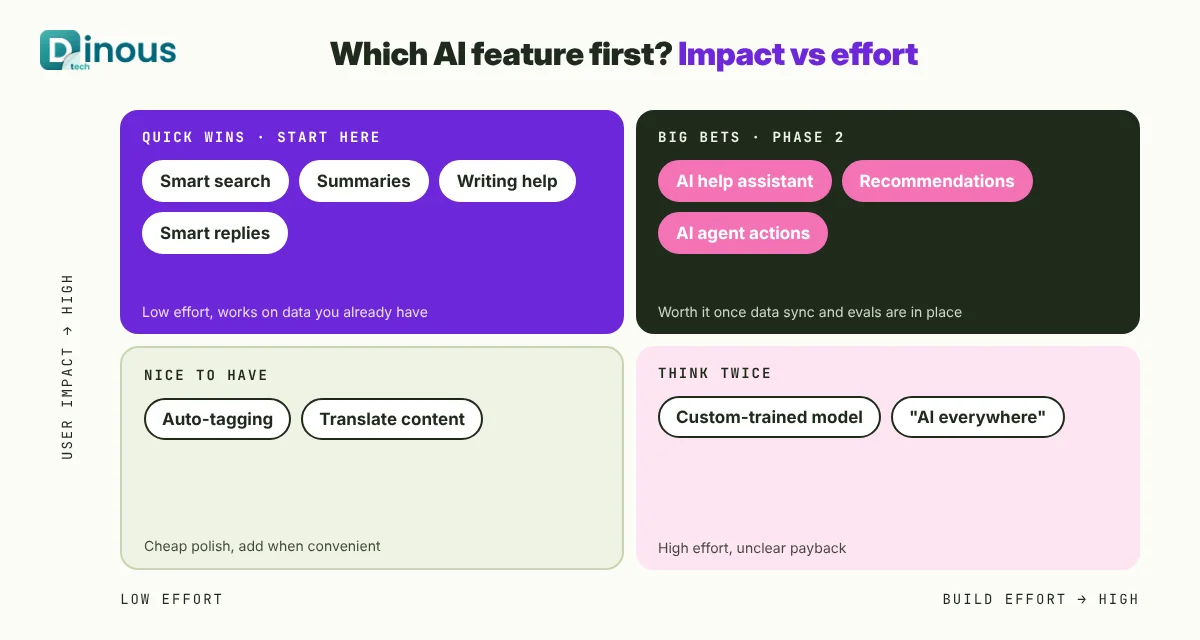
A simple way to choose is to plot each idea by user impact and build effort. Quick wins (high impact, low effort) go first. Big bets such as autonomous agents come later, once the first features have proven their value and your data pipeline is in place.
Is Your App Ready for AI? A Quick Checklist
Before any AI work starts, we check a few basics. You do not need all of them on day one, but each missing item adds time.
- A backend you control with an API the mobile or web app already uses. AI calls will go through it.
- Accessible data. Content, products or records that can be exported or read by a new service, ideally with change events or timestamps so they stay in sync.
- User roles and permissions that are clear enough to stop the AI from showing one customer's data to another.
- Feature flags or remote config so you can release the feature to 5% of users first.
- Analytics and logging so you can measure whether the feature helps (fewer tickets, more conversions, faster tasks).
- A privacy policy and consent flow that can be updated to explain the new AI processing.
- Current app security basics, covered in our mobile app security checklist.
How to Add AI Features to an Existing App: Step by Step
Step 1: Pick one problem, not "AI everywhere"
Start with a single, measurable pain point. "Support gets 400 repeat questions a week" or "users cannot find products with our keyword search" are good starting points. "Make the app smarter" is not. Write down the metric you want to move and the current number.
Step 2: Audit the app and the data
Review the codebase, APIs, database and hosting. Find where the needed data lives, how clean it is, who is allowed to see what, and which parts of the app are fragile. This audit usually takes days, not weeks, and it saves a lot of rework later.
Step 3: Choose the AI approach
Most features do not need a custom-trained model. The usual options, from simplest to most complex:
- Hosted model APIs (large language, vision or speech models) for chat, writing help, summaries and document reading.
- Retrieval-augmented generation (RAG), where the model answers from your own documents or records stored in a vector or hybrid search index. This is the standard choice for help assistants and smart search.
- Classic machine learning for predictions, scoring and recommendations from structured data. Our machine learning development team handles this.
- On-device models for features that must work offline or keep data on the phone, at the cost of extra testing across devices.
- Fine-tuning only when prompts and retrieval cannot reach the quality or tone you need.
Step 4: Design the experience and the fallbacks
Decide where the feature appears, what the user sees while the AI is working (streaming text, a progress state), how users correct a wrong answer, and when the app hands over to a human or falls back to the old flow. Label AI-generated content clearly.
Step 5: Build the AI layer as a separate service
We build a small AI service (or "AI gateway") that sits between your existing backend and the model providers. It holds the API keys, adds your data through retrieval, applies safety filters, caches common answers, tracks usage per user and enforces spending limits. Your current app only needs a few new API calls and screens.
Step 6: Test with real examples
Build an evaluation set of real questions or tasks with expected answers, and test the feature against it before release and after every prompt or model change. Add tests for privacy (can user A see user B's data?), abuse (prompt injection, offensive input) and load.
Step 7: Roll out gradually and measure
Release to internal users, then a small percentage of real users behind a feature flag. Compare the metric from Step 1, watch cost per active user, read the conversations, and improve. Only then roll out to everyone and start on the next feature.
Architecture That Keeps Your Existing App Safe
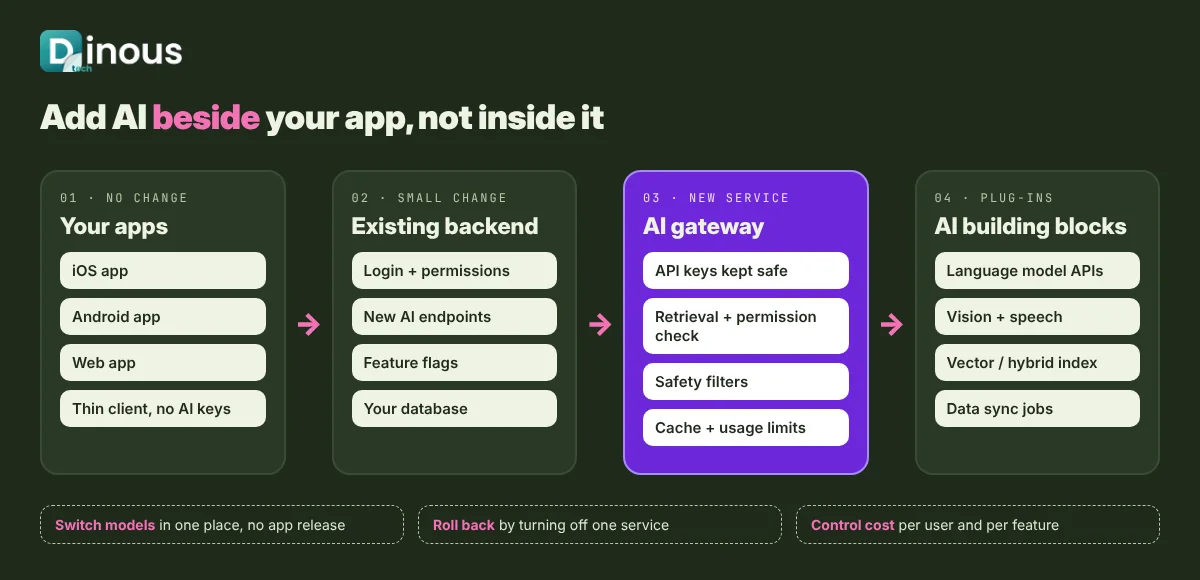
The safest pattern keeps the mobile and web apps as thin clients. They talk only to your existing backend, which forwards AI requests to the AI gateway. The gateway is the only part that talks to model providers and the search index. This gives you:
- No secret keys in the app. A key shipped inside a mobile app can be extracted. On the server it stays private.
- Freedom to switch models. You can change provider or model in one place without releasing a new app version.
- Central cost control. Rate limits, caching and per-user budgets live in one service.
- Clean data boundaries. The gateway checks permissions before retrieving any record, so answers only use data the user is allowed to see.
- Easy rollback. If something goes wrong, you switch off one service, not your whole product.
Tech Stack for Adding AI to an Existing App
| Layer | Common choices | Notes |
|---|---|---|
| Existing app | React Native, Flutter, Swift, Kotlin, React, Next.js | Only new screens and API calls; core code stays |
| Existing backend | Node.js, Python, PHP, Java, .NET | Adds a few endpoints that forward to the AI service |
| AI service / gateway | Node.js or Python (FastAPI) service | Keys, retrieval, safety, caching, usage limits |
| Models | Hosted language, vision and speech model APIs; smaller models for simple tasks | Pick per feature; mix large and small models to manage cost |
| Search and retrieval | Vector databases or vector search in PostgreSQL, Elasticsearch or OpenSearch | Hybrid (keyword + vector) search often works best |
| Data sync | Queues, webhooks or scheduled jobs | Keeps the AI index in step with your main database |
| Monitoring | Logging, tracing, evaluation dashboards | Track quality, latency and cost per feature |
Building in React Native? Our guide on building a React Native app with AI features goes deeper into the mobile side.
How Dinoustech Uses AI
AI is part of how we work as well as what we build.
- AI-assisted development. Our engineers use AI coding assistants to read and map unfamiliar codebases faster, write tests around legacy code before we change it, and review pull requests. People still make every design decision and review every line that ships.
- AI features inside your app. We build smart search, RAG-based help assistants, summaries, document reading, recommendations, voice features and AI agents that take actions through your APIs, all on top of your current product.
- AI support agent for our clients. We can add an AI assistant for your own team and customers that answers common questions from your documentation, creates tickets and escalates to a person when needed, as covered in our AI chatbot development guide.
Cost of Adding AI Features to an Existing App
There is no single price, because the work depends heavily on your current app. These are the factors that move the budget most:
- Feature type. A summary or writing-help feature is far simpler than an AI agent that changes orders or bookings.
- Codebase condition. Clean APIs and documentation make integration quick. Old, undocumented code needs tests and refactoring first.
- Data preparation. Cleaning, structuring and syncing content for retrieval is often the largest hidden task.
- Number of platforms. iOS, Android and web each need UI work, even when they share one AI service.
- Integrations. CRMs, ERPs, helpdesks, payment or booking systems add effort per connection.
- Languages and voice. Each extra language and any voice input or output adds testing.
- Security and compliance needs. Health, finance and children's apps need extra controls and reviews.
- Monthly running cost. Model usage is billed per request or per token, so it grows with users and message length. Caching, smaller models for simple tasks and short prompts keep it in check.
For comparable budgets, see our breakdowns of AI agent development cost, chatbot development cost and ongoing app maintenance cost. If you are choosing how to pay for the work, read fixed price vs hourly vs dedicated team.
Timeline for Adding AI to an Existing App
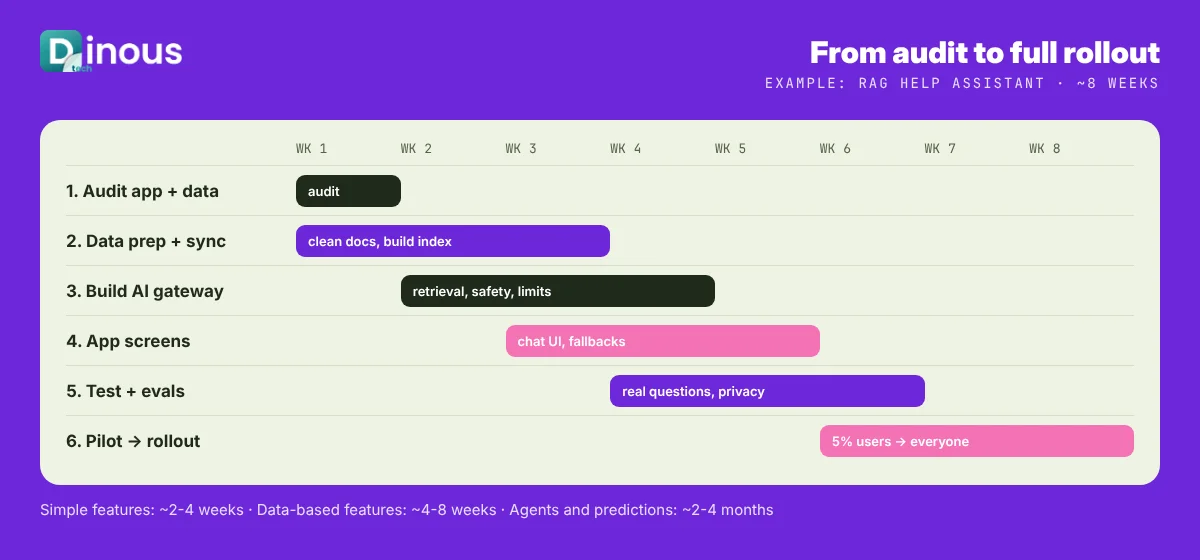
| Scope | Example | Typical range |
|---|---|---|
| Single simple feature | Summaries, writing help, smart replies | About 2 to 4 weeks |
| Feature using your data | RAG help assistant, semantic search | About 4 to 8 weeks |
| Feature with actions or predictions | AI agent, recommendations, fraud or churn alerts | About 2 to 4 months |
| Wider AI upgrade | Several features across iOS, Android and web | 3 months or more, in phases |
These ranges assume a codebase in reasonable shape and quick feedback from your team. App store review, legacy code clean-up and data preparation can add time. Our article on how long it takes to build an app explains what else affects schedules.
Privacy and Compliance When Adding AI
When an app starts sending user data to an AI model, the rules around that data still apply. Things to check:
- Data protection laws such as GDPR in the EU and UK, and state privacy laws in the USA: tell users what is processed, have a legal basis, minimise what you send to the model and respect deletion requests.
- Provider terms. Choose model providers and settings that do not use your users' data for training, and sign data processing agreements where needed.
- Transparency. Make it clear when users are talking to AI or reading AI-generated content. The EU AI Act adds transparency duties for chatbots and generated content.
- Sector rules. Health apps in the USA may fall under HIPAA, financial apps under KYC and financial regulations, and apps for children under extra protections.
- App store policies. Apple and Google have rules on user-generated and AI-generated content, reporting tools and privacy labels.
This section is general information, not legal advice. Please check your specific case with a qualified lawyer.
Common Challenges and How to Avoid Them
- AI silos. The AI works from an old copy of your data and gives outdated answers. Fix it with a sync job or event stream from your main database.
- Wrong or made-up answers. Ground answers in your own content, show sources, limit the AI to topics it knows and add a human handover.
- Costs that grow too fast. Set per-user limits, cache repeat questions and use smaller models where they are good enough.
- Slow responses. Stream answers, keep prompts short and run heavy jobs in the background.
- Data leaks between users. Apply permission checks inside retrieval, not only in the UI, and test for it.
- Prompt injection. Treat user input and retrieved documents as untrusted, and never let the model run actions without permission checks.
- No clear result. Without the baseline metric from Step 1, nobody can tell if the feature worked. Measure before and after.
Why Choose Dinoustech to Add AI to Your App
- We work with your existing code. We audit first, add tests around fragile areas and change only what the feature needs.
- Full-stack team. Mobile, web, backend, data and AI engineers in one team, so the feature works end to end. See our mobile app development and generative AI development services.
- One feature at a time. We ship a measurable first feature quickly, then plan the next one with you based on real results.
- Cost control built in. Usage limits, caching and model choice are part of every AI feature we deliver.
- Worldwide clients. We work across time zones with clients in the USA, UK, Europe, the Middle East and Australia. You can see examples of our work in our portfolio.
Need extra hands for your own team instead? You can also hire AI developers from Dinoustech to work alongside your engineers.
Ready to Add AI to Your App?
Share a short description of your app, its tech stack and the problem you want AI to solve. We will review it, suggest the first feature worth building and give you a clear plan with timeline and cost. Contact Dinoustech to book a free consultation.