Dinoustech Private Limited
MLM Software Migration: How to Switch Platforms Without Losing Genealogy, Commissions or Distributors
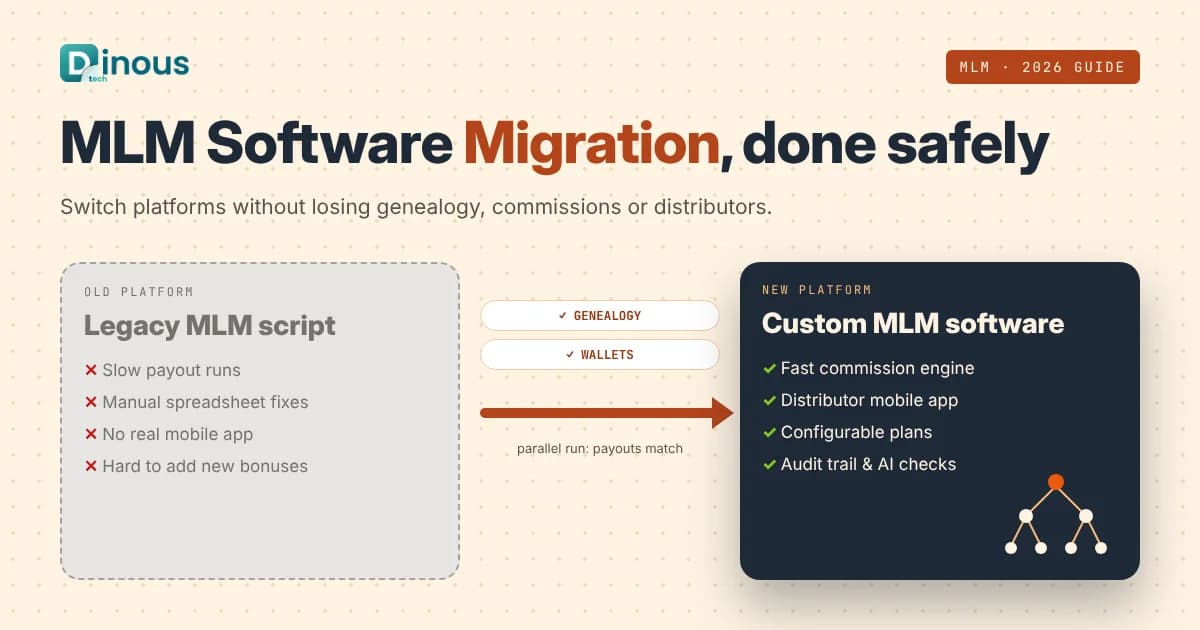
Many direct selling companies start on a ready-made MLM script or an older platform, and it works well until the business grows. Then payouts take days to calculate, the genealogy tree loads slowly, distributors complain about the mobile experience and every new bonus needs a costly workaround. At that point the question is not whether to change platforms but how to do it safely. MLM software migration is the process of moving your distributors, genealogy, orders, wallets and commission history from an old system to a new one without breaking payouts or losing the trust of your field. This guide explains how to plan and run that move in 2026: when to switch, what data has to move, migration approaches, a step-by-step process, how to validate commissions, AI, compliance, cost factors and timeline. It is written for network marketing and direct selling companies worldwide, from the USA, UK and Europe to the UAE, Southeast Asia and Australia.
Dinoustech is an MLM software development company that builds custom network marketing platforms, distributor apps and commission engines for clients around the world. The guidance below comes from the questions business owners ask us before they replace their current system.
Key Takeaways
- The two things you cannot get wrong in an MLM software migration are the genealogy tree (sponsor and placement) and commission history. Everything else is easier to fix.
- Audit and clean your data before you move it: duplicate members, broken sponsor links, orphan accounts and unbalanced wallets cause most migration problems.
- Run the old and new commission engines side by side for at least one or two pay periods and compare every payout before you switch.
- Pick a cutover date right after a commission run, freeze changes for a short window and keep a tested rollback plan.
- Tell distributors early and clearly. A smooth migration that nobody explained still feels like a problem to the field.
- AI can help map messy data, find anomalies in payouts and answer distributor questions during the move, with people checking the results.
In this guide
Table of Contents
- What Is MLM Software Migration?
- Signs You Have Outgrown Your MLM Software
- What Data Needs to Move
- Migration Approaches Compared
- Step-by-Step Migration Process
- Validating Commissions with a Parallel Run
- What the New Platform Should Include
- Recommended Tech Stack
- How Dinoustech Uses AI in MLM Migrations
- Keeping Distributors on Your Side
- Data Security and Compliance
- MLM Software Migration Cost Factors
- Migration Timeline
- Common Challenges
- Why Choose Dinoustech
- Conclusion
What Is MLM Software Migration?
MLM software migration means replacing the system that runs your network marketing business, including distributor sign-ups, genealogy, orders, wallets, ranks and commission payouts, and moving all live and historical data into the new platform. The new system might be a custom-built platform, a different off-the-shelf product, or a rebuilt version of your current software with a modern architecture.
It is more delicate than a normal software upgrade because money and relationships depend on it. Every distributor's income is calculated from the tree and from past volumes. If a single sponsor link is wrong, a whole downline can be credited to the wrong person. That is why a migration needs its own plan, testing and communication, not just a data export and import.
Signs You Have Outgrown Your MLM Software
- Slow commission runs: payouts take hours or days, or need manual spreadsheet fixes every cycle.
- Plan changes are hard: you cannot add a new bonus, rank or promotion without expensive custom work.
- Performance problems: the genealogy tree and back office slow down as the network grows.
- Poor mobile experience: distributors want an app to enrol, order, share and track team performance on their phones.
- Global limits: no proper support for multiple currencies, languages, tax rules or local payment gateways.
- Security worries: old code, missing updates, weak access control or no audit trail.
- Vendor lock-in: you do not own the code or cannot get your data out easily.
If several of these sound familiar, it is time to plan a move. Our article on what features MLM software should have in 2026 is a useful checklist for the new platform.
What Data Needs to Move
List every type of data before you start and decide what moves, what is archived and what is left behind.
| Data area | What it includes | Risk if wrong |
|---|---|---|
| Distributors and customers | Profiles, IDs, contact details, KYC status, join dates, status | Login failures, duplicate accounts |
| Genealogy | Sponsor tree, placement tree (binary or matrix legs), position history | Wrong downlines and wrong payouts |
| Ranks and qualifications | Current rank, highest rank, rank dates, qualification flags | Lost titles and bonus eligibility |
| Orders and volumes | Orders, returns, autoships, personal and group volume per period | Incorrect future commissions |
| Commissions and wallets | Past payouts, pending earnings, e-wallet balances, holds, adjustments | Money disputes and lost trust |
| Products and pricing | Catalogue, kits, prices per country, point values, taxes | Wrong prices and volumes |
| Payments and payouts | Payment tokens, bank or payout account references | Failed renewals and payouts |
| Content and documents | Agreements, tax forms, training content, replicated site settings | Compliance gaps |
Card details usually cannot be copied as raw data. Work with your payment gateway to move stored tokens securely, or ask members to re-enter cards for autoship.
Migration Approaches Compared
- Big-bang cutover: move everything in one planned window and switch all users at once. It is simpler to manage but carries more risk, so it needs strong testing and a rollback plan.
- Phased migration: move one country, module or user group at a time, for example the back office first and then the shop and app. Lower risk, but you must keep two systems in sync for longer.
- Parallel run then cutover: keep the old system live while the new one calculates commissions on the same data in the background. When results match, switch over. This is the approach we recommend for most MLM businesses because it protects payouts.
Step-by-Step Migration Process
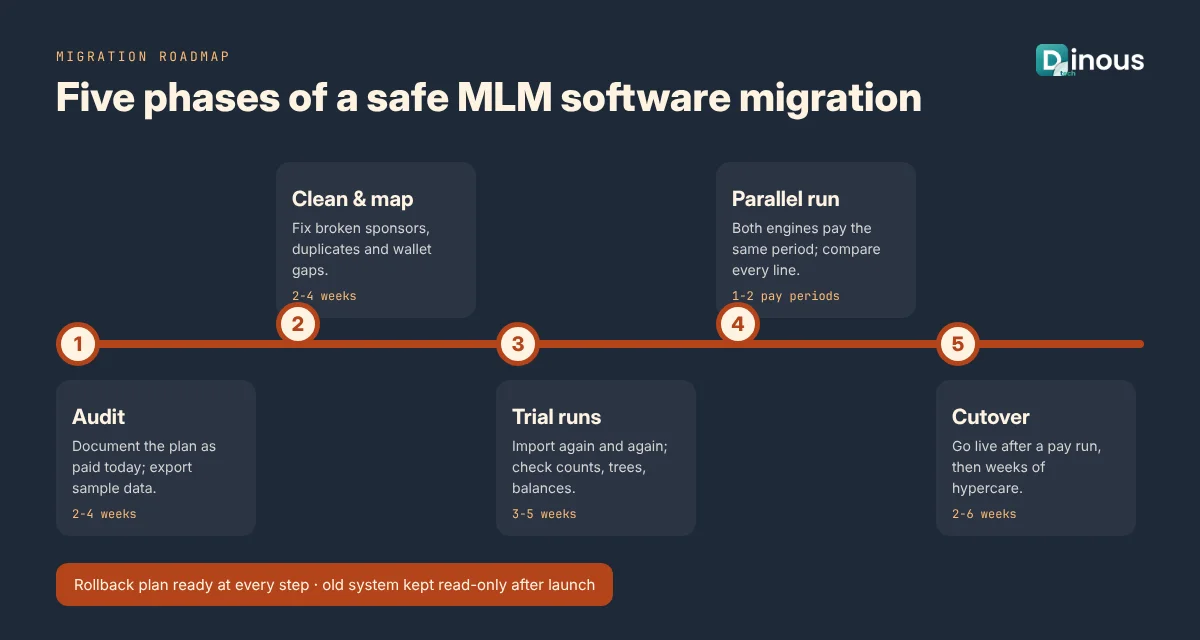
- Discovery and audit: document your compensation plan exactly as it is paid today, list every integration and export sample data from the old system.
- Data cleaning: fix duplicate members, broken sponsor links, orphan accounts, circular trees and wallet balances that do not match transaction history.
- Data mapping: map every old field to the new data model, including status codes, rank names and volume types.
- Build or configure the new platform: back office, distributor app, shop, commission engine, wallets and admin panel.
- Trial migrations: run the full import several times on a test environment and check counts, tree structure and balances each time.
- Parallel commission runs: calculate one or more pay periods in both systems and compare results line by line.
- User acceptance testing: let your admin team and a group of leaders test real tasks with migrated data.
- Cutover: freeze changes for a short window after a commission run, do the final data load, verify and go live.
- Hypercare: watch the system closely for several weeks, with a fast support channel for distributors and the team.
If you are building the new platform from scratch, our step-by-step guide to building MLM software covers the build side in detail.
Validating Commissions with a Parallel Run
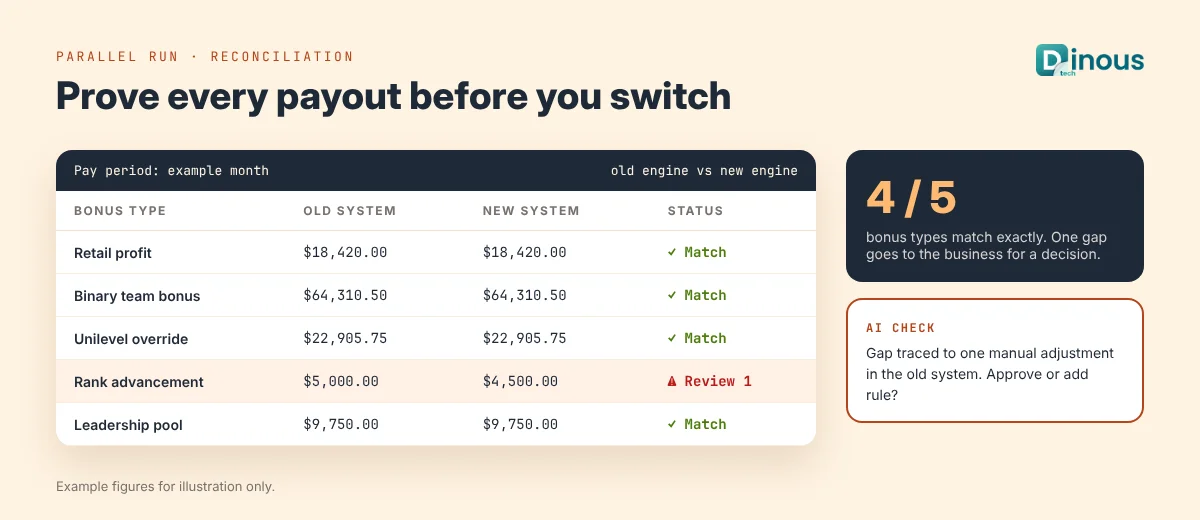
A parallel run is the single most important safety step in an MLM software migration. The new engine processes the same orders and tree as the old one for a completed period, and a reconciliation report compares the output.
- Totals first: compare the total payout per bonus type, then per country and currency.
- Then every distributor: compare each person's earnings, rank and volumes, and list every difference.
- Explain every gap: each difference is either a bug in the new engine, a data problem, or a known bug or manual fix in the old system that the business must decide on.
- Repeat until clean: only plan the cutover when the remaining differences are understood and approved.
This is also the moment to confirm your plan rules are clearly written down. Our explainer on MLM compensation plans covers how binary, unilevel and matrix payouts are calculated.
What the New Platform Should Include
For distributors
- Fast mobile app and web back office with the same login
- Interactive genealogy views (tree, list and leg summaries) that load quickly at scale
- Real-time volume, rank progress and earnings dashboards
- E-wallet with clear transaction history and withdrawal requests
- Replicated websites, share links and simple enrolment
- Training content, announcements and notifications
For admins
- Configurable commission engine with test mode and audit history
- Member, order, autoship, return and adjustment management
- Genealogy tools for approved placement changes, with full logs
- Payout batches, holds, tax data and multi-currency support
- Role-based access, audit trails and reports
- Integrations with payment gateways, shipping, tax, accounting and CRM tools
For distributor-side features in more depth, read how to develop MLM software with distributor management.
Recommended Tech Stack
| Layer | Common choices |
|---|---|
| Distributor mobile app | Flutter or React Native, or native Swift and Kotlin |
| Back office and admin | React or Next.js |
| Backend and APIs | Node.js, Python, Java or .NET with REST or GraphQL APIs |
| Commission engine | A separate service with batch jobs and job queues, designed to rerun a period safely |
| Database | PostgreSQL or MySQL, with tree-friendly structures (closure tables or materialised paths) for large genealogies |
| Migration tooling | ETL scripts, staging database, checksum and row-count reports, reconciliation dashboards |
| Caching and search | Redis for caching, a search engine for member lookup |
| Cloud and security | AWS, Azure or Google Cloud with encryption, backups, monitoring and access control |
How Dinoustech Uses AI in MLM Migrations
A migration involves a lot of messy data and repetitive checks, which is where AI helps most. We use it in three ways, with people reviewing every result.
AI-assisted development and data mapping
Our engineers use AI coding assistants to draft migration scripts, field mappings, data-cleaning rules and test cases faster. AI also helps read old database structures and undocumented code to understand how the current plan is really paid. Senior developers review and test everything before it touches real data.
AI features in the new platform
- Anomaly detection: flags unusual payouts, sudden volume spikes or suspicious account patterns during parallel runs and after go-live.
- Duplicate and fraud checks: finds likely duplicate members or linked accounts during data cleaning.
- Distributor insights: plain-language summaries of team performance and next-rank progress inside the app.
- Content help: drafts training messages and announcements that your team reviews before sending.
Read more in our article on how AI can automate MLM business management.
AI support agent for our clients
During and after the move, we can set up an AI support agent trained on your FAQs and migration guides. It answers distributor questions such as how to log in to the new app, where to find past earnings or how to update a payout method at any hour, and hands complex cases to your support team with the conversation attached.
Keeping Distributors on Your Side
- Brief top leaders first and let them test the new app before launch.
- Announce the timeline, what will change and what will stay the same, especially payout dates.
- Publish short videos and guides for login, ordering and finding past earnings.
- Keep the old system read-only for a period so people can check history if needed.
- Staff a dedicated support channel during the first weeks after launch.
Data Security and Compliance
A migration copies personal and financial data, so protect it at every step:
- Follow privacy laws for each market, such as GDPR in the EU and UK, CCPA and other US state laws, and local data protection rules in the UAE, Australia and Asia.
- Keep card data out of your own databases and follow PCI DSS through your payment provider.
- Encrypt exports, use secure transfer, limit who can access migration data and delete temporary copies afterwards.
- Keep complete audit logs of every data change and manual adjustment.
- Make sure income disclosures, distributor agreements and tax documents carry over correctly, as direct selling rules differ between countries.
This section is general information, not legal advice; please confirm requirements with a qualified adviser in each market you operate in.
MLM Software Migration Cost Factors
Every migration is different, so the cost depends mainly on:
- Network size and history: the number of members, orders and years of data to move.
- Data quality: how much cleaning the old data needs.
- Compensation plan complexity: number of bonuses, ranks, pools and special rules to rebuild and test.
- New platform scope: back office only, or also mobile apps, shop, replicated sites and new features.
- Integrations: payment gateways, shipping, tax, accounting and CRM systems.
- Countries and currencies: each market adds pricing, tax and language work.
- Parallel run length and support: more validation cycles and hypercare mean more effort but less risk.
Our article on the cost of MLM software development explains the build side. Share your current system and plan with us and we will prepare a detailed migration estimate.
Migration Timeline
These ranges are typical for a mid-sized network moving to a custom platform:
| Phase | Typical duration |
|---|---|
| Discovery, plan documentation and data audit | 2 to 4 weeks |
| Data cleaning and mapping | 2 to 4 weeks, in parallel with the build |
| New platform build or configuration | 8 to 16 weeks |
| Trial migrations and testing | 3 to 5 weeks |
| Parallel commission runs | 1 to 2 pay periods |
| Cutover and hypercare | 2 to 6 weeks |
Overall, most migrations take about four to seven months from kick-off to stable operation. See how long it takes to develop MLM software for more on build timelines.
Common Challenges
- Undocumented plan rules: the old system may pay in ways nobody wrote down. Parallel runs reveal them.
- Bad historical data: broken trees and mismatched wallets must be fixed or explained before moving.
- Old vendor cooperation: getting full exports from a previous provider can be slow. Check your contract and request data early.
- Autoship and payment tokens: moving recurring orders without failed charges needs gateway support.
- Change fatigue: distributors dislike surprises. Clear communication reduces support tickets.
- Scope creep: adding many new features during the move increases risk. Migrate first, then improve.
Choosing the right partner matters too; see the common mistakes when choosing an MLM software company.
Why Choose Dinoustech for MLM Software Migration
- Experience building custom MLM platforms with binary, unilevel, matrix and hybrid plans
- A careful process with data audits, trial migrations and parallel commission runs
- Distributor mobile apps and back offices built for speed at scale
- Integrations with payment, shipping, tax and accounting systems worldwide
- Practical AI for data checks, anomaly detection and distributor support
- Full code ownership for you, plus support and maintenance after launch
See our work in our portfolio, or explore our mobile app development and eCommerce development services for the shop side of your business.
Conclusion
A well-run MLM software migration gives your business a faster, more flexible platform without disturbing the people who depend on it. Audit and clean your data, protect the genealogy, prove every payout with a parallel run, communicate early with your field and keep support close after launch. If you are planning to switch MLM software for a network anywhere in the world, contact Dinoustech to discuss your migration, or explore our MLM software development services.