Dinoustech Private Limited
AI Agent Development Cost in 2026: Build Cost, Running Cost and Timelines
AI agent development cost in 2026 depends on three things more than anything else: how much the agent is allowed to do on its own, how many systems it must connect to, and how much it will be used once it is live. A simple FAQ agent on your website is a small project. An agent that reads emails, updates your CRM, books appointments and processes refunds across several tools is a serious software product with its own running costs every month.
This guide breaks down what you actually pay for: types of AI agents, build cost factors, running costs such as LLM usage, a simple way to estimate your budget, hidden costs, timelines and ways to save. For a quick first number, try our free app cost calculator.
Key Takeaways
- Total cost = build cost (one time) + running cost (every month) + improvement cost (ongoing).
- The biggest build cost drivers are integrations, autonomy level and the testing needed to make the agent reliable.
- Running costs include LLM API usage (billed per token), hosting, vector databases, monitoring and human review.
- Start with one narrow, high-value task. A focused agent is cheaper, faster to launch and easier to trust.
- Build time is similar everywhere; developer rates are what change the total, which is why many companies build with offshore teams.
Table of Contents
- What Counts as an AI Agent?
- Types of AI Agents and Their Complexity
- Build Cost Factors
- Running Costs After Launch
- How to Estimate Your Budget
- Example Scenarios
- Questions to Answer Before You Budget
- Hidden Costs to Plan For
- Build vs Buy vs No-Code
- Timelines
- How to Reduce AI Agent Cost
- Where You Build Matters
- How Dinoustech Builds AI Agents
- Why Dinoustech
What Counts as an AI Agent?
An AI agent is software that uses a large language model (LLM) to understand a goal, decide on steps and use tools to complete them. Unlike a basic chatbot that only answers questions, an agent can take actions: search a database, create a ticket, send an email, update a record or call another API, then check the result and decide what to do next.
Most business agents have the same building blocks:
- The model (an LLM from a provider, or an open-source model you host)
- Knowledge from your documents and data, usually through retrieval (RAG)
- Tools: the APIs and systems the agent is allowed to use
- Memory and state so it remembers context within and across sessions
- Guardrails: rules, approvals and limits on what it may do
- Interface: chat, voice, email, WhatsApp or a background job
- Monitoring: logs, evaluations and cost tracking
Types of AI Agents and Their Complexity
| Agent type | What it does | Complexity |
|---|---|---|
| Knowledge / FAQ agent | Answers questions from your documents and website | Low |
| Customer support agent | Answers, looks up orders or accounts, creates tickets, hands over to humans | Medium |
| Booking or voice agent | Takes calls or chats, checks availability, books and reschedules | Medium |
| Sales / lead agent | Qualifies leads, answers product questions, updates CRM, books demos | Medium |
| Internal operations agent | Reads documents and emails, fills forms, updates ERP or CRM records | Medium to high |
| Multi-agent workflow | Several specialised agents that plan and hand tasks to each other | High |
For industry examples, see our guides on AI voice agents for appointment booking and AI agents for salons and spas.
Build Cost Factors
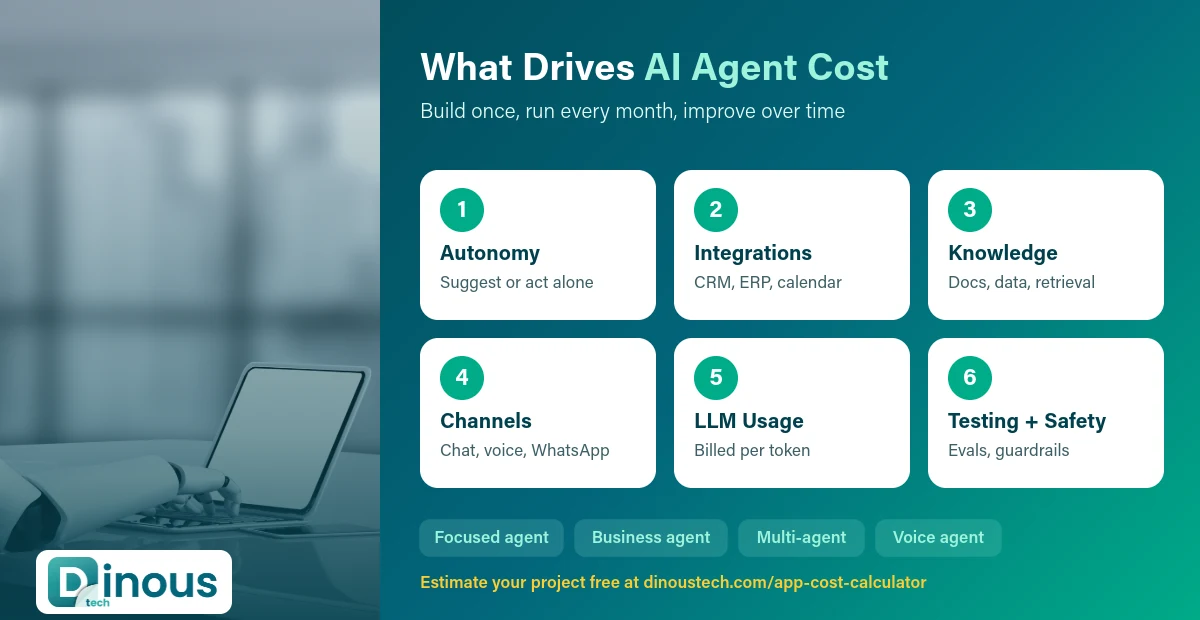
- Scope and autonomy. An agent that only suggests actions for a human to approve is simpler than one that acts on its own. More autonomy means more guardrails and testing.
- Integrations. Each system the agent touches (CRM, helpdesk, calendar, ERP, payment, telephony) needs secure API work, error handling and tests. This is often the largest part of the budget.
- Knowledge preparation. Cleaning documents, structuring data and setting up retrieval so answers are accurate.
- Channels. Web chat is simplest; voice, WhatsApp, email and mobile app each add work.
- Languages. Each extra language needs testing, especially for voice.
- Evaluation and testing. Building test sets of real requests and checking accuracy, safety and edge cases before launch.
- Security and compliance. Role-based access, audit logs, data protection (GDPR, HIPAA where health data is involved, India's DPDP Act) and approval steps for risky actions.
- Admin dashboard. Conversation review, analytics, settings and human hand-over console.
Running Costs After Launch
Unlike most apps, AI agents have a usage-based cost every time they run. Plan for:
- LLM usage: providers bill per token (small pieces of text), with output usually priced higher than input. Long prompts, large documents and multi-step reasoning all use more tokens.
- Voice costs: speech-to-text, text-to-speech and telephony minutes for voice agents.
- Hosting: backend servers, vector database, queues and storage.
- Self-hosted models: if you run your own model, GPU servers replace API fees and are only worth it at high volume or for strict data rules.
- Monitoring and evaluation tools.
- Human review: staff time to check flagged conversations and handle hand-overs.
- Maintenance: model updates, prompt tuning, new tools and bug fixes. See our software maintenance services.
Model prices change often, so check current pricing with your provider and build a usage forecast based on expected conversations per month, average length and how many tool calls each one needs.
How to Estimate Your Budget
A practical way to estimate is to work in hours and usage:
- List the tasks the agent must complete and the systems it must use.
- Estimate build hours for discovery, conversation design, integrations, knowledge setup, interface, admin dashboard, testing and launch.
- Multiply by your team's blended hourly rate to get the build cost.
- Estimate monthly usage: conversations per month x average tokens per conversation x model price, plus voice minutes and hosting.
- Add improvement time each month for tuning and new features.
| Agent size | Typical scope | Rough build effort |
|---|---|---|
| Focused agent / MVP | One task, one channel, 1-2 integrations | About 250-600 hours |
| Business agent | Several tasks, 3-5 integrations, admin dashboard, hand-over | About 600-1,500 hours |
| Advanced / multi-agent | Many tools, voice and chat, strict compliance, several teams | 1,500-4,000+ hours |
These are planning ranges, not quotes. Share your use case with us and we will turn it into a fixed-scope estimate.
Example Scenarios
To make the factors concrete, here is how three common agents compare. The hours are illustrative planning ranges; your scope decides the real number.
1. Website support agent for an online store
Answers product and policy questions from the help centre, checks order status through the store API and hands complex cases to the support team. One channel (web chat), two integrations (store and helpdesk). This usually fits the focused agent range. Running costs are driven mainly by the number of conversations per month.
2. Appointment booking agent for a clinic chain
Takes chats and phone calls, checks doctor availability, books and reschedules appointments and sends reminders. Voice adds speech and telephony work and per-minute costs, and health data adds privacy controls. This usually sits in the business agent range.
3. Back-office agent for a finance or logistics team
Reads incoming emails and documents, extracts data, checks it against the ERP, prepares records for approval and flags exceptions. Many integrations, strict accuracy needs and approval steps put this in the business to advanced range, but it can save large amounts of manual work.
Questions to Answer Before You Budget
- Which single task will the agent own first, and how is it done today?
- Which systems must it read from, and which may it change?
- Which actions need human approval?
- Which channels and languages are required at launch?
- How many conversations or tasks do you expect per month?
- What data rules apply (customer data, health data, payment data)?
- How will you measure success: hours saved, tickets resolved, bookings made, revenue?
Clear answers to these questions make estimates accurate and keep the first version small enough to launch quickly.
Hidden Costs to Plan For
- Messy data: outdated documents and inconsistent records slow down setup and hurt accuracy.
- Edge cases: real users ask unexpected things; testing and fixing them takes time.
- Usage spikes: marketing campaigns or seasonal peaks can multiply LLM costs; set limits and alerts.
- Prompt and model changes: provider updates can change behaviour, so keep regression tests.
- Change management: training staff to work with the agent and review its work.
Build vs Buy vs No-Code
| Option | Best for | Trade-offs |
|---|---|---|
| No-code agent builders | Quick experiments and simple FAQ agents | Limited integrations, per-seat or per-message fees, less control |
| SaaS agent products | Standard use cases like support or scheduling | Monthly fees, fit your process to the tool |
| Custom development | Unique workflows, many internal systems, data control, own brand | Higher upfront cost, you own the code and data |
Many companies prototype with a no-code tool, prove the value, then build a custom agent for scale and control. If you also need a customer-facing chatbot, compare with our chatbot development cost guide.
Timelines
| Agent size | Typical timeline |
|---|---|
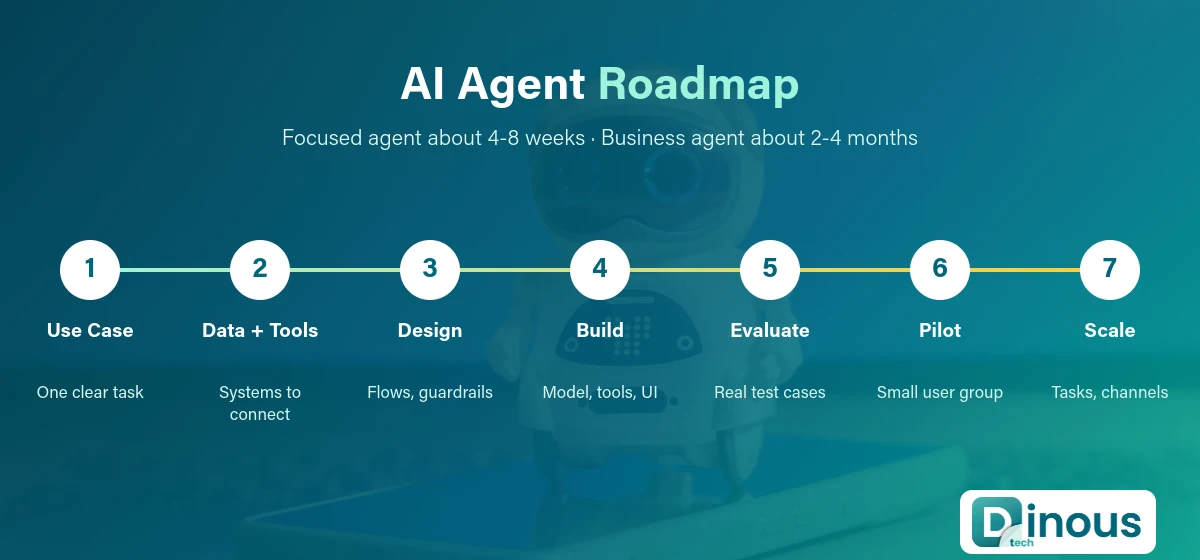
| Focused agent / MVP | About 4-8 weeks |
| Business agent | About 2-4 months |
| Advanced / multi-agent system | 4-8 months or more |
A pilot with a small group of users before full launch adds a few weeks but catches most problems early.
How to Reduce AI Agent Cost
- Start narrow: one task with clear value, then expand.
- Use the right model for each step: smaller, cheaper models for simple steps; larger ones only where needed.
- Keep prompts short and retrieve only the relevant document parts.
- Cache common answers and tool results.
- Human approval for risky actions reduces the testing needed for full autonomy.
- Reuse components such as authentication, logging and admin dashboards across agents.
- Monitor cost per conversation from day one.
Where You Build Matters
The hours needed to build an agent are similar in every country, but hourly rates are not. Rates in India are usually a fraction of US or UK agency rates, so the same agent can cost much less to build with an experienced Indian team. Read our India vs USA vs UK app development cost comparison for details. We work with clients through our pages for the USA, UK, UAE and Australia.
How Dinoustech Builds AI Agents
- AI-assisted development: our engineers use AI coding tools to move faster on integrations, tests and documentation, with human review on every change.
- Agents in your product: support, booking, sales and internal operations agents built through our AI agent development services, with clear guardrails and audit logs.
- AI support for your customers: chat and voice agents that answer questions and hand over to your team when needed.
Not sure where to start? Our AI consulting services help you pick the right first use case, or you can hire AI developers to extend your own team.
Why Dinoustech
Dinoustech is an app and software development company based in Jaipur, India. Our team has 7+ years of experience and 450+ delivered projects across fintech, healthcare, eCommerce, education and on-demand businesses, for clients in the USA, UK, UAE, Australia and India.
- Fixed-scope estimates with clear build and running cost forecasts
- Experience integrating CRMs, helpdesks, calendars, payment and telephony systems
- NDA, full IP ownership and code in your own repositories
- Post-launch monitoring, tuning and support
Get an AI Agent Cost Estimate
Start with our free app cost calculator, then contact Dinoustech with your use case. We will send a clear plan with build cost, monthly running cost and timeline for your first AI agent.