Dinoustech Private Limited
Super App Development: How to Build a Multi-Service App with Mini Apps, Wallet and AI
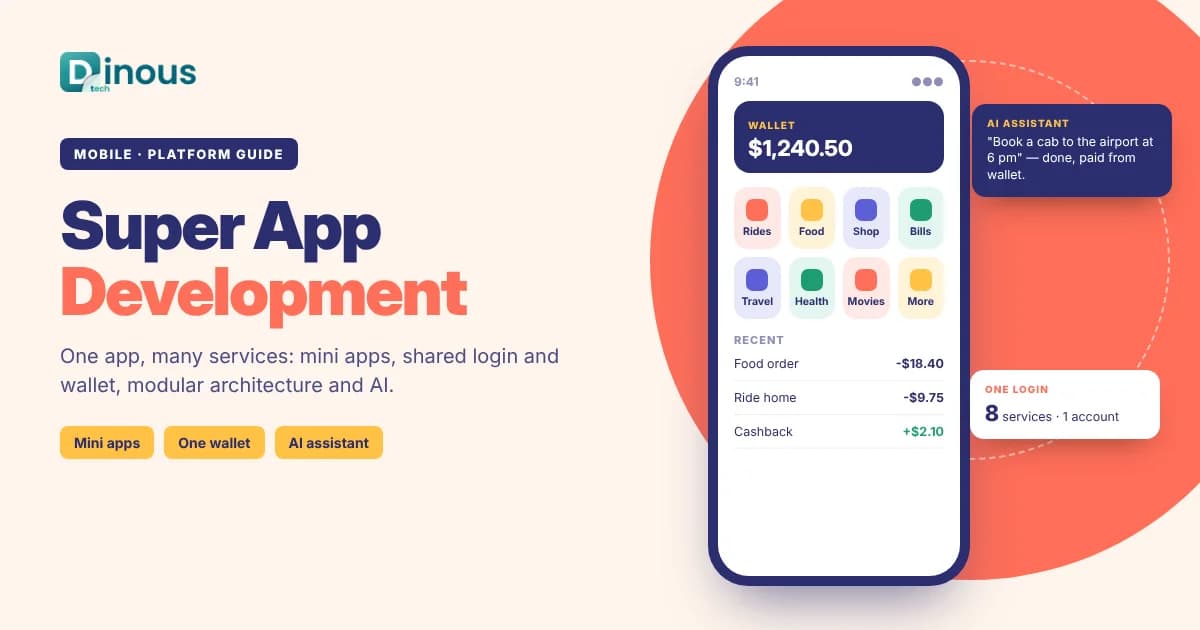
Super app development means building one mobile app that brings many services together, such as payments, shopping, food delivery, rides, bookings and messaging, under a single login and a single wallet. Instead of downloading ten apps, users open one. For businesses, a super app increases engagement, opens new revenue streams and creates a platform that partners can plug into. This guide explains what a super app is, the main types, the architecture behind mini apps, key features, the build process, tech stack, AI features, compliance, cost factors and timelines.
Key Takeaways
- A super app is a host app with shared services (login, wallet, profile, notifications) and many mini apps or modules on top.
- Most successful super apps start with one high-frequency service, such as payments, rides or messaging, and add services over time.
- A modular architecture is essential: separate teams and partners must be able to build and update services without breaking the whole app.
- Mini app frameworks, micro-frontends and well-designed APIs let third parties add services safely.
- App store rules, payments regulation and data privacy laws shape what can run inside the app and how.
- Cost depends on the number of services, the mini app platform, payments and wallet features, partner integrations and scale.
Table of Contents
- What Is a Super App?
- Types of Super Apps
- Is a Super App Right for Your Business?
- How Super App Architecture Works
- Key Features
- Step-by-Step Development Process
- Recommended Tech Stack
- How Dinoustech Uses AI
- App Store Rules and Compliance
- Monetization Models
- Cost Factors
- Development Timeline
- Challenges and Solutions
- Why Choose Dinoustech
What Is a Super App?
A super app is a mobile app that offers many everyday services in one place. Well-known examples in Asia, the Middle East, Africa and Latin America started with a core service, such as messaging, payments or ride-hailing, and gradually added food delivery, shopping, bill payments, travel, insurance, loans and more.
What makes a super app different from a big app with many screens is the platform approach. The host app provides shared building blocks, such as identity, wallet, location, notifications and chat. Each service, whether built by your team or a partner, plugs into these blocks as a module or mini app. Users get one account and one payment method for everything.
Types of Super Apps
1. Consumer Super App
A public app offering payments, delivery, rides, shopping and bookings to millions of users in a country or region.
2. Fintech Super App
Banking, payments, cards, savings, investing, insurance and lending in one app, often with partner offers. See our guide to open banking app development.
3. Commerce and Lifestyle Super App
A retail or loyalty brand adds services such as grocery, pharmacy, travel deals and rewards around its core store. Read more about multi-vendor marketplace development.
4. Employee Super App
One app for staff to access HR, payroll, leave, travel, learning, internal news and tools, replacing many separate systems.
5. City or Community Super App
Residents use one app for transport, utilities, permits, events and local services.
Is a Super App Right for Your Business?
Not every company needs a super app. It makes sense when most of these are true:
- You already have a frequent-use service with many active users, such as payments, rides, groceries or messaging.
- Your users regularly need related services that you could offer yourself or through partners.
- You have, or can partner for, payments and wallet capability, which ties the services together.
- Partners want access to your users and would pay or share revenue to be inside your app.
- You can invest in a platform team for shared services, security and quality over several years.
If you are just starting, it is usually better to build one excellent app with a modular structure, so it can grow into a super app later without a full rebuild.
How Super App Architecture Works
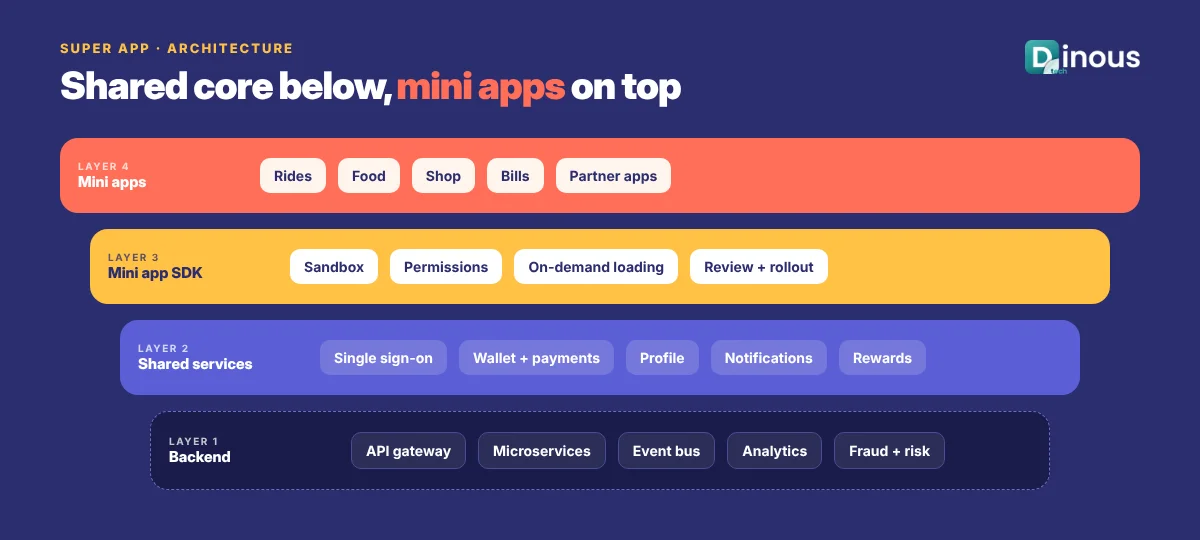
A super app is usually built in layers:
- Host app: the native shell users download. It handles navigation, design system, security and access to device features such as camera, location and biometrics.
- Shared services: single sign-on, user profile, wallet and payments, addresses, notifications, chat, rewards and analytics, used by every service.
- Mini apps and modules: each service (food, rides, bills, shopping) is a separate module. These can be native modules, micro-frontends or mini programs that run in a sandbox and are loaded on demand.
- Mini app SDK and permissions: mini apps call host capabilities, such as payment or location, only through approved APIs and with user permission.
- API gateway and microservices: each service has its own backend, connected through an API gateway with authentication, rate limits and monitoring.
- Partner portal: third parties register, build, test and submit mini apps for review before they go live.
This structure lets teams release updates to one service without rebuilding the entire app, and it keeps a problem in one mini app from affecting the others. Cloud design matters too; see how cloud technology improves mobile app scalability.
Key Features of a Super App
User Features
- One account, one login with biometrics, and one profile across services
- Wallet with cards, bank accounts and stored balance where licensed
- Home screen with personalised service shortcuts and offers
- Unified search across services
- Single order and payment history
- Rewards and loyalty points that work across services
- In-app chat and customer support
- Notifications that users can control by service
Platform and Admin Features
- Service and mini app management, versioning and rollout controls
- Partner onboarding, review and revenue-sharing settings
- Feature flags and remote configuration
- Central user, risk and fraud management
- Campaigns, offers and cross-selling tools
- Analytics across services: active users, conversion, cross-use and retention
Step-by-Step Super App Development Process
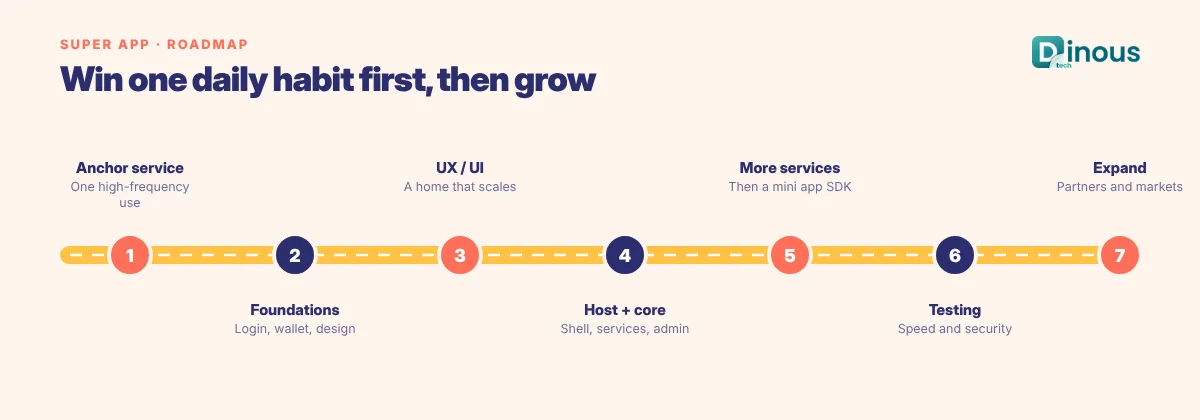
Step 1: Choose the Anchor Service
Pick one service people use often, such as payments, rides or ordering, and make it excellent. A super app grows from daily habits, not from a long list of features on day one. Our MVP app development guide explains how to launch this first version.
Step 2: Design the Platform Foundations
Plan shared identity, wallet, design system, analytics and the module structure early, even if the first release has only one or two services.
Step 3: UX and UI Design
Design a home screen that stays simple as services grow, with clear navigation and consistent patterns across mini apps.
Step 4: Build the Host App and Core Services
Develop the native shell, shared services, backend microservices and admin tools.
Step 5: Add Services and the Mini App SDK
Add the second and third services, then open a mini app SDK and partner portal once the platform is stable.
Step 6: Testing
Test performance, app size, security, payments and failure isolation between modules on many devices. See our mobile app security checklist.
Step 7: Launch, Measure and Expand
Track how many users use more than one service, and add services that match real demand.
Recommended Tech Stack for Super App Development
| Layer | Options |
|---|---|
| Host app | Native Kotlin and Swift, or Flutter or React Native with native modules |
| Mini apps and modules | Mini program frameworks, React Native with Module Federation (for example Re.Pack), Flutter modules, or sandboxed web views |
| Backend | Microservices in Java or Kotlin (Spring Boot), Go, Node.js or Python |
| API layer | API gateway, GraphQL federation or REST, OAuth 2.0 and OpenID Connect |
| Data | PostgreSQL, MongoDB, Redis, Kafka for events |
| Payments | Payment gateways, card issuing and wallet providers that fit your licences |
| Cloud and DevOps | AWS, Google Cloud or Azure, Kubernetes, CI/CD, feature flags and observability tools |
Choosing between Flutter, React Native and native code? Read our guide to cross-platform app frameworks.
How Dinoustech Uses AI in Super App Projects
AI-Assisted Development
Our developers use AI coding assistants for routine work such as API boilerplate, tests and documentation, with every change reviewed by an engineer. In large modular codebases this speeds up delivery across many teams.
AI Features Inside the Super App
- Personalised home screen: shows the services and offers each user is most likely to need.
- Conversational assistant: users can type or say "book a cab to the airport" or "pay my electricity bill" and the assistant routes them to the right mini app.
- Cross-sell recommendations: relevant suggestions across services, such as a ride after a movie booking.
- Fraud and risk detection: shared models across wallet, orders and accounts.
- Smart search: one search box that understands intent across all services.
AI Support Agent
A support assistant can answer questions about any service, check order or payment status through APIs, and hand over to human agents when needed. See more in how to build an AI-powered enterprise mobile app.
App Store Rules and Compliance
- App store policies: Apple and Google have specific rules for mini apps, downloaded code, in-app purchases and payments. Mini apps usually run as web content or sandboxed code, and digital goods may need the platform's in-app purchase system.
- Payments and wallets: stored-value wallets, transfers and lending need the right licences or regulated partners in each country.
- Data privacy: GDPR, India's DPDP Act and other privacy laws require clear consent, especially when data is shared between services or partners.
- Partner governance: review mini apps for security, content and data use before they go live.
This is general information, not legal advice. Please confirm your exact obligations with experts in each market.
Monetization Models
- Commissions: a share of orders, rides and bookings made through the app.
- Payment and wallet revenue: transaction fees, card interchange and financial products through partners.
- Partner fees: listing, placement or platform fees for third-party mini apps.
- Advertising and promotions: sponsored placements and offers.
- Subscriptions: a membership with free delivery, discounts and perks across services.
Super App Development Cost Factors
- Number of services at launch: one anchor service or several.
- Architecture: native modules only, or a full mini app runtime and partner SDK.
- Payments and wallet: gateway only, or stored value, cards and transfers.
- Integrations: partners, merchants, logistics and banking APIs.
- Scale and reliability: expected users, peak loads and uptime targets.
- AI features: personalisation, assistant, fraud detection and support agent.
We share a clear estimate once we understand your services and roadmap.
Development Timeline
| Scope | What It Includes | Typical Timeline |
|---|---|---|
| Anchor service MVP | Host app, login, wallet or payments, one core service, admin | 4-6 months |
| Multi-service app | Three to five services, rewards, personalised home screen, analytics | 8-12 months |
| Open platform | Mini app SDK, partner portal, AI assistant, multi-country support | 12 months or more, in phases |
Challenges and Solutions
- App size and speed: load mini apps on demand, compress assets and monitor start-up time.
- Cluttered experience: personalised home screens and strict design rules for every service.
- Many teams, one app: modular codebases, clear ownership and automated testing in CI/CD.
- Partner quality: review processes, sandboxing and performance limits for mini apps.
- Trust and security: strong authentication, fraud monitoring and clear privacy controls.
Why Choose Dinoustech for Super App Development
Dinoustech is a software development company based in Jaipur, India, building apps for clients in India and around the world. Our mobile app development team builds modular apps with payments, delivery, booking and AI features.
- Experience with payments, marketplaces, ride booking and delivery apps
- Modular architecture with native, Flutter and React Native
- Scalable cloud backends and microservices
- Developers available for calls in US, UK, EU and Middle East time zones
- Long-term support as you add services
See examples of our work in our portfolio.
Build Your Super App With Dinoustech
Whether you want to grow an existing app into a super app or launch a new multi-service platform, we can help you choose the anchor service, design the architecture and build it step by step. Contact Dinoustech today for a free consultation.