Dinoustech Private Limited
Remote Patient Monitoring App Development: How to Build an RPM Platform with Devices, Alerts and AI
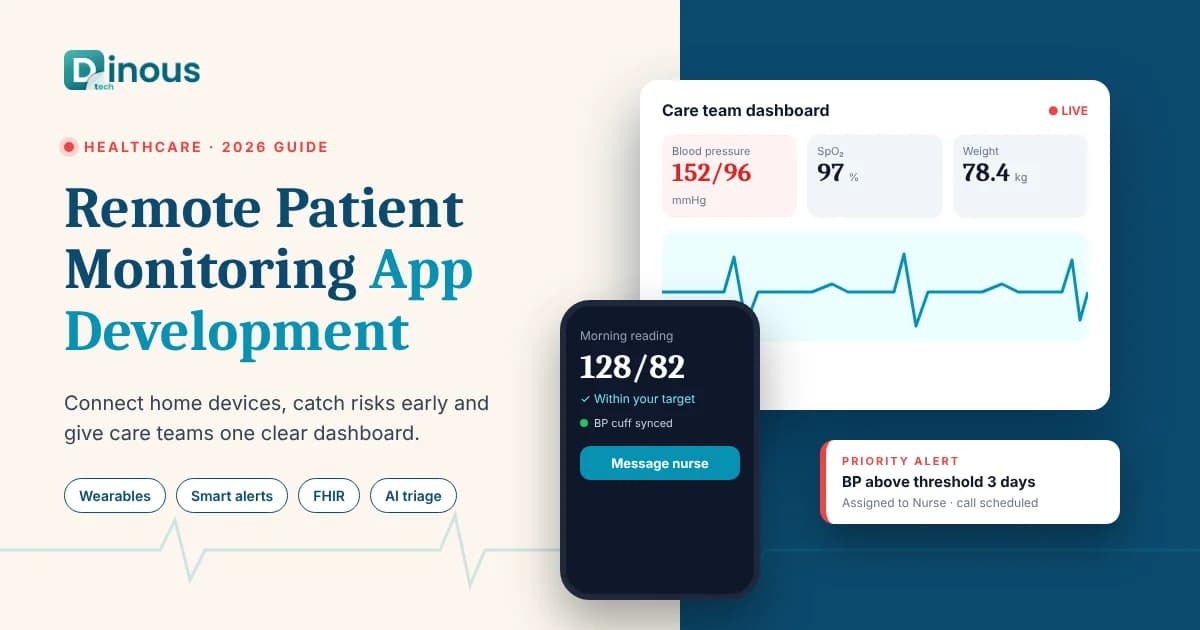
Hospitals, clinics and digital health startups are moving care out of the waiting room and into the patient's home. Blood pressure cuffs, glucose meters, pulse oximeters, smart scales and wearables can now send readings to a care team every day, not just at the next appointment. Remote patient monitoring app development is the work of building the software that makes this possible: the patient app that collects device data, the cloud platform that checks it, and the clinician dashboard that turns thousands of readings into a short list of patients who need attention today. This guide explains how to build an RPM platform in 2026, covering use cases, architecture, device integration, features, AI, compliance, cost factors and timeline. It is written for healthcare providers, care management companies and health-tech founders worldwide, from the USA, UK and Europe to the UAE and Australia.
Dinoustech is a healthcare app development company that builds patient apps, doctor platforms and hospital systems for clients around the world. The guidance below comes from the questions care providers ask us before they start an RPM project.
Key Takeaways
- An RPM platform has three parts: a patient app connected to medical devices, a secure cloud that stores and checks readings, and a clinician dashboard with alerts and workflows.
- Choose your clinical use case first (hypertension, diabetes, heart failure, COPD, post-surgery recovery or elderly care), because it decides which devices, thresholds and care workflows you need.
- Device integration is the hardest part: Bluetooth devices, cellular devices, Apple HealthKit and Android Health Connect each need a different approach.
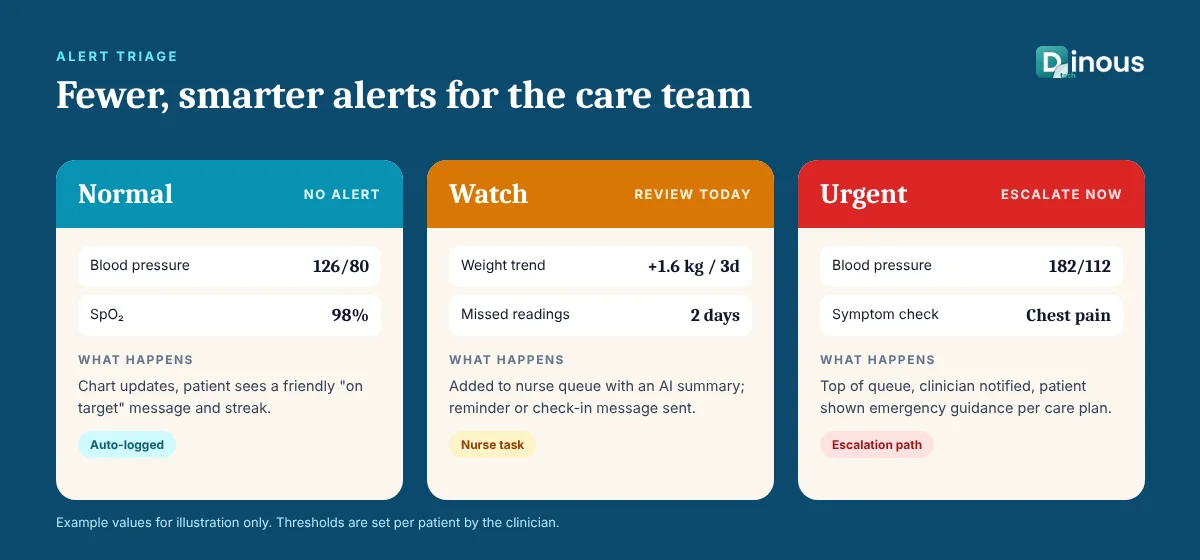
- Good alerting is about less noise, not more alerts. Personal thresholds, trends and triage queues stop clinicians from ignoring the system.
- AI can spot worrying trends, summarise a month of readings and answer patient questions, but clinicians must stay in charge of every medical decision.
- Plan for compliance (HIPAA, GDPR, local health data laws) and, in the US, for reimbursement rules from day one.
In this guide
Table of Contents
- What Is Remote Patient Monitoring?
- RPM Use Cases and Who Builds Them
- How an RPM Platform Works
- Device and Wearable Integration
- Key Features for Patients, Clinicians and Admins
- RPM App Development Process
- Recommended Tech Stack
- How Dinoustech Uses AI in RPM Apps
- Business Models and Reimbursement
- Security, Privacy and Compliance
- RPM App Development Cost Factors
- Development Timeline
- Common Challenges
- Why Choose Dinoustech
- Conclusion
What Is Remote Patient Monitoring?
Remote patient monitoring (RPM) is the use of connected devices to collect health data from patients outside a clinic and share it with their care team. Instead of measuring blood pressure once every three months in a doctor's office, a patient takes a reading at home each morning. The reading travels to a secure platform, where software compares it with the patient's targets and flags anything unusual for a nurse or doctor to review.
RPM is different from a video consultation app. Telehealth is a conversation at a set time; RPM is a continuous stream of data between visits. The two often work together: an alert from the RPM platform can trigger a video call, and a doctor can review the patient's monitoring history during the call. If you are planning a consultation product, our guides on building an AI doctor consultation app and creating a doctor consultation app like Practo cover that side.
RPM Use Cases and Who Builds Them
The best RPM products start with one clinical problem and do it very well. Common use cases include:
- Hypertension: daily blood pressure readings with medication reminders and trend reports.
- Diabetes: glucose meter or continuous glucose monitor (CGM) data, meal and insulin logs, and coaching.
- Heart failure: daily weight, blood pressure and symptom check-ins, where sudden weight gain can be an early warning sign.
- COPD and respiratory care: pulse oximetry, symptom diaries and inhaler adherence.
- Post-surgery and hospital-at-home: short, intensive monitoring after discharge to catch complications early.
- Elderly and assisted living: vital signs plus activity, sleep and fall alerts, with family members kept informed.
- Maternal health and clinical trials: structured data collection for pregnancy care or decentralised research studies.
Who builds them? Hospitals and health systems that want fewer readmissions, physician practices and clinics adding chronic care programmes, care management companies that run monitoring as a service, device makers who need an app for their hardware, and startups building a focused product for one condition.
How an RPM Platform Works
Almost every RPM system follows the same data journey, shown in the diagram below.
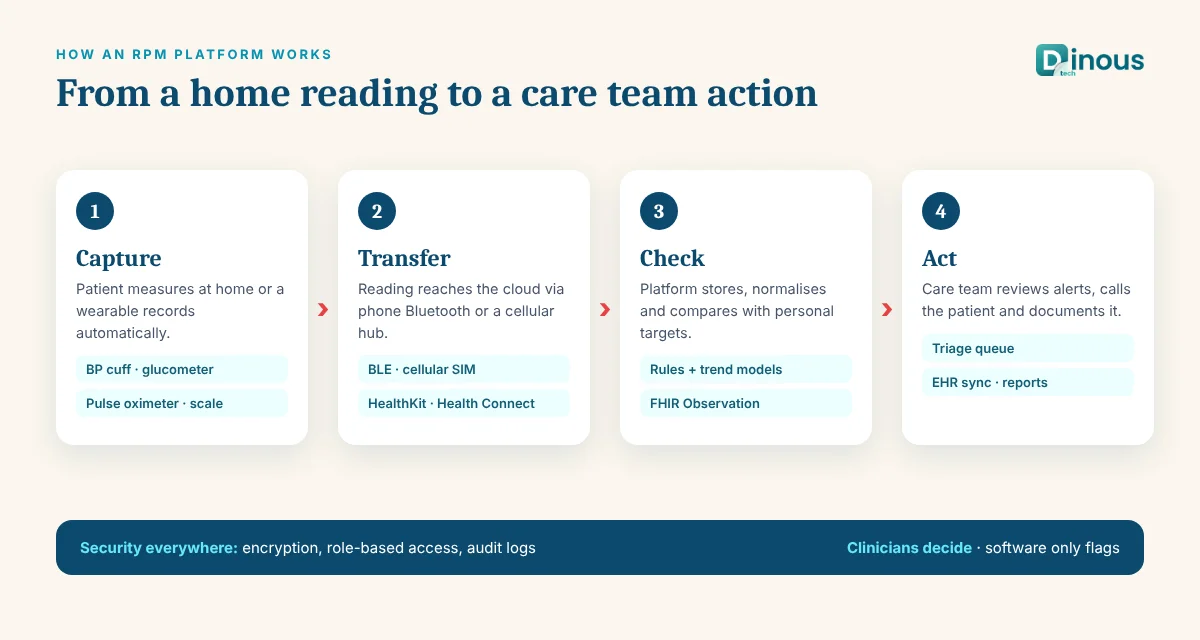
- Capture: the patient uses a connected device, or the device records automatically (a wearable or CGM).
- Transfer: the reading goes to the patient's phone over Bluetooth, or straight to the cloud through a cellular hub built into the device.
- Store and normalise: the platform saves the reading with its time, unit and device ID, and converts different device formats into one standard model.
- Check: rules and models compare the reading with the patient's personal thresholds and recent trend.
- Act: normal readings update charts; out-of-range readings create a task or alert for the care team, and urgent ones follow an escalation path.
- Document: reviews, calls and notes are logged, synced to the electronic health record (EHR) and, where relevant, used for billing reports.
Device and Wearable Integration
Device connectivity decides much of your budget and your patient experience. There are four main routes, and many platforms support more than one:
| Integration route | How it works | Best for |
|---|---|---|
| Bluetooth Low Energy (BLE) | The phone app pairs with the device and reads measurements using standard or vendor-specific profiles | Patients who are comfortable with smartphones |
| Cellular devices | The device has a built-in SIM and sends readings straight to a vendor cloud or your API, with no phone needed | Elderly patients and programmes that need high adherence |
| Apple HealthKit and Android Health Connect | The app reads data the user has already collected from watches and other apps, with their permission | Wellness, activity, sleep and heart rate trends |
| Vendor cloud APIs | Your backend pulls data from a device maker's or aggregator's cloud | CGMs, smart scales and wearables with closed ecosystems |
Choose devices that are cleared for medical use in your target markets when readings will drive clinical decisions. Consumer wearables are useful for trends, but clinicians usually rely on medical-grade devices for blood pressure, glucose and oxygen readings.
Key Features for Patients, Clinicians and Admins
Patient app
- Simple onboarding, consent screens and device pairing with step-by-step help
- Automatic reading sync, plus manual entry when a device is not connected
- Easy charts with targets, and plain-language feedback on each reading
- Medication and measurement reminders
- Symptom check-ins and short questionnaires
- Secure chat, voice or video with the care team
- Large text, high contrast, multiple languages and family or caregiver access
Clinician dashboard
- A triage queue sorted by risk, so the most urgent patients appear first
- Patient timelines with readings, trends, notes, medications and alerts in one view
- Personal thresholds per patient, set by the clinician
- Task assignment between nurses, doctors and care coordinators
- One-click call, message or video visit from an alert
- Time tracking and documentation for each patient interaction
- EHR integration so data and notes do not have to be typed twice
Admin panel
- Organisation, clinic and team management with role-based access
- Device inventory, assignment, shipping status and battery or connectivity alerts
- Programme enrolment, consent records and patient adherence reports
- Audit logs of who viewed or changed patient data
- Billing and outcome reports for management
Many RPM programmes also include appointment booking and patient portal features. Our articles on building a patient portal like MyChart and doctor appointment app development cost go deeper into those modules.
RPM App Development Process
- Clinical discovery: agree the condition, patient group, devices, thresholds, escalation rules and who responds to alerts, with clinicians in the room.
- Regulatory and data review: map which privacy laws apply, whether any feature could make the software a medical device, and how data will flow between systems.
- Device selection and proof of concept: test real devices with the app early, including pairing, sync failures and offline cases.
- UX design: design the patient app for low-tech users and the dashboard for busy nurses. Test both with real users.
- Build the MVP: patient app, device sync, rules engine, alerts, clinician dashboard and admin panel, with security built in from the start.
- Integrations: EHR (usually through HL7 FHIR APIs), messaging, video and billing systems.
- Testing and validation: functional, security and load testing, plus clinical scenario testing of every alert path.
- Pilot: launch with a small patient group, measure adherence and alert volume, and tune thresholds.
- Scale and improve: add conditions, devices, languages, AI features and analytics once the core works.
For the general steps behind any medical product, see our step-by-step guide to developing a healthcare app.
Recommended Tech Stack
| Layer | Common choices |
|---|---|
| Patient mobile app | Swift and Kotlin for heavy Bluetooth work, or Flutter / React Native with native BLE modules |
| Clinician web dashboard | React or Next.js with a charting library |
| Backend and APIs | Node.js, Python or Java, with REST or GraphQL APIs |
| Real-time data and queues | Message queues or streaming (for example Kafka, RabbitMQ or cloud equivalents), WebSockets for live dashboards |
| Databases | PostgreSQL for patient and clinical records, a time-series store for readings, Redis for caching |
| Interoperability | HL7 FHIR resources (Observation, Patient, Device), FHIR or HL7 v2 interfaces to EHRs |
| Communication | Push notifications, SMS, secure in-app chat and WebRTC video |
| Cloud and security | Healthcare-ready cloud services under a signed business associate or data processing agreement, encryption, key management and audit logging |
How Dinoustech Uses AI in RPM Apps
AI is useful in remote monitoring because the data volume is too large for people to read line by line. We use it in three ways, always with clinicians in control.
AI-assisted development
Our engineers use AI coding assistants to speed up repetitive work such as FHIR data mapping, device data parsers, test cases and documentation. Every piece of AI-generated code is reviewed by a senior developer and tested, with extra care around security and patient data. This shortens build time without lowering quality.
AI features inside the RPM platform
- Trend and risk detection: models that look at the pattern of readings, not just single values, and highlight patients whose numbers are slowly getting worse.
- Smarter triage: ranking the alert queue by likely urgency to reduce alert fatigue.
- Visit summaries: a short, readable summary of a patient's month of readings, adherence and symptoms before a review call, which the clinician checks and edits.
- Patient assistant: a chatbot that explains how to use devices, reminds patients to measure and answers general questions, while routing anything clinical to the care team.
- Voice and language support: voice input for symptom check-ins and translation for multilingual patient groups.
AI in an RPM product must not diagnose or change treatment on its own. Features that make clinical recommendations can bring medical device rules into play, so we design them carefully and document how they work. You can read more in our article on AI healthcare software development.
AI support agent for our clients
After launch, we can set up an AI support agent trained on your app's help content and processes. It answers common patient and staff questions about pairing devices, logging in or reading charts at any time of day, and passes harder issues to your support team with the full conversation attached.
Business Models and Reimbursement
How your RPM platform makes money shapes its features:
- Per-patient-per-month SaaS: providers pay a monthly fee for each enrolled patient.
- Monitoring as a service: your company supplies devices, software and nursing staff, and providers pay for the full programme.
- Enterprise licence: a hospital or health system licenses the platform, often with custom integrations.
- Device bundle: device makers include the app and platform with their hardware.
- Direct-to-consumer or employer plans: subscriptions paid by patients, employers or insurers.
In the USA, Medicare and many insurers reimburse remote physiologic monitoring through specific billing codes (such as CPT 99453, 99454, 99457 and 99458). These codes have requirements around device use days, time spent by clinical staff and documentation, and the rules are updated regularly, so the platform should track readings and staff time automatically. Other countries fund remote monitoring through public health programmes, private insurers or hospital budgets, so check the model in each market you plan to serve.
Security, Privacy and Compliance
RPM platforms handle sensitive health data around the clock, so security cannot be added later. Plan for:
- Privacy laws: HIPAA in the USA, GDPR in the EU, UK GDPR, Australia's Privacy Act and health data rules in the UAE and other markets.
- Medical device rules: software that diagnoses, predicts or drives treatment may be regulated as a medical device (for example by the FDA in the USA or under the EU MDR), while simple data display and communication tools often are not. Get a regulatory opinion early.
- Technical safeguards: encryption in transit and at rest, multi-factor login for staff, role-based access, audit trails, secure device pairing and regular penetration tests.
- Consent and data minimisation: clear consent for each data type and only collecting what the care plan needs.
- Clinical safety: documented alert rules, escalation paths and what happens when a device stops sending data.
Our HIPAA-compliant app development guide explains the safeguards in more detail. This section is general information, not legal or regulatory advice; please confirm requirements with a qualified adviser in each market.
RPM App Development Cost Factors
There is no fixed price for an RPM platform, because the cost depends on scope. The main factors are:
- Number and type of devices: each Bluetooth device, cellular vendor or cloud API adds integration and testing work.
- Platforms: iOS, Android, web dashboard and possibly tablets for clinics.
- Clinical logic: simple thresholds cost less than personalised rules, care plans and AI risk models.
- EHR and system integrations: each EHR, billing or scheduling system adds work and vendor coordination.
- Compliance depth: security controls, audits, documentation and any medical device regulatory work.
- Communication features: chat, video, SMS and caregiver access.
- Design quality and accessibility for older or less tech-savvy patients.
- Hosting, monitoring and support after launch, including device logistics if you run them.
The fastest way to control cost is a focused MVP: one condition, two or three devices, one EHR integration and a clean triage dashboard. Tell us your scope and we will share a detailed estimate.
Development Timeline
Timelines vary with scope and integrations. These ranges are typical for a well-prepared project:
| Phase | Typical duration |
|---|---|
| Clinical discovery, compliance review and device selection | 3 to 5 weeks |
| UX and UI design for patient app and dashboard | 3 to 5 weeks |
| MVP development (app, device sync, alerts, dashboard, admin) | 10 to 16 weeks |
| EHR and third-party integrations | 3 to 8 weeks, often in parallel |
| Testing, security review and clinical scenario testing | 3 to 5 weeks |
| Pilot launch and tuning | 4 to 8 weeks |
In total, a focused RPM MVP usually takes about four to six months to reach a pilot. Larger platforms with many devices, conditions and integrations can take longer.
Common Challenges
- Alert fatigue: too many alerts and clinicians stop looking. Use personal thresholds, trend rules and a clear triage queue.
- Patient adherence: patients stop measuring after a few weeks. Reminders, simple devices, feedback and family involvement help.
- Device connectivity: Bluetooth pairing problems and phone settings cause missing data. Test on many phones and show clear fix-it steps.
- Missing or wrong data: readings taken incorrectly or on the wrong person. Add guidance, validation and easy ways to flag bad readings.
- Workflow fit: if the dashboard adds work, staff will avoid it. Integrate with the EHR and design around real nursing routines.
- Scaling: data volume grows fast with each patient and device. Design the data pipeline for growth from the start.
Why Choose Dinoustech for Remote Patient Monitoring App Development
Dinoustech builds healthcare products for providers and startups worldwide. When you work with us on an RPM platform, you get:
- Experience with patient apps, doctor platforms, appointment systems and hospital software
- Native and cross-platform mobile development with Bluetooth device integration
- Clinician dashboards designed for fast triage and clear patient timelines
- Security and privacy practices built for health data, with HL7 FHIR-ready data models
- Practical AI features that support clinicians rather than replace them
- Support, monitoring and improvements after launch
See examples of our work in our portfolio, read the benefits of custom healthcare app development, or explore our mobile app development services.
Conclusion
Remote patient monitoring helps care teams catch problems earlier and keep patients healthier at home. A successful platform starts with one clear clinical use case, reliable device integration, alerts that clinicians trust and strong security, then grows with AI features, more devices and more conditions. If you are planning remote patient monitoring app development for patients anywhere in the world, contact Dinoustech to discuss your idea, or explore our healthcare app development services.