Dinoustech Private Limited
Ambulance Booking App Development: How to Build an On-Demand Ambulance App with Live Tracking and Smart Dispatch
Ambulance booking app development is about one thing above all else: getting the right vehicle to the right patient as fast as possible. A good ambulance app lets a patient or family member request help in a few taps, shares the exact location, finds the nearest available ambulance with the right equipment, and shows live tracking until the patient reaches the hospital. Behind the scenes, a dispatch panel helps operators and hospitals manage fleets, crews and handovers.
The model looks a lot like a taxi app, but the stakes are much higher. This guide explains how an ambulance booking app works, the types you can build, must-have features for patients, drivers, hospitals and admins, the tech stack, compliance points, cost factors and realistic timelines. If you already run a fleet or a hospital network, it will help you plan the product before you talk to a development team.
Key Takeaways
- An ambulance booking app has four parts: patient app, driver/crew app, hospital or operator dispatch panel and admin panel.
- Speed and reliability matter more than design polish: one-tap SOS, accurate location, fast matching and offline fallbacks.
- Different service types need different flows: emergency, scheduled non-emergency transport, ICU/advanced life support and air ambulance requests.
- Health data and location data need strong security and the right compliance for your market (for example HIPAA in the USA or GDPR in the UK and EU).
- A focused MVP usually takes about 3 to 5 months; a multi-city platform with hospital integrations takes longer.
Table of Contents
- What Is an Ambulance Booking App?
- Why Build One Now?
- Types of Ambulance Booking Apps
- How an Ambulance Booking App Works
- Key Features by Panel
- Recommended Tech Stack
- Development Process Step by Step
- How Dinoustech Uses AI
- Business Models
- Security and Compliance
- Cost Factors
- Timeline
- Challenges and How to Solve Them
- Why Dinoustech
What Is an Ambulance Booking App?
An ambulance booking app is an on-demand platform that connects people who need medical transport with ambulance providers. It can be run by a private ambulance company, a hospital group, a healthcare aggregator or a city service. The patient side works like a ride-hailing app, but every step is designed for urgency: fewer screens, clear buttons, automatic location detection and instant updates to family members and the receiving hospital.
Most platforms also handle planned trips, such as dialysis visits, discharge transfers and inter-hospital transfers. These non-emergency trips are often the steady source of revenue that keeps the service running.
Why Build an Ambulance Booking App Now?
- Phone-only dispatch is slow. Calls, manual address taking and radio coordination waste minutes that matter.
- Fleets are fragmented. Many cities have several small private operators. An app can pool them and show who is nearest and free.
- Hospitals want visibility. Knowing that a patient is on the way, with basic details and an ETA, helps emergency teams prepare.
- Patients expect live tracking. People already track taxis and food orders; they expect the same clarity when someone they love is in an ambulance.
- Data improves planning. Trip history shows where demand comes from, so operators can position vehicles better.
Types of Ambulance Booking Apps
| Type | Who runs it | Main focus |
|---|---|---|
| Aggregator marketplace | Startup or health platform | Many independent operators on one app, nearest-match dispatch |
| Single-operator app | Private ambulance company | Own fleet, branded booking, crew management |
| Hospital network app | Hospital group | Pickups to own hospitals, inter-facility transfers, bed readiness |
| Non-emergency transport (NEMT) | Transport provider, insurers, clinics | Scheduled trips, recurring appointments, wheelchair and stretcher vans |
| Air ambulance requests | Air medical operators | Quote requests, medical review, ground-air coordination |
| Corporate and event cover | Operators serving businesses | Standby bookings for events, factories and campuses |
Many products start as one type and add others later. For example, an operator app can open its platform to partner fleets once demand grows.
How an Ambulance Booking App Works
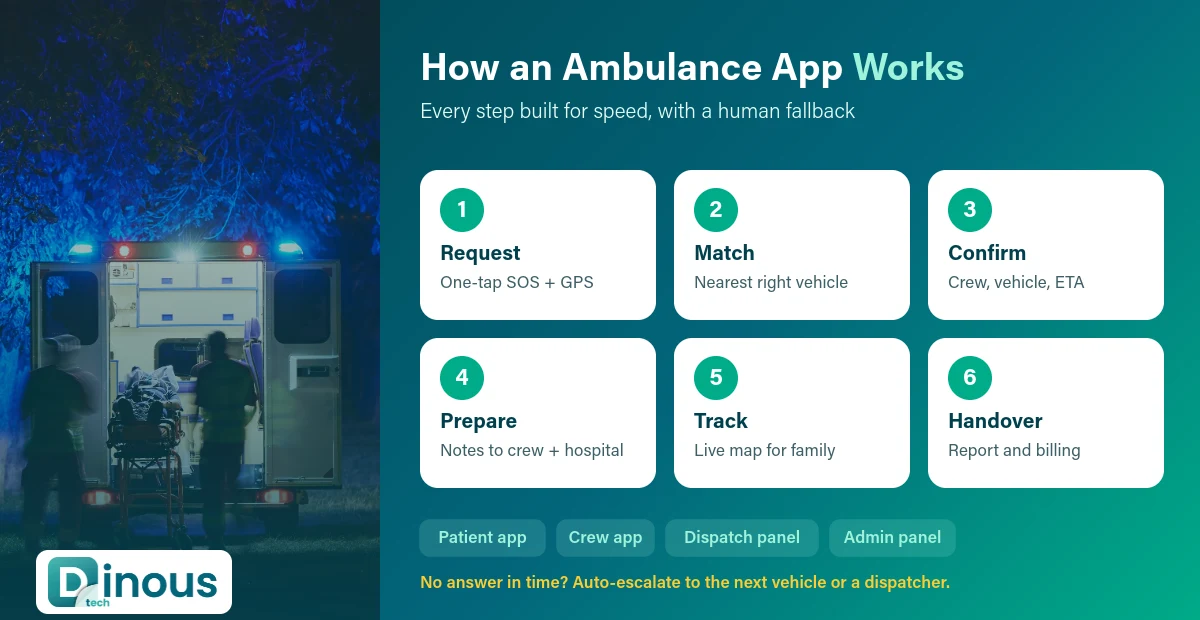
- Request: the user taps SOS or books a trip. GPS fills the pickup point, and the user picks the service type (basic, advanced life support, ICU, patient transport).
- Match: the system finds the nearest free ambulance with the right equipment and crew, using live locations and an ETA calculation.
- Confirm: the crew accepts. The patient sees vehicle number, crew details and a live map. A call button connects to the crew or the control room.
- Prepare: optional pre-arrival notes (symptoms, age, known conditions) go to the crew and, with consent, to the receiving hospital.
- Track: family members get a tracking link. The hospital sees the ETA.
- Handover and close: the crew marks arrival and handover, the trip is billed (cash, card, insurance or corporate account) and a report is saved.
If no ambulance accepts within a set time, the request escalates automatically: to the next nearest vehicle, a partner fleet, or a human dispatcher. That fallback logic is one of the most important parts of the whole system.
Key Features by Panel
Patient app
- One-tap SOS with automatic location and a large, clear button
- Book now or schedule a trip, with service type selection
- Saved medical profile: blood group, allergies, conditions, emergency contacts
- Live tracking, ETA and in-app or masked phone calls to the crew
- Share trip link with family
- Fare estimate, payments, insurance details and invoices
- Hospital preference and nearby hospital list
- Booking for someone else (a common real-world case)
- Multi-language support and accessibility options
Driver and crew app
- Online/offline status, shift start and vehicle check list
- Request alerts with a loud, repeating sound and quick accept
- Turn-by-turn navigation and traffic-aware routing
- Patient notes from the request
- Trip status updates: reached, patient on board, reached hospital, handover done
- Simple digital patient care report and photo upload
- Earnings or trip log for each crew member
Hospital and dispatch panel
- Live map of all vehicles, their status and equipment
- Manual assignment and override for dispatchers
- Incoming patient alerts with ETA and pre-arrival notes
- Inter-facility transfer booking
- Escalation queue for unaccepted requests
Admin panel
- Operator, vehicle, crew and document verification (licences, permits, equipment certificates)
- Pricing rules by service type, distance, waiting time and night hours
- Zones, coverage areas and partner fleets
- Payments, payouts, insurance and corporate billing
- Reports: response times, cancellations, demand heatmaps and crew performance
- Support tickets and complaint handling
Many of these pieces are shared with ride-hailing products. If you want to see how dispatch logic works in a taxi setting, read our guide on taxi dispatch software development and how GPS technology improves booking apps.
Recommended Tech Stack
| Layer | Common choices |
|---|---|
| Mobile apps | Flutter or React Native for one codebase; native Swift/Kotlin where deep device features are needed |
| Web panels | React or Next.js |
| Backend | Node.js or Python, with WebSockets for live updates |
| Database | PostgreSQL or MongoDB, Redis for fast location lookups |
| Maps and routing | Google Maps Platform, Mapbox or HERE |
| Calls and SMS | Twilio or a local telecom API, with number masking |
| Push notifications | Firebase Cloud Messaging and Apple Push Notification service |
| Payments | Stripe, Razorpay or regional gateways, plus insurance and corporate billing |
| Cloud | AWS, Google Cloud or Azure with multi-zone setup and backups |
Our teams often use Flutter for the patient and crew apps because one codebase covers Android and iOS and keeps updates fast.
Development Process Step by Step
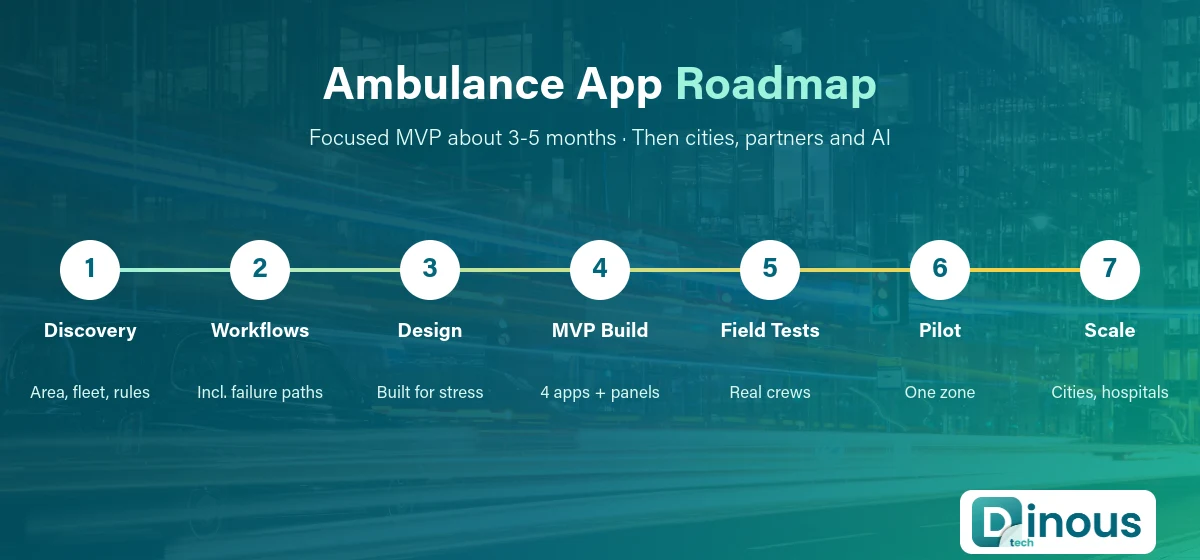
- Discovery: define your service area, service types, fleet model (own or partner), payment methods and local rules.
- Workflow design: map every path, including failures: no driver accepts, the patient cannot speak, the network drops, the hospital is full.
- UX and UI design: design for stress. Large tap targets, very few steps and clear status messages.
- MVP build: patient app, crew app, dispatch panel and admin panel with core booking, matching, tracking and payments.
- Testing: load tests, location accuracy tests, poor-network tests and field trials with real crews.
- Pilot launch: one city or zone, with human dispatchers watching every trip.
- Scale: add partner fleets, hospital integrations, corporate accounts and new cities.
How Dinoustech Uses AI in Ambulance Apps
AI should support people, not replace medical judgement. These are practical uses we build into dispatch and healthcare products:
- Smarter dispatch: ETA prediction from live traffic and history, so the system picks the vehicle that will actually arrive first, not just the closest one on a map.
- Demand forecasting: heatmaps by time and area help operators place vehicles where requests are likely.
- Request triage support: a short guided question flow (or voice) that captures symptoms and suggests the right service type, always with a clear "call now" option and human review.
- Voice-to-report: crews dictate notes and the app turns them into a structured patient care report, similar to an AI medical scribe.
- Fraud and misuse checks: flags repeated fake requests or unusual billing patterns.
We also use AI-assisted development inside our own team for code review, test generation and documentation, which shortens delivery time. After launch, clients can get an AI support agent that answers common questions from patients and partner operators, with hand-over to a human for anything sensitive.
Business Models
- Per-trip fees: base fare plus distance, waiting time and service-type charges.
- Commission: for aggregators, a share of each partner operator's trip.
- Subscriptions: family or senior care plans with priority response and free scheduled trips.
- Corporate and event contracts: standby ambulances and employee cover.
- Hospital and insurer partnerships: transfer contracts and direct insurance billing.
- Software licensing: white-label dispatch software for other operators.
Security and Compliance
An ambulance app handles location data and health information, so security is not optional. Plan for encrypted data in transit and at rest, role-based access for crews, dispatchers and hospital staff, audit logs, consent screens before sharing health notes, and secure backups. Depending on where you operate, you may need to follow HIPAA (USA), GDPR (UK and EU), local health data laws and transport rules for ambulance licensing and equipment. Many regions also have rules on how private apps work alongside public emergency numbers, so the app should always make it easy to call the official emergency number. This is general information, not legal advice; check the rules in your market with a local expert.
Cost Factors
The cost of an ambulance booking app depends on scope, not on a fixed price list. The main drivers are:
- Number of apps and panels (patient, crew, dispatch, hospital, admin)
- Service types and their different flows
- Matching logic: nearest vehicle only, or equipment, crew skill and ETA based
- Integrations: hospital systems, insurance, telecom, maps and payments
- Compliance and security work for your markets
- Offline and fallback features for poor networks
- Number of languages, cities and partner fleets
- Where your team is based and its hourly rate
Our taxi app cost breakdown is a useful reference because the core booking and tracking engine is similar. For a quick first number for your own feature list, use the free app cost calculator.
Timeline
| Phase | Typical duration |
|---|---|
| Discovery and workflow design | 2 to 3 weeks |
| UX/UI design | 3 to 4 weeks |
| MVP development (apps + panels) | 8 to 14 weeks |
| Testing and field trials | 2 to 4 weeks |
| Pilot launch in one zone | 2 to 4 weeks |
| Hospital integrations, new cities, AI features | Ongoing, 2 to 4 months per major phase |
Some phases overlap, so a focused MVP usually goes live in about 3 to 5 months. Timelines grow with integrations and compliance reviews.
Challenges and How to Solve Them
- Poor network in emergencies: add SMS fallback, cached last location and a direct call button.
- Driver supply: start in a zone where you have enough vehicles, then add partner fleets with clear payouts.
- Fake or prank requests: phone verification, abuse limits and AI-based flags, while never blocking a genuine emergency.
- Wrong service type: simple triage questions and dispatcher review for unclear cases.
- Hospital coordination: begin with simple ETA alerts, then integrate deeper once the partnership is proven.
- Trust: show verified crew, vehicle details and equipment, and publish response-time performance.
Why Dinoustech
Dinoustech is an app development company with 450+ projects delivered and a team with 7+ years of experience in mobile apps, on-demand platforms and healthcare software. We have built booking, dispatch and live tracking systems for mobility products, and secure apps for healthcare clients. That mix is exactly what an ambulance booking platform needs.
- Experience with real-time tracking and dispatch from our taxi booking app development work
- Healthcare-grade security and compliance from our healthcare app development projects
- Practical AI features that save time for crews and dispatchers
- Clear phases, fixed milestones and support after launch through our maintenance services
You can see our recent work in the portfolio, or read about related products such as airport transfer apps.
Planning an ambulance booking app? Share your service area, fleet size and service types, and we will send a clear plan with phases and timelines. Contact Dinoustech to get started.